Participating Frequently
June 27, 2023
Answered

Photoshop tool icons are missing

  • June 27, 2023
  • 124 replies
  • 41127 views

Recenlty my Photoshop tool icons simply do not appear on the toolbar. they function fine but it is troublesome to find the right tool. The only way I could solve this is to reinstall photoshop but I cannot possibly do that every day.

Correct answer Sameer K

Hey, @Stefan31701036zdnm. Welcome to the Photoshop Community. I'll help you figure this out.

What version of Photoshop are you working on? Moving this to discussions for now.


Try this:

  • Go to the following location on Windows 10/11: Users/[user name]/AppData/Roaming/Adobe/UXP/PluginsStorage/PHSP
  • Press Windows + R & type this is the Run Window - %APPDATA%\Adobe\UXP\PluginsStorage
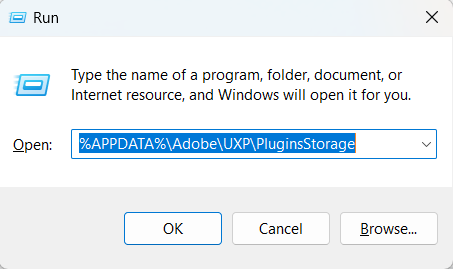
    image.png


  • In the PHSP Folder, rename the 26 folder by adding a .old at the end. ('26' > Rename > '26.old')

These changes will give a refresh to panels in Photoshop. Let me know how it goes.

Thanks!

Sameer K

124 replies

Participant
March 5, 2025

Yes, I also have this problem in PS2025 and 2024. Plus the problem of not being able to change fonts.

What's with Adobe Photoshop products, these errors have been gooing on for years. going by replies.

123fay
Participant
March 5, 2025
I went back to a previous version. Am afraid to update again. Paying for
something that has a glitch that no one can seem to fix any other way.
Participant
February 21, 2025

Hi 

I have recently done an update and now when I open PS the tools on the left side are blacked out. Other times they are there. I have to keep closing and  opening up again. I would really appreciate advice.

Andy J Hart
Ged_Traynor
Community Expert
Community Expert
February 22, 2025

@Andy J Hart not sure what you mean by blacked out, but have a look at the correct answer in the below link to see if it helps, if it's not that, can you post a screenshot to highlight the issue

https://community.adobe.com/t5/photoshop-ecosystem-bugs/photoshop-tool-icons-are-missing/idc-p/14079878#M112305

123fay
Participant
February 16, 2025

Ged_Traynor
Community Expert
Community Expert
February 17, 2025
123fay
Participant
February 16, 2025

I am having the same problem and cannot use my photoshop cc.  I have tried everything mentioned and nothing is bringing back my tools.

Inspiring
January 28, 2025

You're exactly right.  The "fix" worked, then it didn't, I tried everything that was recommended to fix it, but finally gave up and am still using Beta.  I can understand "bugs", but I figure that once they know so many people are struggling with something that interferes significantly with their ability to work, it is shameful that they don't focus some attention on it and fix it since we are paying so much to even have their programs.

jamiek10700599
Participant
January 28, 2025

I've been juggling with this for a while and sometimes the "fix" works and sometimes it doesn't. Right now it seems nothing is and maybe I'll have to roll back updates.


This is a consistent unprofessional problem. I just want the most basic functions of a program I pay for to work.

Inspiring
January 17, 2025

I would fire the person who approves version releases.

Inspiring
January 17, 2025

Adobe fix your app. Have to roll back to previous versions to avoid this bug. Some would say the toolbar is an important asset of the app. 

Known Participant
January 17, 2025
It's the only way I could get my toolbar back. Rolling back means we don't
get the latest features, but at least we can process our photos. How many
people have to complain about it to get Adobe to fix this problem?
Inspiring
January 5, 2025

Well, good morning and I take it all back, lol!  PS 26.2.0 worked great last night, tools displayed normally, all good.  This morning when I opened PS, the tools are back to being just little arrows in the corner.  Not sure what this bug is about, but it is frustrating!  Also, PS 2025 is crashing more than is acceptable upon opening files.  I'm going back to using the Beta.

Inspiring
January 4, 2025

Same issue here, ever since 2 updates ago for me.  Windows 11, machine way above specs. 

HOWEVER, it just updated it to 26.2.0 and it seems to have fixed the toolbar issue!  Thank goodness!

Known Participant
January 5, 2025
I was using 26.2.0 with Win 10 and had the same problem and others. Solved
it by going to the last one starting with 25. No suggestions helped. It
looks like I'm stuck short of any 26 updates. I'll use my current version
until I finally have to move away from PS after over 20 years.


