Participating Frequently
June 27, 2023
Answered

Photoshop tool icons are missing

  • June 27, 2023
  • 53 replies
  • 39382 views

Recenlty my Photoshop tool icons simply do not appear on the toolbar. they function fine but it is troublesome to find the right tool. The only way I could solve this is to reinstall photoshop but I cannot possibly do that every day.

Correct answer Sameer K

Hey, @Stefan31701036zdnm. Welcome to the Photoshop Community. I'll help you figure this out.

What version of Photoshop are you working on? Moving this to discussions for now.


Try this:

  • Go to the following location on Windows 10/11: Users/[user name]/AppData/Roaming/Adobe/UXP/PluginsStorage/PHSP
  • Press Windows + R & type this is the Run Window - %APPDATA%\Adobe\UXP\PluginsStorage
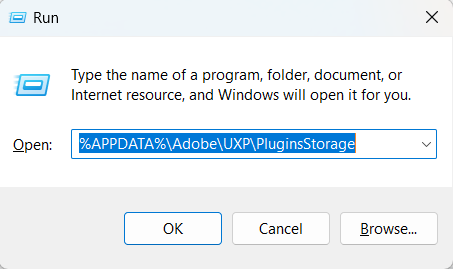


  • In the PHSP Folder, rename the 24 folder by adding a .old at the end. ('24' > Rename > '24.old')

These changes will give a refresh to panels in Photoshop. Let me know how it goes.

Thanks!

Sameer K

53 replies

Participating Frequently
June 28, 2023

Wait, nope, it happened again. Changing Windows Scaling did not work, and now uninstalling and installing does not work either. Methinks the time to end Adobe Subscription is at hand 

Participating Frequently
June 28, 2023

I managed to resolve this by resetting my Photoshop cache and resetting preferences. It is strange that I would have to do that to restore a basic function of this subscription based program I am systemically paying for but boy do I hope Adobe is happy.

Jeff Arola
Community Expert
Community Expert
June 27, 2023

What version of Windows and version of Photoshop are you using?


Does adjusting the Windows OS Scaling back to 100% make any difference?


