

Lovro7
Participant
March 27, 2026
Question

Photoshop won’t launch and gives an error
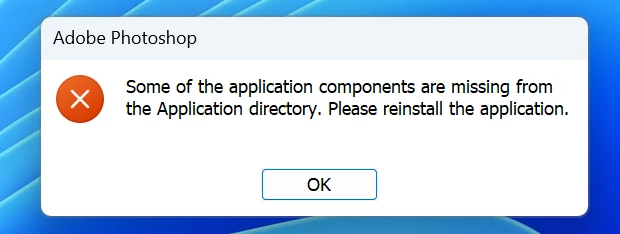
I installed the latest version of Photoshop, but when I try to start it, I get the error shown in the photo. I have tried at least five times to completely remove everything from my Windows 11 system and also used your tool to delete the remaining files. After each attempt I restarted the computer, but the problem still persists.

Could you please tell me what might be wrong? I urgently need Photoshop.

Thank you for your help.

    2 commentaires

    nik.m
    Community Manager
    Community Manager
    March 27, 2026

    Hey, thanks for reaching out! 

    As Peru Bob suggested, try updating Windows and installing/repairing the Visual C++ redistributable packages. If you continue to experience the same behavior, try launching the application as an administrator by right clicking on the Photoshop icon. 

    Let us know how things go! 

    Thanks, 

    Nikunj 

    Lovro7
    Lovro7Auteur
    Participant
    March 31, 2026

    Hello,
    I updated Windows 11, installed the latest version of C++, and installed the latest graphics card drivers. However, it still says that something is missing.

    Thank you for your response.

    Sameer K
    Community Manager
    Community Manager
    April 3, 2026

    Thanks for the updates on this. Try using the Creative Cloud cleaner tool to remove and reinstall from the Creative Cloud desktop app: https://helpx.adobe.com/creative-cloud/apps/troubleshoot/diagnostics-repair-tools/run-creative-cloud-cleaner-tool.html 


    Also, you can get Photoshop (beta) from the Apps section > Beta Apps in the Creative Cloud desktop app. 


    Let me know how it goes.

    Thanks!
    Sameer K

    Peru Bob
    Community Expert
    Community Expert
    March 27, 2026