
Kbirch
Participant
October 15, 2018
Answered

Scaling Images with shift no longer works after update (20.0)

  • October 15, 2018
  • 75 replies
  • 264286 views

After updating to CC 2019, I am not longer able to scale images evenly simply by holding shift.

I went to keyboard shortcuts and found a "scale" shortcut that was unassigned, so i assigned it to "S" as it simply wouldn't let me assign shift:
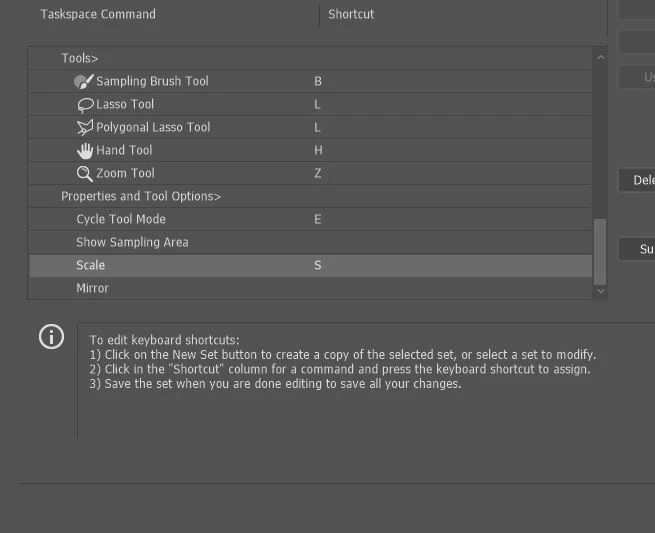
Now it seems to only want to scale evenly and won't let me scale however I want simply by dragging the corner of the image. Sometimes it doesn't go evenly when I transform with Ctrl+T and scales evenly after I press S, but wont let me go back to scaling unevenly.

Any Ideas?

Correct answer John Waller

It's a new feature. The old behaviour has been reversed. Default = proportional (constrain). Shift for non-proportional. Few people see any logic in this change.

Plenty of forum posts on this

Scaling Images with shift no longer works after update (20.0)

CC20 transform tool: Shift doesn't keep Aspect ratio

The new behaviour can be disabled.

To revert to the legacy transform behavior, do the following:

  1. Use Notepad (Windows) or a text editor on Mac OS to create a plain text file (.txt).
  2. Type the text below in the text file:

    TransformProportionalScale 0

  3. Save the file as "PSUserConfig.txt" to your Photoshop settings folder:
    • Windows: [Installation Drive]:\Users\[User Name]\AppData\Roaming\Adobe\Adobe Photoshop CC 2019\Adobe Photoshop CC 2019 Settings\
    • macOS: //Users/[User Name]/Library/Preferences/Adobe Photoshop CC 2019 Settings/

75 replies

Participant
April 3, 2019

This cant be true . Redicolous Fools. best idea to change a common interface feeling like that. Is someone Adobe developer using Photoshop at  at all it seems you are just messing up the feeling of everything. Best situation when you have to rush through something on work and you start Photoshop with an awkward feeling like that proportinal transform.

Participant
April 2, 2019

WHY did they change this? Its awful!
I hate to update this software. it always get worst and worst ;*( And why on earth can't we keep the old settings as an option? it make no sense?!

Participant
March 21, 2019

I would be somehow ok with this change if these motherf****** would be consistent with it. God damn not to mention that in illustrator shift has the same behaviour as before, when they want to change it, they should change it atleast through all of their products.

But it's even more frustrating when it doesn't work within the same program, for instance, while working with some smart objects you have to still use shift. Person behind this decision should be fired or atleast change their career. Only moron could approve this, not UX an experienced designer.  I guess this is a result of forced inclusion. God bless CS5.

My muscle memory is really suffering.AdobeSupport

Inspiring
March 19, 2019

If it's helpful, I wrote a simple Applescript that toggles the Shift-Proportional/non-proportional thing back and forth.

You need to quit Photoshop, then run it, then restart Photoshop.

It runs a Terminal command line that creates the PSUserConfig.txt file referenced in the official documentation.

Run it again and it deletes the file.

For anyone who doesn't like mucking around with creating preference files and saving them in the right spot, this is as close as we could get to a "push-button" solution.

begin script code

======================

tell application "Finder"

  --grab the path to the PS prefs folder

  set PSprefs to the folder "Adobe Photoshop CC 2019 Settings" of (the path to the preferences folder) as alias

  if exists file "PSUserConfig.txt" of PSprefs then -- if the settings file change is present

  display dialog "The default setting — Proportional Scaling — is turned off." & return & return & "Do you want to turn it on?"

  try -- remove the file

  do shell script "rm ~/Library/Preferences/Adobe\\ Photoshop\\ CC\\ 2019\\ Settings/PSUserConfig.txt"

  on error

  display alert "The text file could not be deleted."

  end try -- try remove

  else -- if the file is not there

  display dialog "The default setting — Proportional Scaling — is turned on." & return & return & "Do you want to turn it off?"

  try -- create the settings file

  do shell script "cd ~/Library/Preferences/Adobe\\ Photoshop\\ CC\\ 2019\\ Settings/; echo TransformProportionalScale 0 >PSUserConfig.txt"

  on error

  display alert "The text file could not be created."

  end try -- try create

  end if -- exists

end tell -- Finder

========================

end script code

Inspiring
March 19, 2019

oh, and for what it's worth, I saved it into an Automator application.

Open Automator, create a New > Application; drag in the component to "Run Applescript" (use the Search field) and then paste the code above into it and save.

DKTR Jeroen
Known Participant
March 15, 2019

And yet they call this

Usability improvements???????

JC!!!

Participant
January 29, 2019

THIS IS DRIVING ME CRAZY!!!!!!!!

brandonl8911795
Inspiring
January 29, 2019

There's a fix on pg 1. You need to add a text doc to the Settings folder. Why they didn't add a button in Prefs for this is beyond me.

etnuvo
Participating Frequently
January 25, 2019

Hey, while we're at it, let's convolute some more functions, Adobe. Who the heck do they have working on this stuff?

As inane a concept as Apple making you plug a first gen "pencil" into the Lightning port on ipad Pro. Nothing pro about that stupid concept... then they abandon 1st gen owners of their product by not making the next iteration backward compatible. I'm so sick of these bloated corps taking advantage of designers who spend good money and have remained loyal over the decades.

More and more I'm seeing independent software devs offering Open Source design tools. May have to go that route.

It's as if Adobe just doesn't care what designers / illustrators / users think about their products as they continue to make poor UX choices.

davidicus
Inspiring
January 18, 2019

BIGGEST WTF EVAR!
none of the other adobe products do this, so good luck trying to retrain your fingers.
can't even believe the depths of egotistical idiocy necessary to dump this on us.

etnuvo
Participating Frequently
January 25, 2019

EXACTLY!!!!

Participant
January 16, 2019

Just another day ruined by adobe 2019. put it off as long as I could, and knew BS was coming. This plus changing undo commands and taking all the tools out of the toolbar are the one that have thrown me off all morning. Why? I wonder if has anything to do with these tools all matching Power Point functions and commands now. I thought adobe was to keep the pitch deck posers out!

Participant
January 14, 2019

Thank you for the fix. This is the worst bit of UI work I have ever seen, absolutely amazed this passed. Just going to echo others in the hope that someone at Adobe reads this.