
Kbirch
Participant
October 15, 2018
Beantwortet

Scaling Images with shift no longer works after update (20.0)

  • October 15, 2018
  • 75 Antworten
  • 264286 Ansichten

After updating to CC 2019, I am not longer able to scale images evenly simply by holding shift.

I went to keyboard shortcuts and found a "scale" shortcut that was unassigned, so i assigned it to "S" as it simply wouldn't let me assign shift:
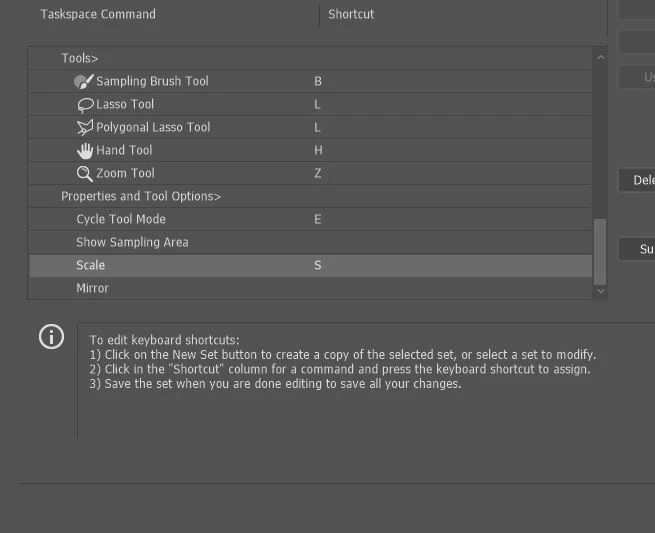
Now it seems to only want to scale evenly and won't let me scale however I want simply by dragging the corner of the image. Sometimes it doesn't go evenly when I transform with Ctrl+T and scales evenly after I press S, but wont let me go back to scaling unevenly.

Any Ideas?

Beste Antwort von John Waller

It's a new feature. The old behaviour has been reversed. Default = proportional (constrain). Shift for non-proportional. Few people see any logic in this change.

Plenty of forum posts on this

Scaling Images with shift no longer works after update (20.0)

CC20 transform tool: Shift doesn't keep Aspect ratio

The new behaviour can be disabled.

To revert to the legacy transform behavior, do the following:

  1. Use Notepad (Windows) or a text editor on Mac OS to create a plain text file (.txt).
  2. Type the text below in the text file:

    TransformProportionalScale 0

  3. Save the file as "PSUserConfig.txt" to your Photoshop settings folder:
    • Windows: [Installation Drive]:\Users\[User Name]\AppData\Roaming\Adobe\Adobe Photoshop CC 2019\Adobe Photoshop CC 2019 Settings\
    • macOS: //Users/[User Name]/Library/Preferences/Adobe Photoshop CC 2019 Settings/

75 Antworten

Participant
January 13, 2019

Wow I'm so happy to know it's not just me! I was going crazy trying to fix this. Such a ridiculous update, I'm very surprised and disappointed they did this. Going to try fixing now...

Thanks so much for the info

Participant
January 10, 2019

THANK YOU. Also: COME ON ADOBE! This is the most backwards, unnecessary, annoying, unintuitive BS.

Stop making me miss the days of physical discs where at the least the program doesn't change all the time for no good reason. Making things more complicated than they need to be really doesn't help those of us who don't have hours to study your new training videos that are always getting released - just make new tools and leave the ones that work just fine alone ffs. The 2019 out-of-the-box version made me think of Gimp 2006. Stop making arbitrary changes!

joon910810
Participant
January 2, 2019

And whats more crazy is that they shift the key for free transform images, but keep the SHAPE transform the same as before (press shift to transform proportionally)!! Wow, and that's really confusing.

Kukurykus
Legend
January 2, 2019
rduggan@2gcinc.com
Participating Frequently
December 26, 2018

Because Adobe has yet to respond to this string everyone that receives a survey from Adobe to rate its products should put a comment such as this to the survey:

Kukurykus
Legend
December 26, 2018

I saw in other theards of different forums this is something it's not possible even somone not interested in haven't noticed it.

rduggan@2gcinc.com
Participating Frequently
January 2, 2019

I have no idea what you are saying here if you agree or disagree...but this is te formal Adobe forum and Adobe should be responsive.

jarrodm37227696
Participant
December 19, 2018

The dumbest thing about this is when you make a selection with the marquee tool and you want to transform it, it scales the selection proportionally. So Why exactly would I want to do that? it makes no sense.

Participant
December 19, 2018

Just chiming in as yet another frustrated person whos time was wasted doing a workaround for this stupid change before I came here. If this is what my years of Creative Cloud membership is paying for I may just cancel it and get PS... by other means.

Participant
December 15, 2018

Is this just for Photostop? Doesnt seem to be working for Illustrator either, and I dont know how to fix it!

visualworks
Participating Frequently
December 11, 2018

I have tried to learn "the new ways"...

But it is not with it!

This is simply amazingly ill, stupid and unnecessary change.

How the hell did Adobe come up with it?

What was the reason?

- Hey what could we do to make designers' life harder?

- How about we introduce some stupid change that would require them to change their deeply rooted habits?

- What a great idea! Let's do this!

- Hey, and let's not make it easy to go back to the way it was!

- OMG - that's so funny! Those poor bastards! I can't wait to hear them moaning!

This sucks. I wish I didn't have to go through it all for no bloody reason...

Participating Frequently
December 9, 2018

It took me a while to find the "solution" on that page. For anyone else trying to do this, here's the name of the section on the page that MscottR69 linked to. Search for it and you'll find the instructions in a snap. Thanks Mscott.

How do I turn off the new proportional scaling by default behavior while transforming layers?

User5878
Participant
December 7, 2018

Thank you! I used this procedure: Transform objects in Photoshop and it worked flawlessly.

Anyway it would have been better for Adobe to add a checkbox in options.

The new behavior is really annoying, I'm not happy.