
Kbirch
Participant
October 15, 2018
Answered

Scaling Images with shift no longer works after update (20.0)

  • October 15, 2018
  • 75 replies
  • 264293 views

After updating to CC 2019, I am not longer able to scale images evenly simply by holding shift.

I went to keyboard shortcuts and found a "scale" shortcut that was unassigned, so i assigned it to "S" as it simply wouldn't let me assign shift:
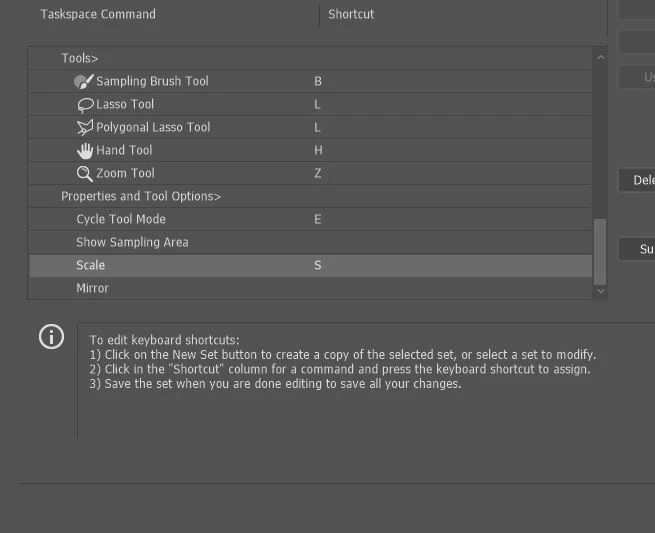
Now it seems to only want to scale evenly and won't let me scale however I want simply by dragging the corner of the image. Sometimes it doesn't go evenly when I transform with Ctrl+T and scales evenly after I press S, but wont let me go back to scaling unevenly.

Any Ideas?

Correct answer John Waller

It's a new feature. The old behaviour has been reversed. Default = proportional (constrain). Shift for non-proportional. Few people see any logic in this change.

Plenty of forum posts on this

Scaling Images with shift no longer works after update (20.0)

CC20 transform tool: Shift doesn't keep Aspect ratio

The new behaviour can be disabled.

To revert to the legacy transform behavior, do the following:

  1. Use Notepad (Windows) or a text editor on Mac OS to create a plain text file (.txt).
  2. Type the text below in the text file:

    TransformProportionalScale 0

  3. Save the file as "PSUserConfig.txt" to your Photoshop settings folder:
    • Windows: [Installation Drive]:\Users\[User Name]\AppData\Roaming\Adobe\Adobe Photoshop CC 2019\Adobe Photoshop CC 2019 Settings\
    • macOS: //Users/[User Name]/Library/Preferences/Adobe Photoshop CC 2019 Settings/

75 replies

RobH79
Participating Frequently
December 6, 2018

This is a joke! Yet more evidence of Adobe trying to dumb down their products for a wider, more novice userbase.

I acknowledge the 'fix' but as some many others have pointed out this was never broken, so don't break it for us to have to fix it. Seriously, you would think it was obvious that such a fundamental change as this would have necessitated an easy way to toggle your preference; not this convoluted method which gives Adobe no insight as to how many people truly detest this change.

You need to ensure that future editions of Photoshop look for the PSUserConfig.txt file so that the change is carried forward. I don't want to have to be looking this up again in 12 months or should I ever need to re-install at some point ... better yet make it a user selectable preference!

Sheeesh man, are you guys like bored or summin? I got tasks I could give you if you really have nothing better to do that give me a headache ... or better yet go make this an option in the preferences.

You get the point, right?

</endrant>

justinbmiller
Participating Frequently
December 4, 2018

I have a classroom full of students following walkthroughs I've written using Shift to scale uniformly. There is no way I'm making this manual update on over 30 computers. Thanks to AKS666 for the fix. I may run it on my personal computer.

This is the single worst change Adobe has made to the suite of software. I don't even want an option to turn this off. I want this functionality completely reverted to what I've been doing for 20 years. How was this submitted, tested, and approved?

Participating Frequently
November 30, 2018

I work with Photoshop from 22 years. It's very stupid change this function, even because, other Adobe Application (Illustrator, Indeisgn) have kept the same function unchanged. I'm very angry

Participant
November 28, 2018

What the hell is Adobe team thinking to change the basic shortcut that was the same for decades!!!!!

UPDATE PLS!!!!!!!!

Is Adobe even responded to this post??????

Thanks to people who arranged the problem!

WHERE IS ADOBE?

Participating Frequently
November 27, 2018

Someone in charge in Adobe is making some really bad decisions lately...

Participating Frequently
November 19, 2018

Ugh, why go and create a new behaviour that millions of users have become accustomed to since the dawn of time? I really hate you guys some times, Adobe.

Holstrom Law
Participant
November 16, 2018

Adobe.... PLEASE CHANGE THIS BACK!

It is extremely frustrating to any seasoned user, and frankly... didn't need to be "fixed".

Participant
November 16, 2018

Worst thing like this really hurts my time. I am 40 years old stop changing stuff like this. Took me a full day to find a way to change it back.

Kukurykus
Legend
November 16, 2018

I heard of plenty others who experienced up to few hours to find cause of that. Even if that was one hour multiplied by just million users it gives nearly 4 years only for that sample 'group' of people who spent to find what is wrong. Use much higher real numbers, and then another days of adaptation to these changes and you will have so enormous number that you can't compare to nothing other tha uncountable stars in the cosmos!

Jhenrydesign
Participant
November 16, 2018

You want to loose loyal users, THIS is how you loose loyal users...

I was able to revert back BUT this is among one of the dumbest changes that should have been researched PRIOR to the update AdobeSupport

Emad Haddad
Participant
November 16, 2018

Participating Frequently
November 19, 2018

Thank you - very helpful!