
Participant
February 9, 2023
Question

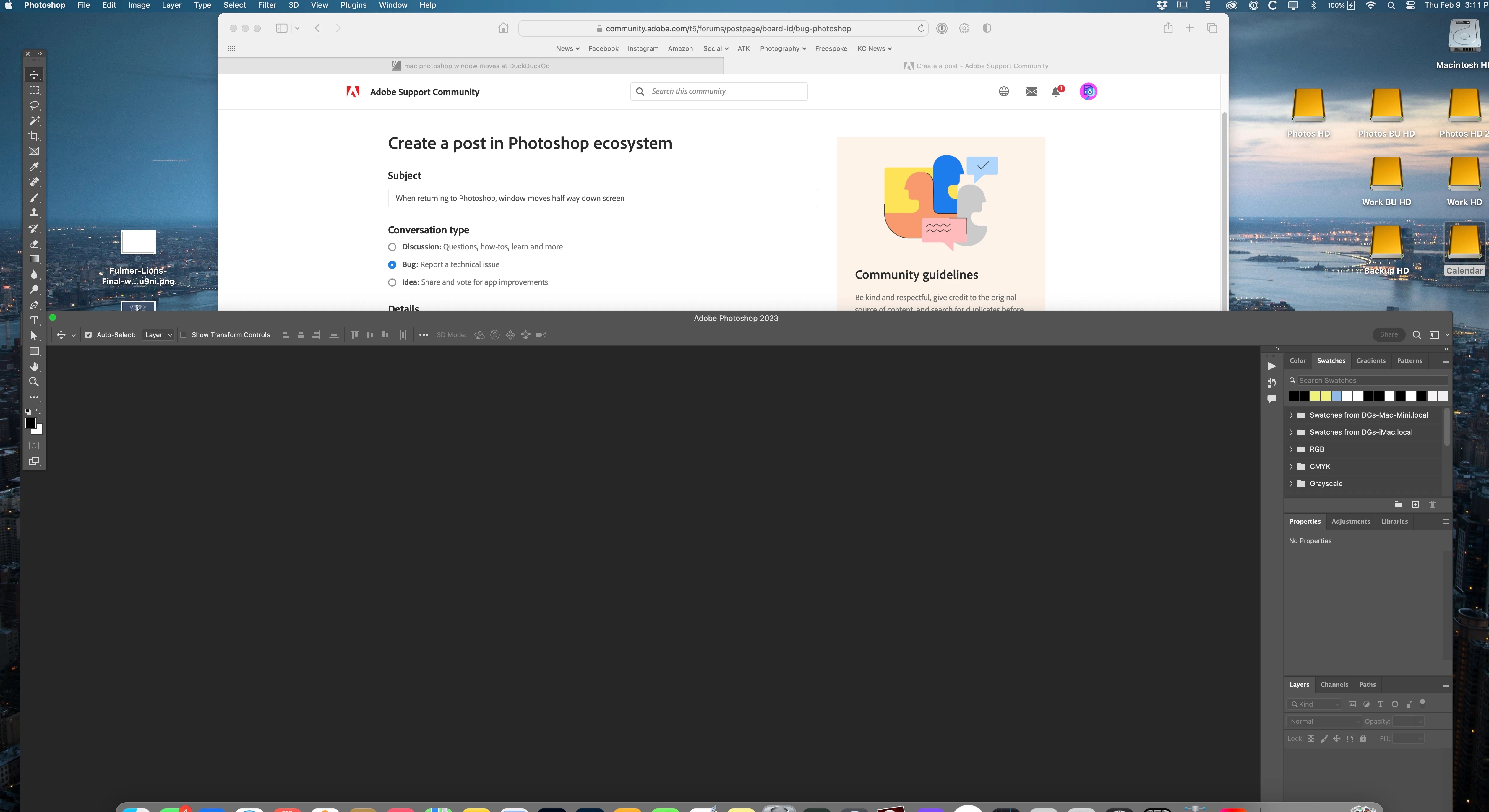
When returning to Photoshop, window moves half way down screen

  • February 9, 2023
  • 5 replies
  • 2796 views

The Photoshop work window randomly moves about half way down the screen when returning to it from any other app. I use Shift+Tab to rotate through windows I have open/using. It will randomly move the Photoshop workspace down the monitor screen. The Tool strip on left stays in place though. I've tried to change the Photoshop workspace window to a diffrent size but it has no effect. It's random and very annoying. Has anyone had this issue and/or fixed it? I have read other users having the same issue but no solution.

Has anyone had this problem and discovered a solution?


Mac Mini M1, MacOS 13.1, Studio Display, Photoshop 24.1.1 (everything is most current version)
 

This topic has been closed for replies.

5 replies

glamorous_operator1549
Participating Frequently
December 6, 2023

Same problem - mac studio and monitor. Adobe indesign, photoshop and illustrator all open up halfway down the monitor after the mac is on sleep mode. occasionally undocked palette will appear on the other side of the screeen as well. And with Indesign sometimes just get a completely grey workspace. Can't believe they can't sort this out. 

Kevin Stohlmeyer
Community Expert
Community Expert
December 6, 2023

@glamorous_operator1549 The issue isn't with Adobe products - the issue is with the Mac OS Ventura recognizing the external screen resolution/size after waking up. Its an Apple bug.  Have you checked the Apple community for solutions?

Participant
December 6, 2023

Kevin - Apple has fixed this problem a while back. Make sure you have updated your MacOS to the latest version along with your Adobe products you have installed, including if you have one, the Studio Display. Thanks!

Participant
July 4, 2023

Mac Studio, osx 13.4.1 LG HDR WQHD screen, gives me the same problem. very anoying. 

Participant
March 7, 2023

I have the same problem. I don't use docking or tabs, as I have a large monitor. Over time, my windows all drift to the bottom-left of the screen. This has happened for a few years, and it never happens when I am watching, so it might be related to viewing the desktop or when photoshop is in the background or sleep. 


The only workaround is that I re-cascade my windows from time to time. 

Owen Clay
Participating Frequently
February 27, 2023

This is not a Photoshop only issue, but it does appear to be an Adobe only issue. There are a few historical MacOS issues that present in a similar way, but it appears that there are ways to solve those.


I have this issue with ALL the Adobe apps that I use on a regular basis (Illustrator, InDesign, Photoshop, Dreamweaver etc) but not with ANY other app (Chrome, MS Office etc).


I'm using a Mac Studio (M1 Max, Ventura 13.1) with a Philips 329P1H UHD monitor connected via USB-C > DisplayPort.


There is a very similar thread on the Illustrator forum (https://community.adobe.com/t5/illustrator-discussions/window-and-panels-moving-when-mac-goes-to-sleep/m-p/13603483/page/2#M357398) where the Adobe representative has acknowledged it as an issue and has said there is a fix in the works. However, the more noise that is made about it, the higher a priority it becomes.


I hope that helps in some way, even if only to let you know that others are in the same (frustrating) boat!

Kevin Stohlmeyer
Community Expert
Community Expert
February 9, 2023

Hi @Dave_Gstar see https://community.adobe.com/t5/photoshop-ecosystem-discussions/photoshop-starts-in-wrong-screen-position/m-p/13429350

https://community.adobe.com/t5/photoshop-ecosystem-discussions/photoshop-window-always-moved-after-sleep-mode-mbp-clamshell-amp-studio-display/m-p/13253465

https://community.adobe.com/t5/photoshop-ecosystem-discussions/two-monitor-operation-with-mac-studio-and-screen-layout-configuration-is-lost-periodically/m-p/12981218

The common thread on all of these is the Mac OS is not recognizing the monitor when waking from sleep - causing the monitor resolution to default - thereby moving open windows to the same position after sleep.

Not sure this has been resolved but it's not really a PS specific issue that I can tell either.

Participant
February 9, 2023

Thanks, Kevin - I think I'll try resetting the PS Prefs by deleting & see if that helps (read that in one of the threads but doubt that will fix)

Side note: Sometimes when I wake my Mac one or two of the HD icons will move around the screen, also. Oddly, I have found if I don't have a file on the desktop directly next to or below any of the HD icons, it doesn't happen but if I do, the HD icon moves upon waking. Thinking this is all the same related issue now. Thanks I appreciate your links! Dave

Kevin Stohlmeyer
Community Expert
Community Expert
February 10, 2023

It is all related - I experience the same thing with my MacBook Pro waking up from sleep - instead of putting your computer to sleep, turn off those settings in System Preferences and just lock your screen. It wont lose connection to the external monitors then.