
Help reorganizing folders after restoring PSE Catalog
Hello all! First off, I'm a very novice PSE user, but fairly tech comfortable when it comes to following directions and such. But, I'm definitely over my head here, so I'm hoping someone knows how to accomplish this task without me messing up my PSE Catalog. 🙂
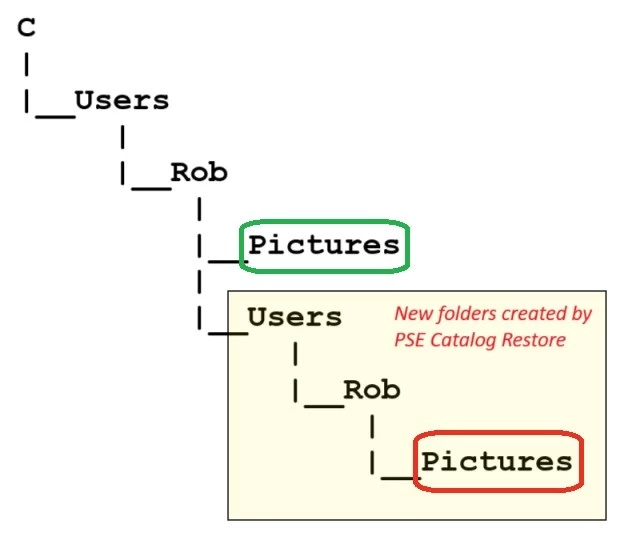
So, after following the instructions I found on Adobe's website, I successfully backed up my old PSE-11 catalog (~40,000 photos) from a Windows 10 computer and then ran "Restore Catalog" on my new Windows 11 computer with PSE-2025. After processing for a long time, it appears to have successfully restored all of my photos, but unfortunately they are in the wrong location. The restore created a set of sub-folders within my main folder (see attached diagram) so that now my pictures that were originally in C:\Users\Rob\Pictures (shown in green below) are instead placed in C:\Users\Rob\Users\Rob\Pictures (shown in red below).
I would very much like to move all of those pictures into the correct folder. I know that I can do that within Windows Explorer, but I fear that will disconnect all of the files in my PSE Catalog. Can I easily reconnect those disconnected files, or is there a better way to move my restored Pictures folder to its proper location (within C:\Users\Rob\)?
Thank you!


 AdChoices