Answered
How to stop PSE2022 automatically resizing placed images
Can anyone help with this please? I am new to PSE and would much appreciate advice.
TIA

Can anyone help with this please? I am new to PSE and would much appreciate advice.
TIA
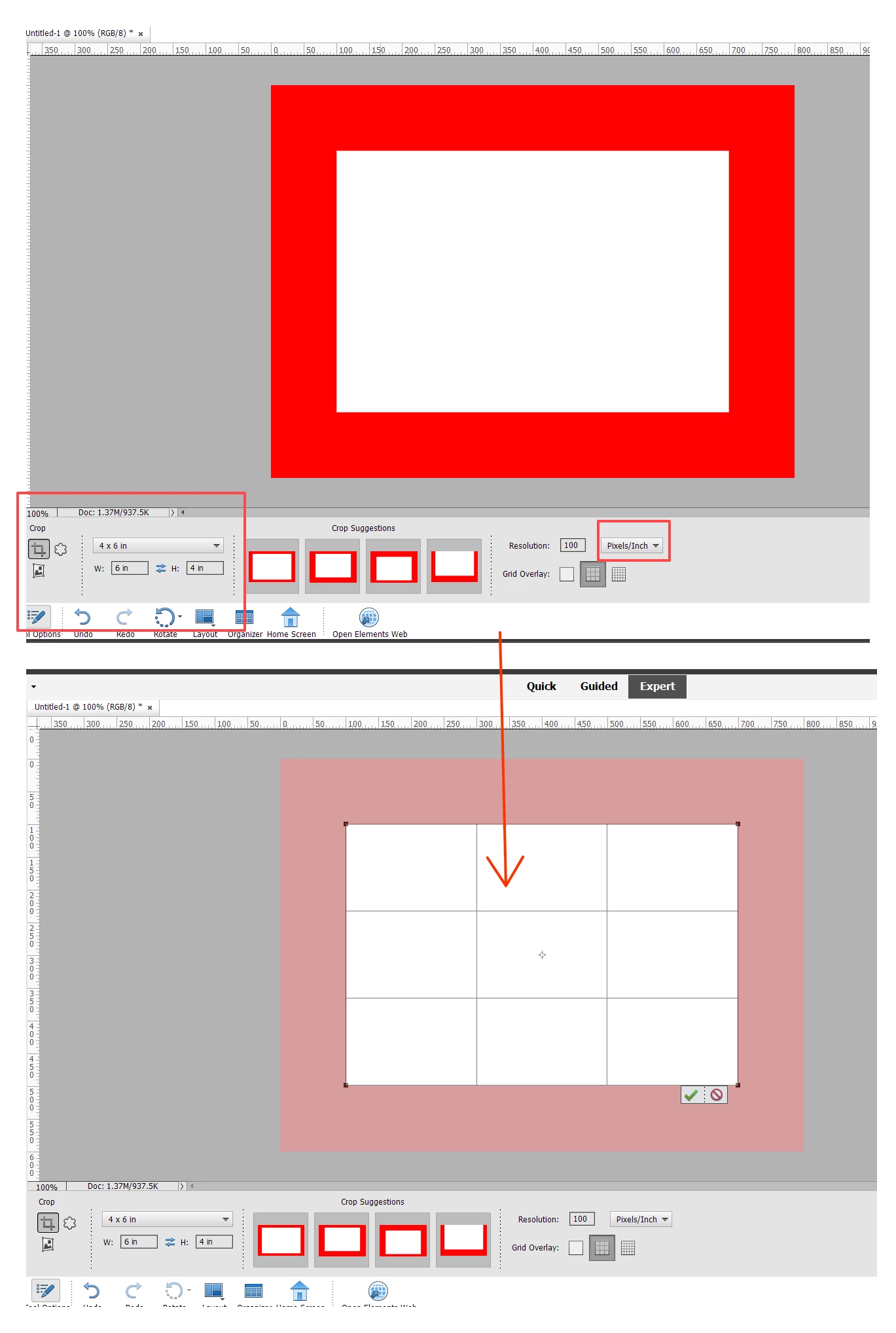
I still may not fully understand the problem. As I understand it, you want to print an image at its original resolution and it will exceed the size of the paper you want to print it on. So, for example, if you have a 600x400 pixel image and want to print it at 100 pixels per inch, it would fill a 6x4 inch paper size. However, if the original image is 800x600 pixels with the same resolution of 100 ppi, only a portion of the image will be printed on the 6x4 inch paper.
If I have correctly described the problem, you could crop the original image to the size of the paper you want to use by setting the size of the crop to the size of the paper and maintaining the original resolution. This gives you full control over which part of the image will be printed. My example is illustrated in the following screenshot:
If I have not correctly described your problem, please give us more specific details about your question and, if necessary, give us a screenshot of what you are trying to do.
Already have an account? Login
Enter your E-mail address. We'll send you an e-mail with instructions to reset your password.


 AdChoices