

Question
Modifying a script from PS to work in PSE
A user wrote me a Photoshop script that adds the dimensions of a photo at 300ppi to the bottom of a printout. I haven't been able to get that script to work in Elements.
Here's the original Photoshop script:
/*
Add Document Dimensions & Resolution to Description Metadata of Open Document.jsx
4th May 2024, Stephen Marsh
https://community.adobe.com/t5/photoshop-ecosystem-discussions/script-to-add-image-size-to-description-field-to-include-in-printing-marks/td-p/14597499
*/

#target photoshop

// Rounded to 1 decimal place
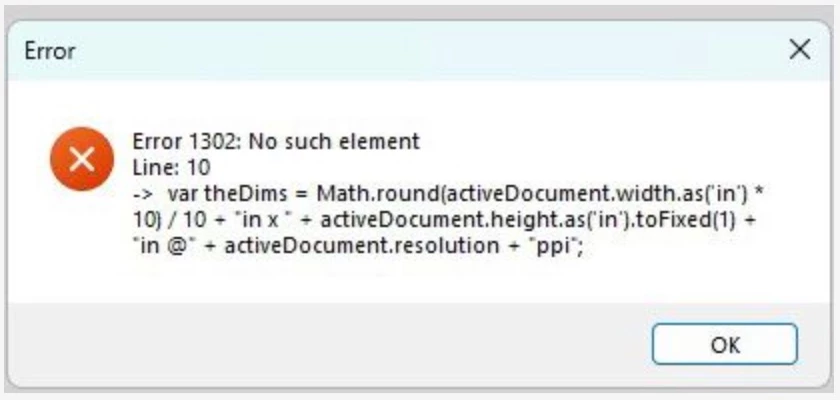
var theDims = Math.round(activeDocument.width.as('in') * 10) / 10 + "in x " + activeDocument.height.as('in').toFixed(1) + "in @" + activeDocument.resolution + "ppi";

if (ExternalObject.AdobeXMPScript === undefined) ExternalObject.AdobeXMPScript = new ExternalObject("lib:AdobeXMPScript");
var xmp = new XMPMeta(activeDocument.xmpMetadata.rawData);
xmp.deleteProperty(XMPConst.NS_DC, 'description');
xmp.setProperty(XMPConst.NS_DC, 'description', theDims);
app.activeDocument.xmpMetadata.rawData = xmp.serialize();
Which kicks back this error in Elements:
The original author recommended this modification:
// Rounded to 1 decimal place
var theDims = activeDocument.resolution + "ppi";

if (ExternalObject.AdobeXMPScript === undefined) ExternalObject.AdobeXMPScript = new ExternalObject("lib:AdobeXMPScript");
var xmp = new XMPMeta(activeDocument.xmpMetadata.rawData);
xmp.deleteProperty(XMPConst.NS_DC, 'description');
xmp.setProperty(XMPConst.NS_DC, 'description', theDims);
app.activeDocument.xmpMetadata.rawData = xmp.serialize();
But that hasn't worked either.
I was hoping that someone more familiar with Elements might be able to point me in the right direction.
Thanks!


 AdChoices