
Inspiring
September 11, 2023
Question

"Original Location" not listed as an option in Catalog Restore Operation

  • September 11, 2023
  • 4 replies
  • 753 views

I am trying to restore my PSE19 catalog to PSE19 on a new laptop.  The Backup file has been saved to an external harddrive.

When I attempt the Restore operation on the new laptop, the Restore menu box does not list "Original Location" as a Restore option.  The only options I get are "Specify Destination" and "Restore Original Folder Structure".

Why is the "Original Location" not listed as a Restore option? Picture attached.
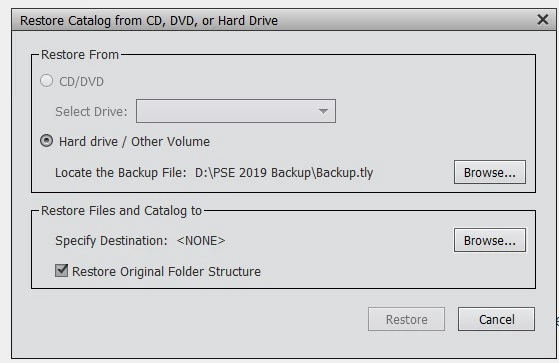
 

This topic has been closed for replies.

4 replies

Greg_S.
Community Expert
Community Expert
September 11, 2023

As the linked HelpX article says:
Make sure that you are logged in to the new computer using the same user name as the old computer.

So, as Michel has indicated, this is the probable reason why the Original Destination is not available. 

@Bob Ward can you please tell us whether you have used a different User Account name on the old and new machines.  Even a single character difference can be important.

Bob WardAuthor
Inspiring
September 11, 2023

Greg, I have no idea what my User Acct names are.  Don't remember ever being asked to create such names.  But, since they must exist somewhere, they probably are different on each computer.

Bob WardAuthor
Inspiring
September 12, 2023

Thanks for all the tips from Michel and Greg.  Great help to get the problem resolved.

MichelBParis
Legend
September 11, 2023

@Bob Ward 

It's the first time I see that option missing.

I don't know if there has been any change in the Organizer since PSE9, but people have always had difficulties in understanding what is "original location". For Adobe that means same drive, same location in the folder tree. For many; that option ignores the drive identification. As suggested by Greg, that option does not make sense if you restore on new computer, hence on a different drive. The second option refers to the file tree's structure.

Another thing which can happen is that there is a default (hidden) location in your user folder. Changing computers often implies a slight change in your user name. Then, the original location is unknown in your new computer.

Anyway, you are free to restore on the slightly changed default location of the new computer.

If you open the organizer, it has been installed by default in the correct location in your new user system folder.

The location is stated in the Help menu of the organizer in System Info.

That's the location you should specify for the backup.

If you want to choose a different location (which I always do), you create a new master folder where you want on an internal or external drive (don't specify the root folder, create your own folder).


Bob WardAuthor
Inspiring
September 11, 2023

Thanks for that detailed info Michel.  So by creating a new PSE catalog folder, I won't be corrupting anything in the way that PSE stores my photos.  For example, if I create a "PSE Photos" subfolder in my "Pictures" directory, and then restore to that new folder, everything will work fine?

MichelBParis
Legend
September 11, 2023
quote

Thanks for that detailed info Michel.  So by creating a new PSE catalog folder, I won't be corrupting anything in the way that PSE stores my photos.  For example, if I create a "PSE Photos" subfolder in my "Pictures" directory, and then restore to that new folder, everything will work fine?


By @Bob Ward


What I am suggesting is NOT to create a new "PSE catalog folder".

When you have installed the recent PSE, automatically a new catalog folder (it's empty) has been created in the default location for catalog folders.

When you start the Restore process from the new computer, the organizer must know where to restore two things:

- the media folders tree (what I do call the "library"

- the new (converted if needed) catalog folder.


If my example explains the lack of the "original location" is true, for instance your user system folder is now called "Bob Ward" instead of "Ward Bob", you'll only have the option to restore on a new location. And that applies to the library, that is the media folders tree. If you create a "PSE Photos" subfolder in your My Pictures directery (a good idea) that's the location where your media folders tree will be restored. You could as well decide to create that library on an external drive.

What is not intuitive is that the new catalog folder has to be restored as well, and it can't be restored in the original folder of the old drive, so the rule for the orgnizer is to restore automatically that folder just under the "PSE Photos" subfolder. For instance, if you have restored on an extenal drive, the folder will reside on the external drive.


There are good reasons to store all catalogs under the same default (hidden) master catalog folder, there are also good reasons to store the library and catalog on a different, even external drive. If you prefer the default, the catalog manager has the option to move your catalog from the present "custom" location to the default "accesible to all users". That option may require that you launch that command from a different catalog, for instance the one created in the PSE install process.


Greg_S.
Community Expert
Community Expert
September 11, 2023

See this article which describes the different options available to you.

Bob WardAuthor
Inspiring
September 11, 2023

Yes, that is the article that I have been following.  That article also shows the "Original Location" option for the Restore on the new computer.  As noted abobe, I don't get that option when restoring to my new computer.

Greg_S.
Community Expert
Community Expert
September 11, 2023

I believe it is because you are not restoring the backup to the original location but to a different drive on a new computer.  The catalog keeps track of the specific drive where the media files are stored.

Bob WardAuthor
Inspiring
September 11, 2023
So where do I tell it to Restore to?