Participant
October 21, 2023
Answered

Parts of Organizer unresponsive

  • October 21, 2023
  • 1 reply
  • 321 views

I have Elements 2022. I am just learning to use it. Organizer has a lot of potential photos in it but only a couple are visible.  The rest are grayed out and have a huge question mark in the center.  I would delete them, but I cannot figure out how.  Also the links on the top left (File, Edit, Find, View, Help) are not responsive.  Any help would be appreciated.

This topic has been closed for replies.
Correct answer Greg_S.

The Organizer is simply a database that displays photos stored on your computer hard drives.  If you import photos into the catalog and then change the location of the files using Windows File Explorer or Mac's Finder, OR if you disconnect an external drive (or memory card) where the files are stored, the Organizer will not know what happened to them and will treat them as missing.  This is why you have the question mark icon displayed instead of the full photo thumbnail.


You can delete the missing thumbnails from your catalog by selecting them and pressing the Delete key on your keyboard.  A message will then pop up asking if you also want to delete the files from your hard drive.  I suggest you don't accept that option until we figure out what you are doing wrong.


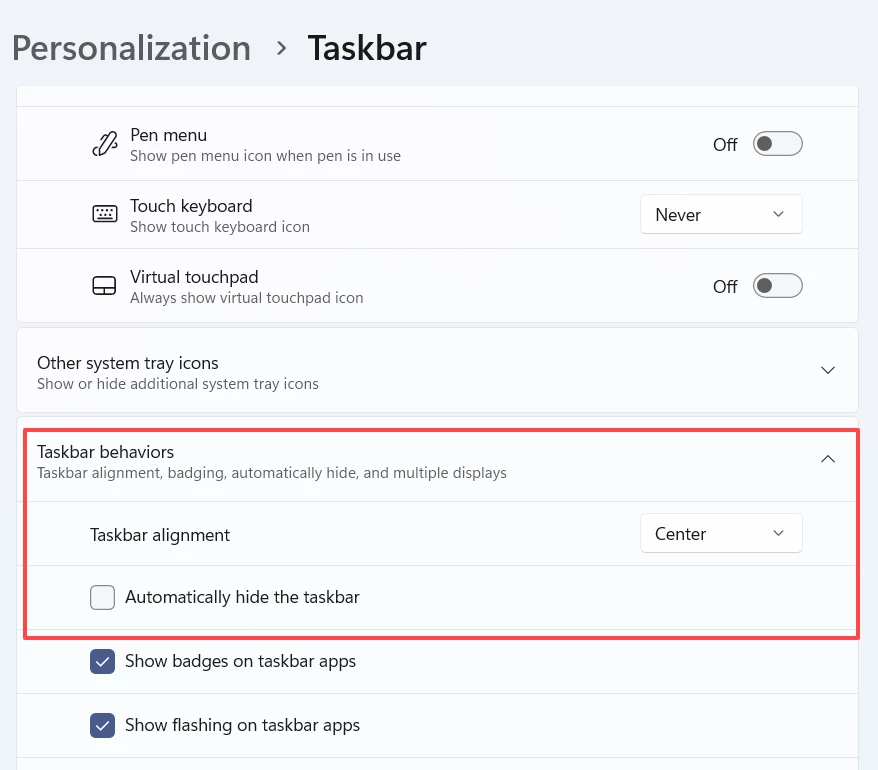
As for the menus being non-responsive, that usually happens on a Windows machine when you have your computer set to auto-hide the task bar.  If that is the case, hover over the task bar and right-click on it.  You should then choose Taskbar Settings from the pop-up context menu.  That will take you to the Windows settings where you can disable the Automatically  Hide setting under Taskbar Behaviors (in Windows 11).
 

1 reply

Greg_S.
Community Expert
Greg_S.Community ExpertCorrect answer
Community Expert
October 22, 2023

The Organizer is simply a database that displays photos stored on your computer hard drives.  If you import photos into the catalog and then change the location of the files using Windows File Explorer or Mac's Finder, OR if you disconnect an external drive (or memory card) where the files are stored, the Organizer will not know what happened to them and will treat them as missing.  This is why you have the question mark icon displayed instead of the full photo thumbnail.


You can delete the missing thumbnails from your catalog by selecting them and pressing the Delete key on your keyboard.  A message will then pop up asking if you also want to delete the files from your hard drive.  I suggest you don't accept that option until we figure out what you are doing wrong.


As for the menus being non-responsive, that usually happens on a Windows machine when you have your computer set to auto-hide the task bar.  If that is the case, hover over the task bar and right-click on it.  You should then choose Taskbar Settings from the pop-up context menu.  That will take you to the Windows settings where you can disable the Automatically  Hide setting under Taskbar Behaviors (in Windows 11).

 

Participant
October 22, 2023

Thank you so much.  That took care of both issues.  I feel like an idiot for not trying the delete button. 😄