


Participating Frequently
January 4, 2018
Question

Arabic text problem

  • January 4, 2018
  • 11 replies
  • 23943 views

Hello Guys . so thank God in those couple years we can now write arabic in Adobe product . but After the latest updates and the new text tool i still got some problems  and i hope you can help me :

1- in the legacy title some letters doesn't connect but when i write it on the text tool it connect .. please find the photo Attached
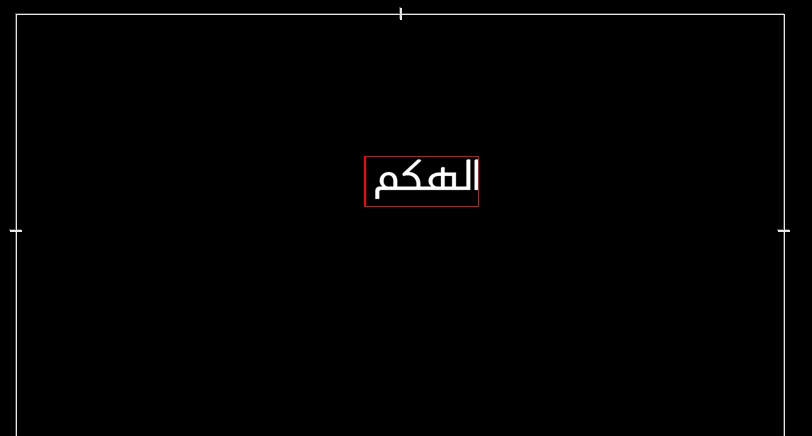
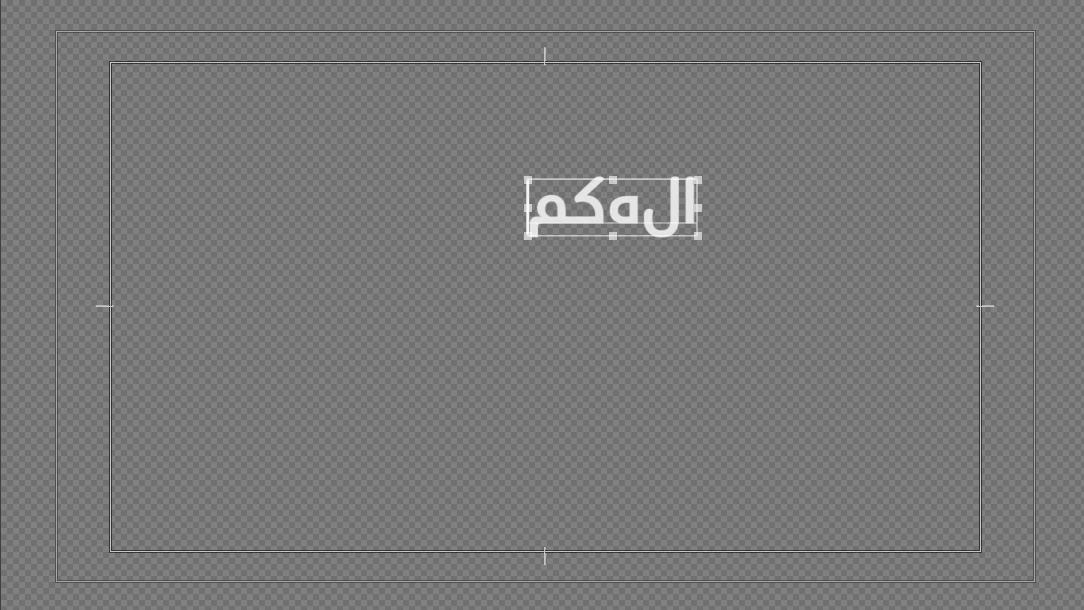
2- the new text tool Add a space after the word as you can see in photo 1   ...so it can't be aligned right

3- is there a magic button i don't know that can the legacy tool options come to the new text tool as aligning and all other text things

thank you guys hope you can help me

cheers.

This topic has been closed for replies.

11 replies

Community Expert
December 26, 2024

Almost 7 years and the space bug at the end of any "Right to Left" text is unresolved! This is a huge problem for all RTL text users, I wonder why it's so hard to solve this one?

Participant
December 26, 2024

Asalam o Alaikum anaselkhatib.  m sure u fixed your problem but to be sure that things are working fine at ur end. This problem occured with me too but i got it fixed inthe Essential Graphics.  >>>Select the Text which is split (disjointed) in letters and go to the Essential Graphics , plz check the Paragraph symbol  and change it from left to Right (if u hover the mouse on it  says"right to left typing". This worked fine for me . and finally , under the font style box (regular, bold, thin,) there are patterns of lines , plz choose the one on the extreme right , when u hover mic over it says " Right Align text". Hope it helps

Participant
July 16, 2021

I had this problem and thanks to South Asian option in Graphics settings, solved it. But now I have another problem. My problem is that when I type in Arabic and Persian, the signs are not placed correctly. For example when I write a sentence and I put a (.) at the end of the sentence, instead of being at the end of the sentence, it appears in the begginning. Can anyone help me with this problem in Captions part?

Stan Jones
Community Expert
Community Expert
July 16, 2021

If you are using PR 2021, there is a new setting for South Asian and Middle Eastern captions. Right click on the Caption Track header, and pick "track settings." If you are using PR 2021, try that first.


Let us know if that works - or doesn't!


Stan


Participant
June 1, 2020

I know none of this makes sense, but apparently you need to paste the text into Adobe Premiere backwards. Here is a webiste that will reverse the Arabic text for you. 

Type in Arabic in the Input column > hit the Process Input button > Copy the generated text from the output column > Paste it in the legacy title in Adobe Premiere > select the pasted text and pick a font that support Arabic. 

I am usign Courier New font, and I have no trouble so far. 

https://omar84.com/docs/taw/arabic_writer.html

Participant
July 29, 2024

Hi how are you? I have tried this and it works, however I can't seem to change the font of the text any more? Any idea why? thanks

Stan Jones
Community Expert
Community Expert
July 29, 2024

@ralzayani,


This is an old thread, and a universal text engine is now used. You should not need to paste backwards text.


A screenshot of the font issue might help.


Stan


Participant
January 25, 2020

hey

I'm also facing the same problem coudn't find a solution 

Participant
October 20, 2018

Same problem with the new update 2019.. This solution isn't available anymore.. Can you please tell me how to fix it?

Ameera1
Participant
December 5, 2018

I have the same issue with arabic font in the new update. doesn't get fixed with the preference solution can someone help

Community Expert
July 17, 2018

I tried both the Legacy Title and the Graphic Text and both work perfect writing Arabic text that I tested

using more than 1 Arabic font family. The letters are perfectly connected.

Make sure you set Type to South Asian and Middle Eastern in the preferences before starting any text,

sometimes you will have to restart premiere after changing these settings

Kevin-Monahan
Community Manager
Community Manager
January 13, 2018

Hi anaselkhatib,

Are you clear of this issue yet? Please let us know.

Thanks,
Kevin

Kevin Monahan - Sr. Community & Engagement Strategist – Pro Video and Audio
Participating Frequently
January 13, 2018

Hey kevin,

unfortunately no I still have a problem and it is really weird that some letters don't connect in the legacy tool but it does in the graphic tool .

Mike Dziennik
Community Expert
Community Expert
January 11, 2018

Just out of curiosity, why do you want to use the legacy tool (which I'm sure adobe will remove at some point) is the new tool works correctly?

Participating Frequently
January 13, 2018

the legacy tool goy a lot of controlling options like aligning .right to left ...and it is really hard to have a full control in the new title

Mike Dziennik
Community Expert
Community Expert
January 9, 2018

Ah, so the letters SHOULD all connect?

I have only done Arabic text a couple of times before - the most annoying thing is the reversing when you copy/paste. Would be good if adobe could implement automatic reversal when you paste.

Zaid Al Hilali
Community Expert
Community Expert
January 10, 2018

mikedzk  wrote

Ah, so the letters SHOULD all connect?

Well, not all characters have to be jointed but some. For instance the two words you pasted into Premiere should read as…

بعض النصوص