
Participating Frequently
Feb 13, 2026 9:50 PM UTC
Answered

Audio Waveform not showing on Premiere Pro 26
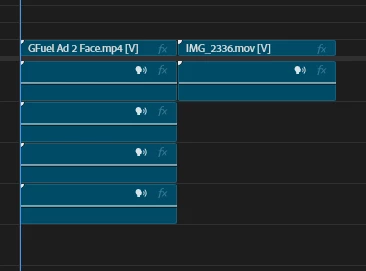
Pretty much what the title already says, sometimes Premiere loads up and reads the waveform (that wheel on top-right corner) but now it simply doesn’t read any audios from the videos I’m working on.


Things that I already tried to fix the problem:

  1. Sequence - Render Audio
  2. Reset preferences 
  3. Delete Peak Files
  4. Check and unchecking Show Audio Waveform

Keep in mind that the issues only shows up with Premiere 26 since I tried working on the 25 and it the waveform showed up there, so I think maybe Premiere 26 have some kind of weird bug to read audio files?


Any suggestions to what I could do to get the waveform back? 

    M00NDR00LCorrect answer
    Participant
    Apr 28, 2026 11:23 PM UTC

    Oh man, the dreaded missing waveforms. I have long experienced the exact same problem on multiple versions of Premiere, with intermittent luck getting them to come back. It’s beyond frustrating! I’m highly dubious this will work every time, but I just successfully fixed it following these steps in this exact order:

    1. Went to Premiere > Settings > Audio; turned on BOTH “Generate waveforms automatically during import” (on by default) and “Generate waveforms and conform audio using multithreading”.
    2. Went to Premiere > Settings > Media Cache > Remove Media Cache Files; selected “Delete” > “Delete unused media cache files.”, clicked OK.
    3. Quit and restarted Premiere.

    To be fair, I’ve tried similar steps in the past while on other versions as recent as v25, with no improvement. But I just installed v26.2 and figured I’d give it one more try. I was genuinely stunned to re-open Premiere and actually see waveforms again. I really hope you have the same luck!

    33 replies

    Participant
    Oct 28, 2026 4:13 PM UTC

    There seem to be 200 people with the same problem. Do we need many more examples of how to fix it? Literally everyone is trying all of the work arounds. I just bought a new laptop for the purpose of finishing a large linear edit project, and I can’t use it without the waveforms. Tried all of the suggested methods, waveforms still not showing. This is extremely infuriating.

    Translate
    Inspiring
    Sep 17, 2026 5:21 PM UTC

    Same issue in 26.5 on MacOs. 

    Translate
    Participant
    Sep 2, 2026 7:37 PM UTC

    you are the GOAT

    Translate
    SplashFabric
    Participant
    Aug 3, 2026 8:23 PM UTC

    What worked for me was in the sequence, unlinking the audio from the video, render and replace audio only. I hope this helps!

    Translate
    Participant
    Oct 15, 2026 1:37 AM UTC

    Uhg, thank you - this one worked for me as well. I tried EVERYTHING else before this one

    Translate
    Community Manager
    Oct 23, 2026 6:10 PM UTC

    Hi Serene_Aurora3003,
    Glad to hear you found a workaround! Could you please confirm which version of Premiere you’re using and whether the issue occurred with all media types or only specific ones
    Thanks,
    Sumeet

    Translate
    Grudgehammer
    Participant
    May 27, 2026 5:58 PM UTC

    Been dealing with this as well (2 hours of time wasted on an edit that should take 30 minutes). Aside from just re-rendering your audio in media encoder, I found out why mine wasn’t showing up: I had to be 100% zoomed into the timeline or source to see the waveform. It wouldn’t show up any other way. Still just as infuriating but at least I was able to sync up with my media encoder audio (as auto-sync almost never works). Hopefully this is helpful to someone else out there!

    Translate
    Participant
    May 15, 2026 4:44 PM UTC

    Hello everyone, I have been looking for a solution for a long time now. Professionally editing videos was impossible cause of this mistake. I finally found the solution. Everything else wasn´t working for me. Its very simple (unfortunately hahaaha) 


    Make Sure you guys open the Timeline settings (look at the pictures above) and select show audio waveforms… 


    I must have accidentally deselected it at some point. I guess there is a lot of people out there who are experiencing the same. Hope I can help. 👊🏻


    here is a official youtube tutorial by adobe btw: 


    Translate
    M00NDR00LCorrect answer
    Participant
    Apr 28, 2026 11:23 PM UTC

    Oh man, the dreaded missing waveforms. I have long experienced the exact same problem on multiple versions of Premiere, with intermittent luck getting them to come back. It’s beyond frustrating! I’m highly dubious this will work every time, but I just successfully fixed it following these steps in this exact order:

    1. Went to Premiere > Settings > Audio; turned on BOTH “Generate waveforms automatically during import” (on by default) and “Generate waveforms and conform audio using multithreading”.
    2. Went to Premiere > Settings > Media Cache > Remove Media Cache Files; selected “Delete” > “Delete unused media cache files.”, clicked OK.
    3. Quit and restarted Premiere.

    To be fair, I’ve tried similar steps in the past while on other versions as recent as v25, with no improvement. But I just installed v26.2 and figured I’d give it one more try. I was genuinely stunned to re-open Premiere and actually see waveforms again. I really hope you have the same luck!

    Translate
    Participant
    May 13, 2026 10:18 AM UTC

    This just worked for me on Premiere Pro 2025; massive thanks! Tired of dealing with these issues!

    Translate
    Ezell47
    Participant
    Jun 13, 2026 8:54 PM UTC

    This worked for me on Premiere Pro Version 26.2.2. THANK YOU!

    Translate
    Zach12131415
    Participant
    Apr 22, 2026 9:22 PM UTC

    waveform no longer works for me in either 2025 or 2026.  Adobe can you please fix this?

    Translate
    jamieclarke
    Community Manager
    Community Manager
    Apr 23, 2026 1:11 PM UTC

    Hi ​@Zach12131415 - In your Preferences > Audio Do you have “Generate waveforms automatically during import” and “Generate waveforms and conform audio using multithreading” checked or unchecked?

    Translate
    Participant
    Apr 16, 2026 2:07 AM UTC

    Same issue. Is this going to be fixed? As much as I love editing blind, it’s not great for a professional workflow. 

    Translate
    Participant
    Mar 3, 2026 10:28 PM UTC

    Same issue. Also fed up. As the price rises and Da Vinci stays free. Sigh...pushing me away, can’t waste hours that are supposed to be “billable,” working to make their software actually work! 

    Translate
    jamieclarke
    Community Manager
    Community Manager
    Mar 4, 2026 1:12 PM UTC

    Hi ​@deborahs8976687 -   Thanks for submitting your bug report. We need a few more details to try to help with the issue. Please see, How do I write a bug report?

    Can you send a sample clip to jamiec@adobe.com 

    Translate
    laurie_1453
    Participant
    Apr 6, 2026 5:42 PM UTC

    Same issue. I am tired of this. Adobe should do better. Every update is something.

    Translate