
Inspiring
March 16, 2023
Question

BUG: Use Previews....Doesn't Use Previews.

  • March 16, 2023
  • 98 replies
  • 16172 views

This workflow has been broken for a long time and I would really love to fix this one. I know this used to be on uservoice but I can't find the old bug. 


Steps:


1. Set sequence preview file to "Apple ProRes 422HQ" or whatever your favorite is. 

2. Render Sequence to full green.

3. Go to Export, Select an H.264 preset, check "use previews"

4. Watch as PrPro doesn't acess a single preview on disk and instead renders the whole timeline from scratch. 


From my current example I have a .png sequence from blender than I've rendered to green in the timeline.


Export->H.264, use previews checked...


Look at windows resource monitor, why is premiere chewing up PNGs when it should just be referencing the preview files I JUST RENDERED. 
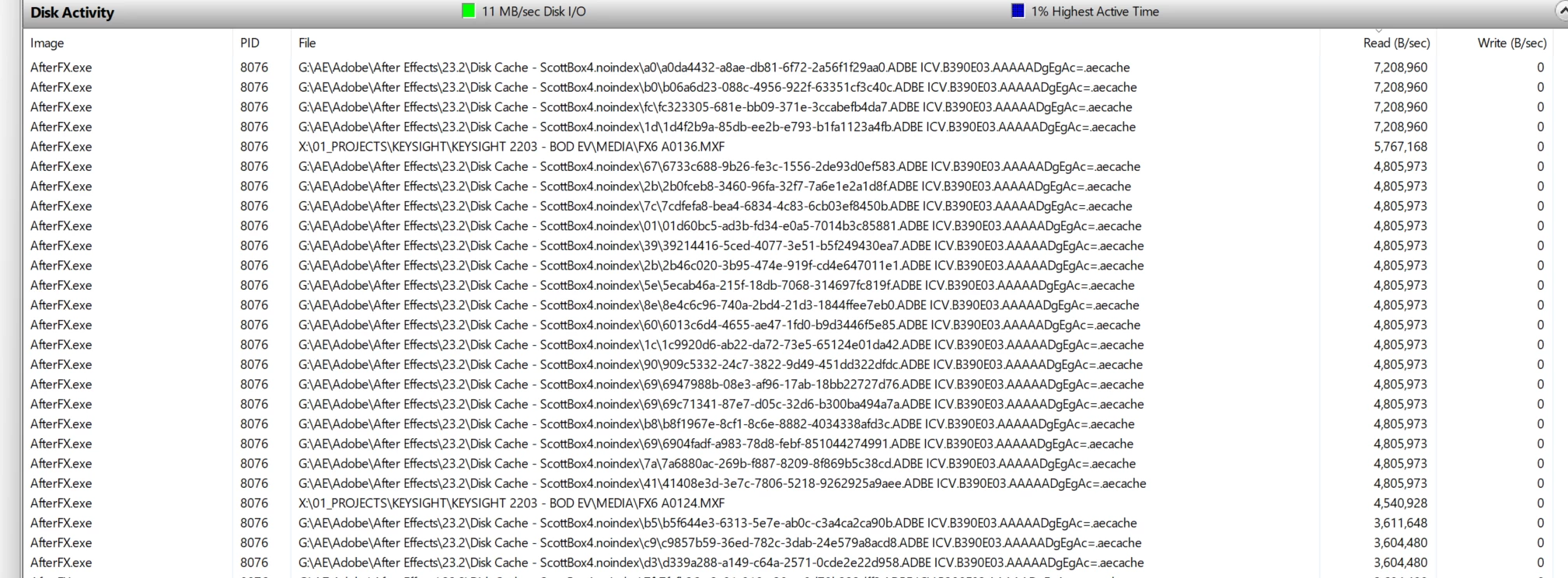
.aecache files being acessed for no reason. 
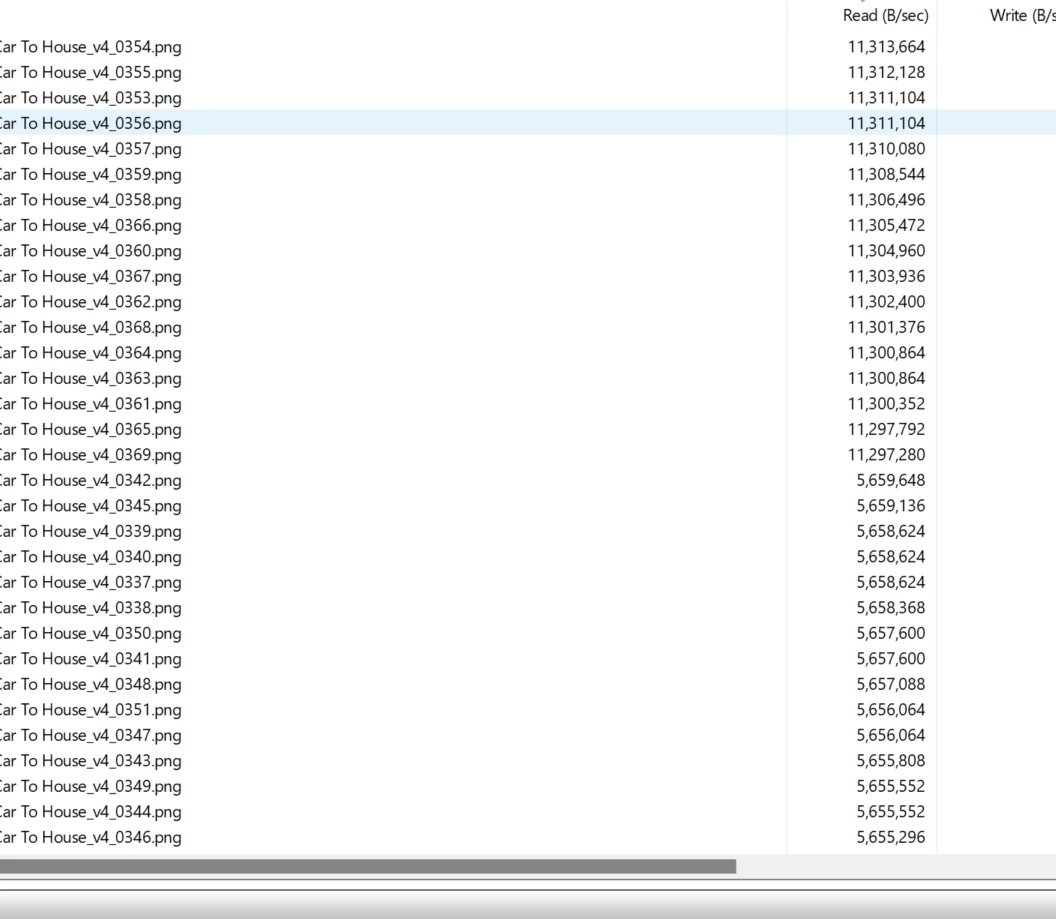
.png sequence being read. WHY. 


98 replies

JonesVid
Community Expert
Community Expert
February 2, 2024

Yes, I fully agree with the comment on QC software issues. You work with one Premiere Pro release get to know the pitfalls, but you can work around stuff.

Then the new release comes out .... (deep breath everyone) and the whole situation is turned upside down on its head where core things that worked don't anymore.


From my experience this points to :

1. Code is poorly structured and like a patchwork quilt

2. Design is poorly documented

3. Trying to spread software maintenance across too many teams with weak management

4. Weak QC/QA procedures and bypassing core functionality

5. Fee paying subscribers are the QA department


When you post an issue in Bug Reports  that can be replicated - there is never any Adobe Engineering response.

They tend to like attending to easy stuff like "the colour of my button is not orange but red" ......etc


I'm just getting a bit fed up with this.


R Neil Haugen
Legend
February 1, 2024

Good information there, thanks for posting!

Everyone's mileage always varies ...
Scott.C.Author
Inspiring
February 1, 2024

I don't trust media encoder (many, many failures over the years, been burned too many times to use it with any sort of confidence) but I may have to lean into it more as its nearly a 5x speedup because it actually respects the use previews switch most of the time!


14 min timeline.... Exported in 1min 49 seconds. 

Output from Rendered(all green) ProRes422LT Timeline to H.264 ~1:49 through media encoder with "use native" unchecked. 


Output from Premiere, same exact settings. Esentially hit "export" instead of "queue" in the export dialog. 


... 6:45. 


This is a less severe example since its just 1 layer of color and 3.2k ProResLT media and minimal dynamic links. On other jobs this could be up to a 10x speed bump but the lack of engineering response by Adobe seems like they think this performance being left on the table is a non-issue. 


These kinds of inconsistencies from app to app and year to year are what drives people like me crazy. Our job is both technical and creative and problem solving is part of the job, but you just want your established workflows to WORK not bug out every other release. Make use previews...use previews every time....


I don't want to have to render out to an intermediate ProRes file anymore, its too many hoops when you're on a tight deadline and adds more QC issues. 


michaelp92032205
Inspiring
January 30, 2024

Today I just went back and opened an old project in Premiere 2022. It was rendered in the timeline using ProRes and exported to H.264 and I clicked "use previews" and it used the previews during the export the way it's supposed to.


Sure would be great if the 2024 version of the program worked like that. How can you break a feature and call it an upgrade?

Scott.C.Author
Inspiring
January 26, 2024

Anyone from Adobe dev team care to respond? @Francis-Crossman17221443 @Fergus H . This is a big gap in functionality. 

JonesVid
Community Expert
Community Expert
January 9, 2024

I tend to agree with Shebbe that a 'Major Release' is not the way to fix a bug like this.

Its a broken existing feature that worked a few releases back. I bet it is not that complicetd to fix it either - just guessing though.

It really should be fixed in an intermediate 24.x update.

Anyway , ... at last Engineering has acknowledged it is broken and needs fixing.

Ryan Fritzsche
Inspiring
January 9, 2024

@MobyTrix this is great to hear.  If the engineers are finally engaged and working on it, then that's great news.  I'm still a little peeved it's taken so long to get anyone to pay attention to it and that it's going to take another 10 months to get addressed, but still happy it's finally happening.  

Shebbe
Community Expert
Community Expert
January 9, 2024

Thanks for that Moby.

As promising as that may sound, personally I still think aiming to fix a bug in a major next release sounds to me like they aren't even considering it as a bug when arguably you can. Or simply a broken feature. Now they seem to make us think it's going to be a "new feature" which we should be happy about that takes time to develop and release. The only way you can make me happy is a hotfix releasing tomorrow which should've been fixed years ago.

MobyTrix
Known Participant
January 9, 2024

(I'm the same account as "mobygamer", this is my regular account for the forums) I just got a call from Adobe support that they brought it up to engineering, they were able to reproduce it, and are definitely targeting to fix it in the new version to be released at Adobe MAX in roughly September or October.  I relayed the information that some of us have seen success if the Renderer is set to Software Only in the project settings.

While I'm not happy I have to wait for exports again for roughly the rest of the year, I am encouraged by the fact that they contacted me back, acknowledged the problem, and gave a tentative date for a fix.

R Neil Haugen
Legend
January 6, 2024

Yea, what seems to be perhaps several general issues with smart rendering are defintely needing attention. Some formats/codecs don't respond as it seems they should.


I know of one SoCal editor who does apparently much network stuff, who says they typically do render & replace of their 'main' sequences set to run overnight, to the one format/codec they have normally working. Which is the same as their expected export deliverable. I'm assuming probably a ProRes.


It just keeps their workflow ... flowing. Playback is better, exports quicker, life moves on.


I know they said after they export from Pr, they routinely use some other specialized app to make the two or three required deliverables, which are probably some form of H.264.


A bit more complex than what I work with. And I'm sure they wish they didn't need to always do an R&R ... but ... this gets it out the door on time. All the time.

Everyone's mileage always varies ...