
Inspiring
March 16, 2023
Question

BUG: Use Previews....Doesn't Use Previews.

  • March 16, 2023
  • 98 replies
  • 16172 views

This workflow has been broken for a long time and I would really love to fix this one. I know this used to be on uservoice but I can't find the old bug. 


Steps:


1. Set sequence preview file to "Apple ProRes 422HQ" or whatever your favorite is. 

2. Render Sequence to full green.

3. Go to Export, Select an H.264 preset, check "use previews"

4. Watch as PrPro doesn't acess a single preview on disk and instead renders the whole timeline from scratch. 


From my current example I have a .png sequence from blender than I've rendered to green in the timeline.


Export->H.264, use previews checked...


Look at windows resource monitor, why is premiere chewing up PNGs when it should just be referencing the preview files I JUST RENDERED. 
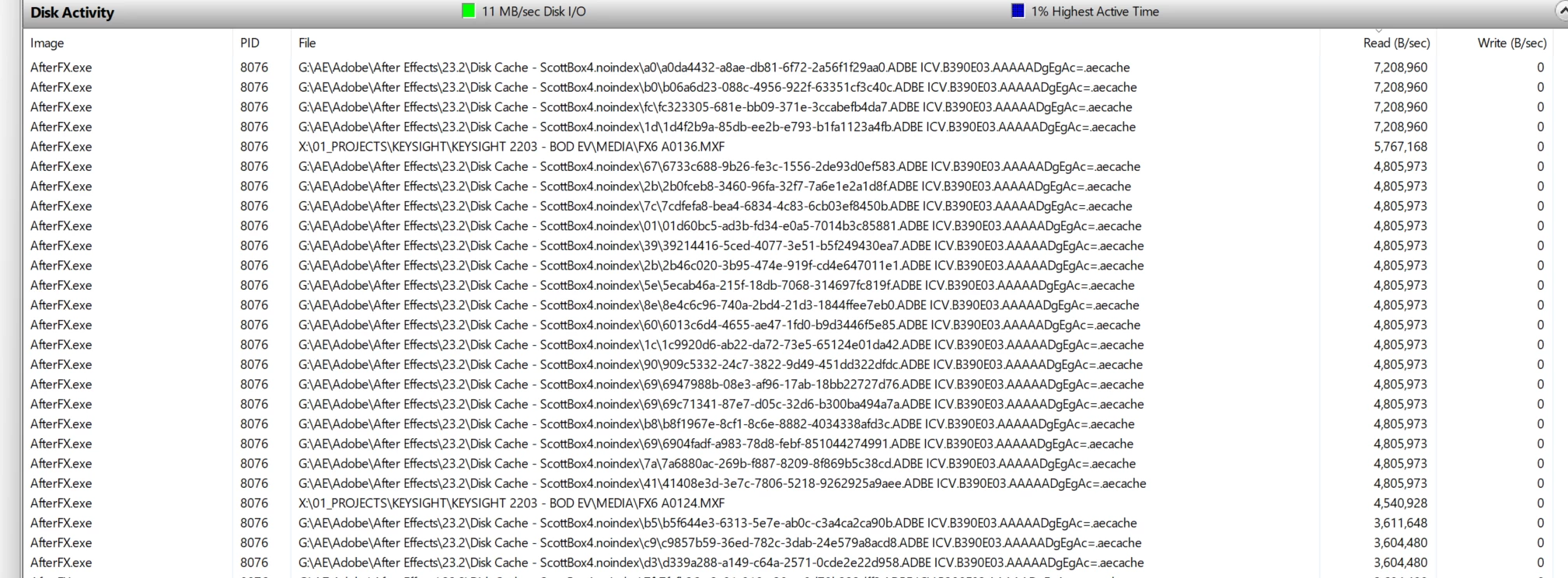
.aecache files being acessed for no reason. 
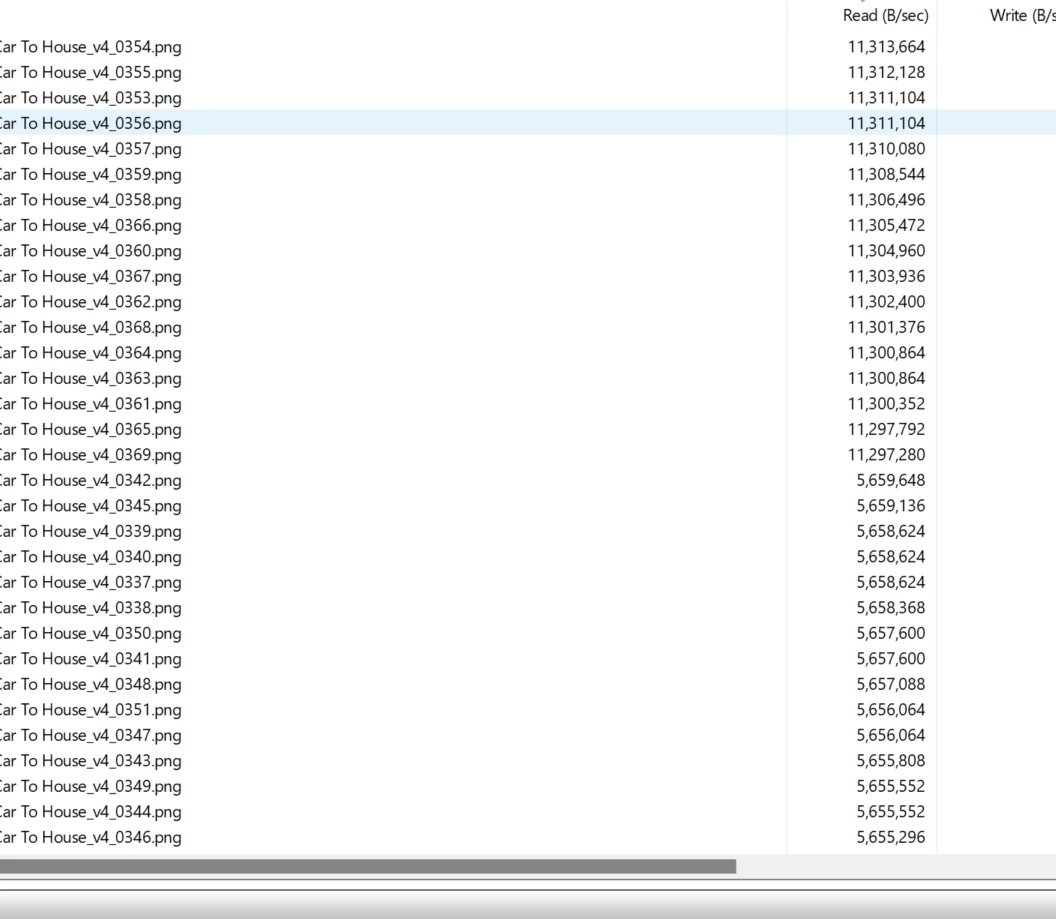
.png sequence being read. WHY. 


98 replies

JonesVid
Community Expert
Community Expert
January 6, 2024

I totally respect what you have said here.

We also made clear our views into setting priority of develeopment as an engineering team - but commercial impact and customer satisfaction ruled.

The desire for  'Clean code' approach  rings many bells...... 🙂

I think in summary we are in agreement - however - the problem we are focuing on in this thread is so well defined and reproduceable that it totally baffles me and many others why this has been ignored for so long.

Smart rendering was promoted by Kevin Monahan a while back and we all got on board with this as it was a great workflow. Now its broken.

Anyway, all we can do is hope this issue of losing rendered ProRes files gets addressed.

( I did see a post by MyerPJ where using ProResLT worked - yet to try it !)

New year, new hope !!


R Neil Haugen
Legend
January 6, 2024

"Companies" are just groups of humans. Every human is by nature, different than any other. And all groups also are different from any other group. There will be similarities in some things, but many things will be carried out differently. So ... that's the underlying humanity of the thing.


I've dealt with I don't know how many companies over the last 40+ years of pro imaging. From those making hardware ... such as large photoprocessors, to integrated hardware/software machines, to software only. 


And in every case, every case, there was always an Engineering viewpoint to deal with. While it varied in how much one needed to explain a difference in outlook, it wasn't that big a variance. Well, and most companies had someone who ran ... interference, or perhaps, translation, betwen clients and vendors. Facilitating real-time interchanges of perceptible data points.


I've met a number of the devs for Premiere, AfterEffects, and Audtion at events. They all are heavy duty editors in their own time, passionately so,  and they do feel quite comfortable in discussing the app in general use. And naturally, that they do feel they are also Users.


They are delightful people, in all. Fascinating to get to meet and talk with, always.


Yet, there is that "engineering" nature to their approach. They are very aware of, and partial to, having "clean" code. Unclean code is baaaaad, Leads to unexpected things, which always leads to unhappy clients.


Very, very baaad.


So when it's a case of a suggestion from users, that to them, seems like the most 'natural' way to implement would be to bugger the code a bit, well ... that's not going to go very far.


Because they then feel they are protecting the users. Worried about potential user troubles due to X change.


Well ... sometimes, "we" aren't as interested in being protected as being ... perhaps, enabled, shall we say?


Like the limitations in Lumetri's 'reach' for changes. Which are there by intent, to keep users from screwing up their pixels. However, many of us wish we could tell "Lumetri" to let us bugger those pixels up, if we choose to do so.


For an entirely different company, take BlackMagic. As someone who's been around colorists heavily ... works for/with/teaches them ... for years now ... there's a TON of things many top pro colorists have wanted changed in behaviors in Resolve for version after version.


And ... are still on their pleading's list of things they ask for, every version ...

Everyone's mileage always varies ...
JonesVid
Community Expert
Community Expert
January 6, 2024

Comment from R Neil Haugen

"All very understandable. But you and I aren't the ones building this ... and there is such a thing as engineering "outlook". Which can vary notably among engineers, of course".


Come on now Neil - as an R&D manager - if I had said that in my day I would have been out the door in no time.

Customers come first - not Engineering's view on life

Adobe should not be running a holiday camp ?

JonesVid
Community Expert
Community Expert
January 6, 2024

I find that statement 'if engineering wants to fix this' worrying

Before I retired I ran an R&D team in the Voice & Data Comms world. Engineering didn't get to choose what they fixed - it was the customers shouting from the rooftops and not paying their bills. Our Product Management/Commercial  team would prioritise what got fixed. It was certainly not up to Engineering.

They had to put their heads on the line and commit to realistic Fixing timescales. If it was reproduceable bugs - they would be first on the list to be fixed. Reproducing a bug is 80+ percent there to fix it.

What sort of company is Adobe running ?.


Shebbe
Community Expert
Community Expert
January 6, 2024

"They acknowledged that if engineering wants to fix this, it won't be until the next major release at the end of 2024."

I find this highly concerning. Especially the "if engineering wants to fix this" part.

Ryan Fritzsche
Inspiring
January 5, 2024

Well it's nice to hear an actual update.  Thx for sharing.  It's a pity it's not on any big fix lists already; it's been a problem for a few years now.  But here's to hoping for v2025 to fix it.

Participating Frequently
January 5, 2024

I opened a case with Adobe for this; waiting to hear back after explaining the issue to someone who called me back.  They acknowledged that if engineering wants to fix this, it won't be until the next major release at the end of 2024.

Inspiring
January 5, 2024

My Work Around! Been doing it for a while.

Make sure entire sequence is rendered. Then go to File/Project settings/General and change renderer to software only. And then it will export using previews that is if yout previews are rendered to the same codec you're exporting to. When finished switch it back to Mercury Playback Engine.


Also, the make sure entire sequence is rendered before switching to software only is important, B/C if a portion of a clip is rendered and you finsih rendering it in software only there will be a color shift Mid Clip.


Hope this helps. It's a pain in the ass but it works


Known Participant
December 23, 2023

It's frustrating as it used to work perfectly, and it was a massive bonus to be able to do that. I used to like watching my edit rended and knowing that it will look exactly like that in the exported file.


So please Adobe, it's not something new we are asking for, it's an option we are paying for every year since many years and it should work 100% on a paid software.

JonesVid
Community Expert
Community Expert
December 23, 2023

Well, I must admit I have only scan read most of the posts under this topoic but can agree that 'Use Previews' in Premiere now seems to have been nuked completely as it loses the pre-rendered Pro Res 422 Render files

See my post here

https://community.adobe.com/t5/premiere-pro-bugs/some-prores-422-video-preview-files-lost-on-closing-and-re-opening-project/idc-p/14316350#M19154


Other users reporting this now.

The feature seems to have been 'nuked' totally - and I am not convinced if you have the previews it actually is using them.


I rendered a clip using Neat Video denoise plug-in  this afternoon.

On the timeline the  it looked good when complete, but took ages to render initially as this rendered a preview to Pro Res 422 format as it should. I could see that lareg file in my Video Previews Folder.


But come export time the export got stuck in the same place!. It was trying to re-render the clip all over again on export when I had ticked 'Use Previews on Export'. It should have used the clips in my Video Previews Folder

The export matched my sequence settings exactly as the Pro Res 422 Previews.

What is Premiere doing?

I think this whole area of functionality needs 'the road digging up' and Engineering need to sort it out.


Finally - I agree with the earlier discussion that in principle, it should not really matter what format you export to using Premiere.


If you have Pro Res 422 Pre-Rendered timeline clips then there is no reason why it can't export them as H264 or H265. All it will be doing is using the embedded Media Encoder to translate those clips.


Just hope 2024 sees some improvement in this area for Premiere Pro as it is causing me a lot of hassle and wasted time.

This is basic stuff.