
Inspiring
March 16, 2023
Question

BUG: Use Previews....Doesn't Use Previews.

  • March 16, 2023
  • 98 replies
  • 16172 views

This workflow has been broken for a long time and I would really love to fix this one. I know this used to be on uservoice but I can't find the old bug. 


Steps:


1. Set sequence preview file to "Apple ProRes 422HQ" or whatever your favorite is. 

2. Render Sequence to full green.

3. Go to Export, Select an H.264 preset, check "use previews"

4. Watch as PrPro doesn't acess a single preview on disk and instead renders the whole timeline from scratch. 


From my current example I have a .png sequence from blender than I've rendered to green in the timeline.


Export->H.264, use previews checked...


Look at windows resource monitor, why is premiere chewing up PNGs when it should just be referencing the preview files I JUST RENDERED. 
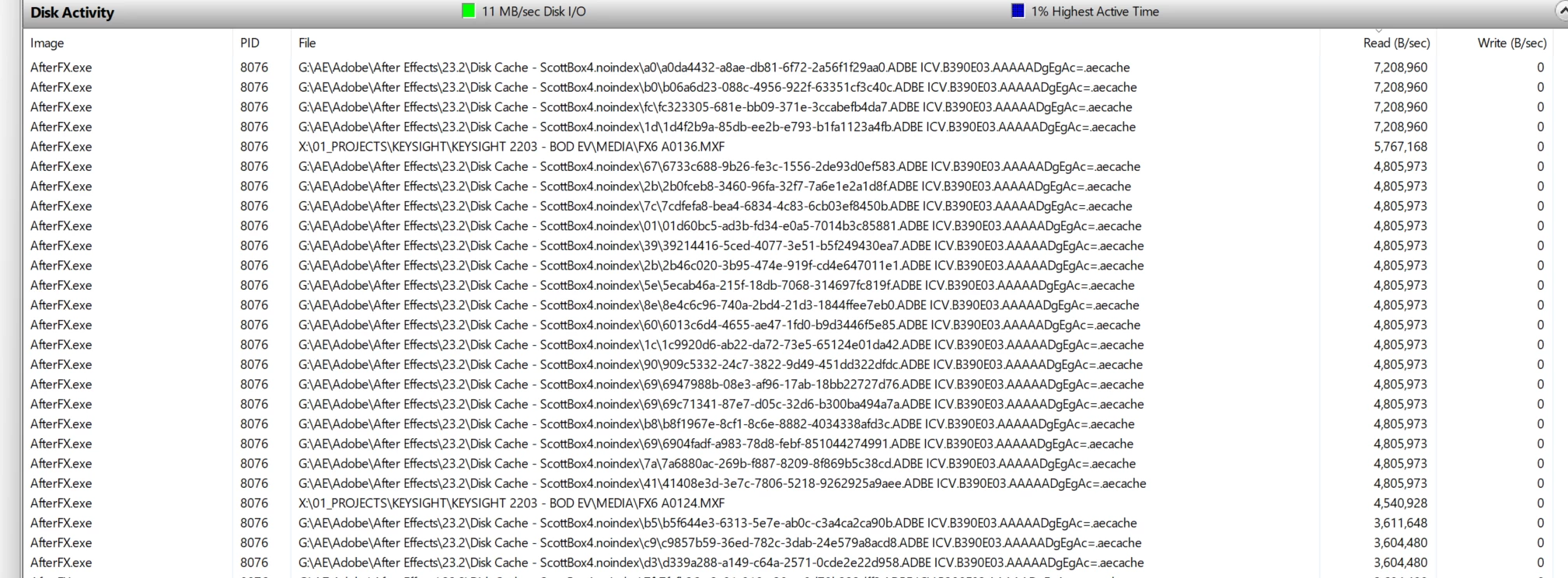
.aecache files being acessed for no reason. 
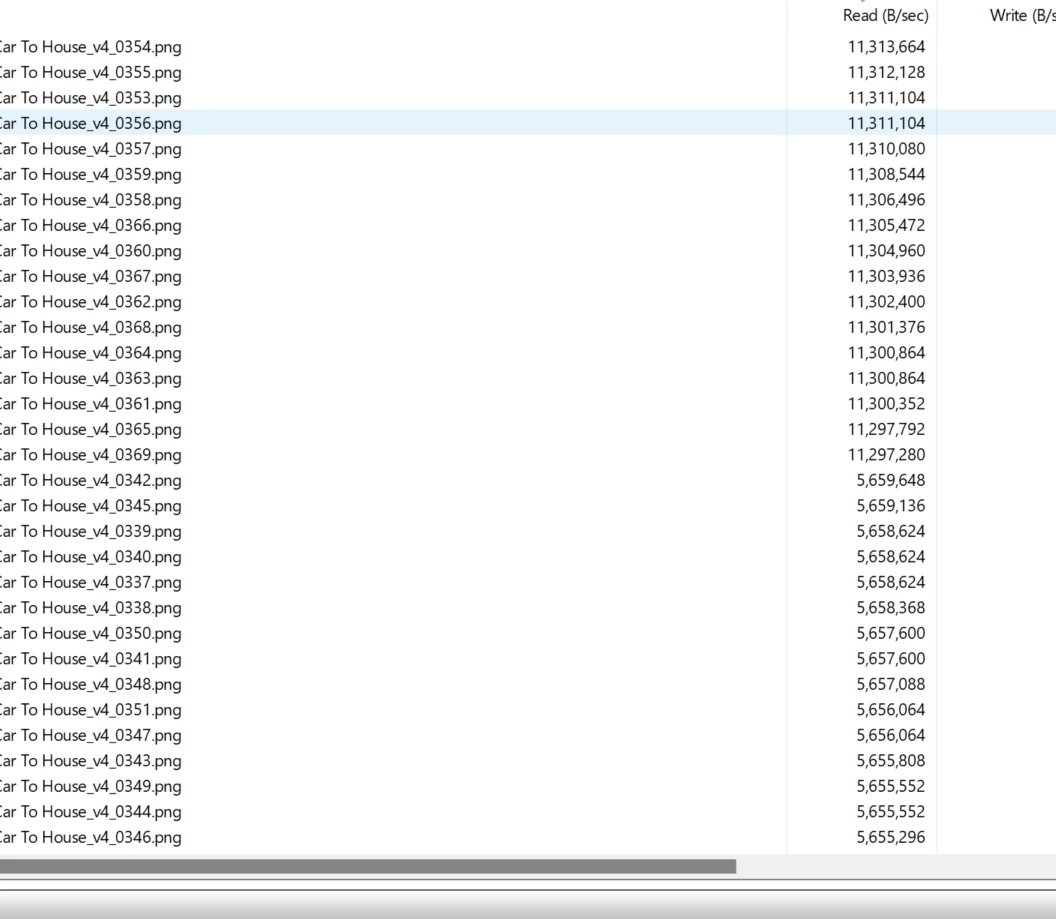
.png sequence being read. WHY. 


98 replies

Scott.C.Author
Inspiring
December 21, 2023

Also just doing a test render here of a green timleine of AE comps and its still re-rendering from the aecache instead of just reading the .PRV folder...so not fixed...yet...

Scott.C.Author
Inspiring
December 21, 2023

Yeah I may have spoken too soon on the beta build I don't use it every day but I was testing it out for a small project this week and the "use preview" checkbox re-appeared today... 


Warren Heaton
Community Expert
Community Expert
December 21, 2023

I think what we're seeing in the current beta is the process of being able to use Previews being fixed.  Of course, this is just a guess.

As best as I can tell, Use Previews is working again as expected when the Previews are ProRes and the export is ProRes.  Prior to this beta, if the ProRes Preview frame size was lower than the Sequence Frame size for faster rendering of previews in a rough cut, exporting no longer scaled the previews correctly (the preview frame size would be positioned at the upper left with green filling the export frame size),

Hopefully this means that we'll see this extended to exporting to other formats.  For example, while we can export ProRes to a watch folder for transcode to H264, it would be better to be able to export to H264 directly - especially when queuing multiple Media Files for export in Export Mode.


For what it's worth, all NLEs require frame independent formats (ProRes, DNx, All I-frame MPEG) for previews (Premiere Pro, Final Cut Pro, Resolve).  Long-GOP formats can be source footage, but not previews footage.

Shebbe
Community Expert
Community Expert
December 21, 2023

Looks like this topic still lives. I also had given up after my assumption that it always worked but at some point it didn't anymore? 2019 or something.... 


I don't understand why there would be arguments against it or why it has been removed. A professional video editing software should have the means to use chache/render prior to export and from there to any format regardless of what the chosen cache format is. I'm not saying copy BMD Resolve exactly, but one would expect at least some kind of comparable robust, and usable mechanic. The current way really serves no purpose in a world with multiple deliverable formats with heavy source timelines.


Ryan Fritzsche
Inspiring
December 21, 2023

This is a bug.  it used to work.  It was broken somewhere around version 2019 or 2020.  Adobe needs to fix it.  I do not understand why it would not be possible.  I've never once used a long-GOP codec for previews, and even if I did... if Premiere can play it back in real-time, then it should be able to use it to use it to export.  90% of my exports are at low-res and quality doesn't matter, so I don't care that re-rendering everything from scratch is "better" (which is debateable, depending on preview settings, obviously but still irrelevant).  But it taking 20 minutes to export something that I've already spent 20 mins rendering and which should take 2 minutes to encode from ProRes to H.264 is a huge problem.

R Neil Haugen
Legend
December 20, 2023

Just ... ouch! Not happening here, and no clue why you're getting that. There's some truly odd behaviors that users here and there are getting, and I can't see the why behind them. Often equipment and processes are different from others getting the specific crud, but sometimes, they're the same.

Everyone's mileage always varies ...
Known Participant
December 20, 2023

Premiere is becoming a nightmare with exports, it's still not using Previews and it keep pausing then continuing then pause again. It never paused before when no effects were on the timeline.

R Neil Haugen
Legend
December 20, 2023

All very understandable. But you and I aren't the ones building this ... and there is such a thing as engineering "outlook". Which can vary notably among engineers, of course.


And from the many discussions I've had with the devs at NAB and elsewhere, I'm very familiar with the difference between user logic chains and "obvious" associations, and the engineering view of the same things.


I think all of us "here" have engineering decisions and choices we disagree with. I *certainly* do!


And as someone who uses and discusses Resolve nearly as much, there's the same difference "over there". Just typically on different issues.


Would certainly be nice to be able to get more buy-in of "our" viewpoints on many things. No question.


But I do pass on what I've gleaned from discussions with devs. Whether or not I agree with them is immaterial really. But maybe of use for understanding why X is ... X.


That's all.

Everyone's mileage always varies ...
Scott.C.Author
Inspiring
December 20, 2023

Hi Neil,


As I've explained before in this thread there is no technical reason why Premiere Pro can't use the preview files that are ProResLT or 422HQ files on disk and pass those into the H.264 encoder, bypassing the source media. We aren't dealing with the days where the default seqeunce preview was a low quality Mpeg file. 


My workflow is typically very AE heavy and I use dynamic links to build transitions, lower thirds, graphics, and any other manner of basic VFX (screen replacements etc) that I then assmble in Premiere. I know "render and replace" exists, and use it begrudginly from time to time, but  often times these things need to remain as live dynamic links, and its very convienient to be able to bash CTRL+E to jump in and tweak a screen graphic or other effect.


I use the previews to get smooth playback and "render as I go," which is a pretty typical way to work. Of coruse I can then output that to a ProRes422 file; smart rendering still works, but I don't want to send a 100GB ProRes422hq file to client. I don't have a need for that until final delivery typically. So its an uncecessary extra step to generate a ProRes quicktime and then drop that into media encoder. Rendering straight to h.264 can take forever on certain jobs since it doesn't bother to use the preview files on disk which are of high quality.  


Look I'm a workflow nerd at heart, and I hate anything that is throwing a wrench in the pipeline, espscially when it worked in a superior way in previous iterations (don't get me started on the neuvo export window in general)  Media Encoder sometimes follows the old behavior of using the preview files on disk but does this inconsistently at best, which is par for the course with AME. 


If they could give us this, along with having preview files go mysteriously red when you close the forground AE process I would sing the praises of the Pr dev team, but it looks like they are moving away from what could be a huge timesaver which makes me unhappy. 

R Neil Haugen
Legend
December 20, 2023

I don't think they use previews with long-GOP media. As your cuts aren't limited to iframes, anything has to be encoded "fresh". Premiere has no muxing capabilities.


So that may explain the difference. Match source specifically matches to H.264. Match sequence doesn't, as H.264 isn't part of the sequence metadata. It's just a clip type used on the sequence. Which likely will have different codecs.


Edit:


An easy way to check, is have a sequence with mostly say ProRes or DNX on it, all intraframe. Try the match source option, and see if it shows "use previews" as an option.

Everyone's mileage always varies ...