


Participant
November 22, 2020
Question

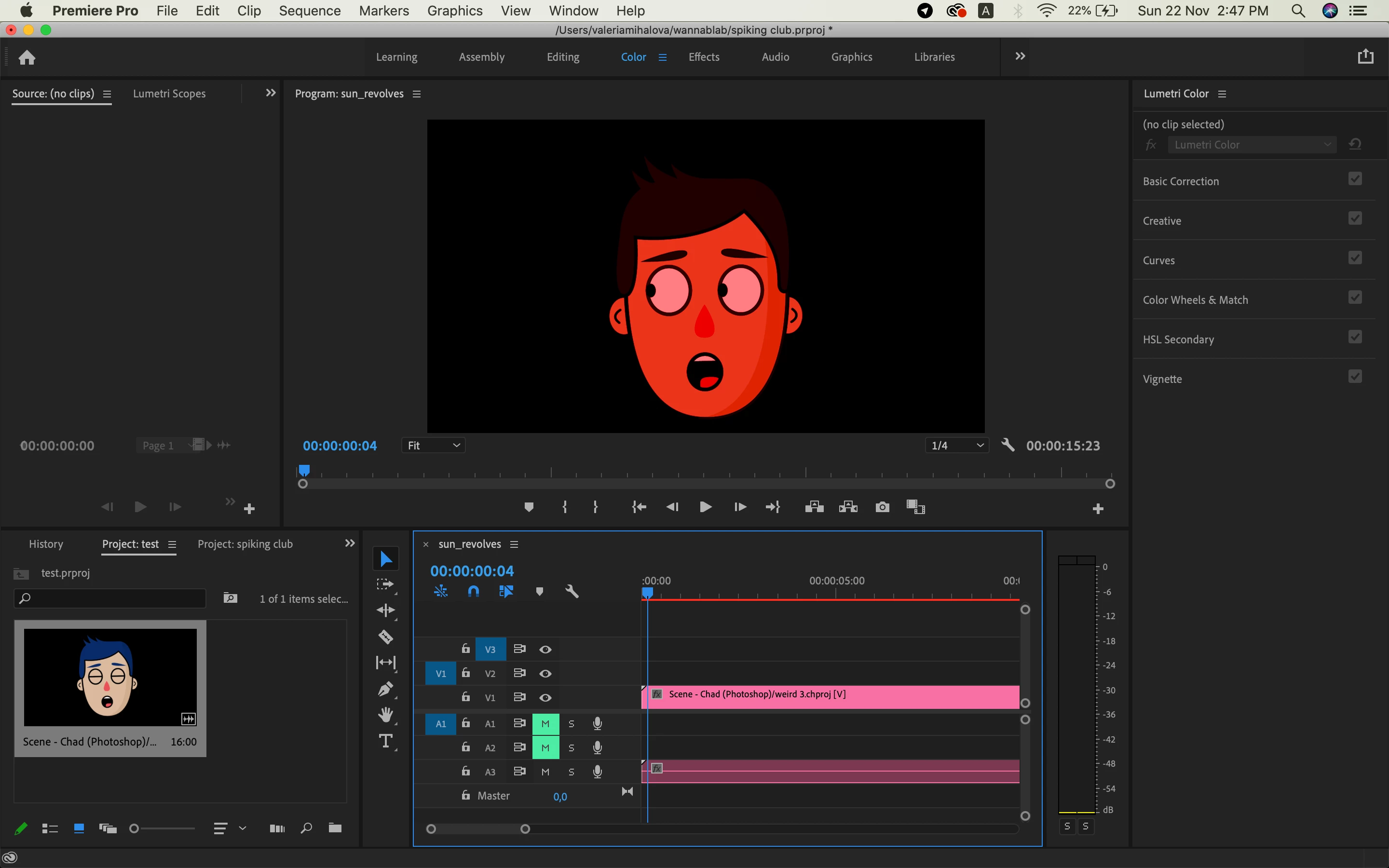
Character Animator scene has a wrong colour after exporting to Premiere Pro

  • November 22, 2020
  • 3 replies
  • 687 views

Hi! After importing Character Animator scene with File -> Import -> .chproj file -> selected scene it always become kinda pinky. It works in the same way for every screne for all the puppets. I've already reinstalled Premiere Pro. Any suggestions what I'm doing wrong?
This topic has been closed for replies.

3 replies

alexm88455289
Participating Frequently
November 30, 2020

Same issue here!

alexm88455289
Participating Frequently
November 30, 2020

I solved this by adding a Set Matte effect. 


Participating Frequently
December 6, 2020

I've just tried this but it didn't work for me. 

Community Expert
November 22, 2020

What colour space is your sequence set to?

Ann Bens
Community Expert
Community Expert
November 22, 2020

This seems to pop up on a regualar basis.

Not sure but guessing this is an alpha channel issue and a bug.

Instead of importing from the project can you render the file out with a video codec.

Also turn off MPE hardware.