Participating Frequently
October 25, 2017
Answered

Color wheel alignment off

  • October 25, 2017
  • 2 replies
  • 1710 views

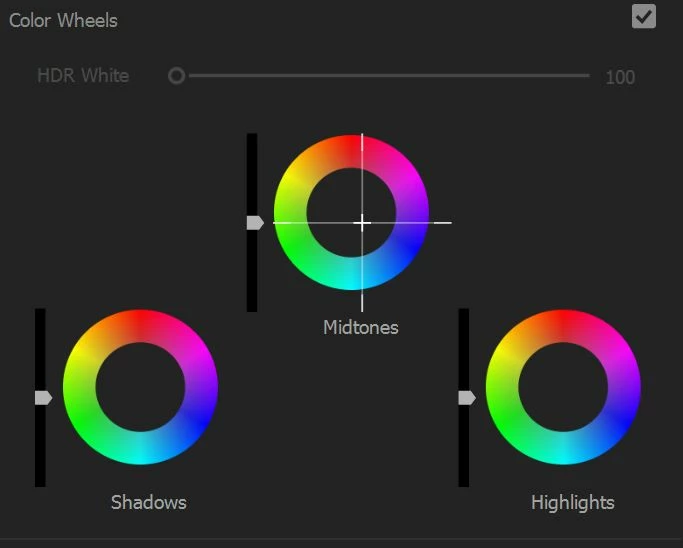
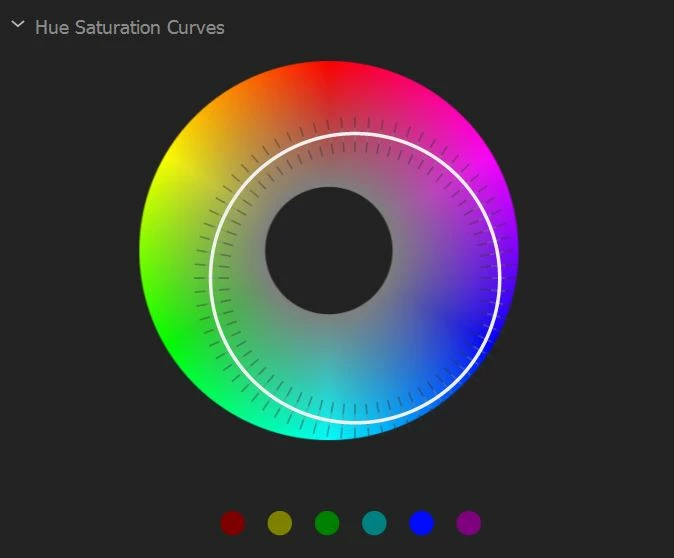
So this is a weird one.  Using a 4K monitor and premiere pro.  My color wheels alignment are off, see photo.

Those are at the default values, not adjusted!  Makes it pretty hard to make adjustments.

I tried updating to latest CC and it's still like this... Any thoughts?

Nothing came up in google.
This topic has been closed for replies.
Correct answer cbehba

I have the same problem.

Dell Precision 5520

4k screen

Windows 10 Pro

Intel i7 7820

16GB RAM

512GB 960 m.2

​Edit: I was able to fix the problem by

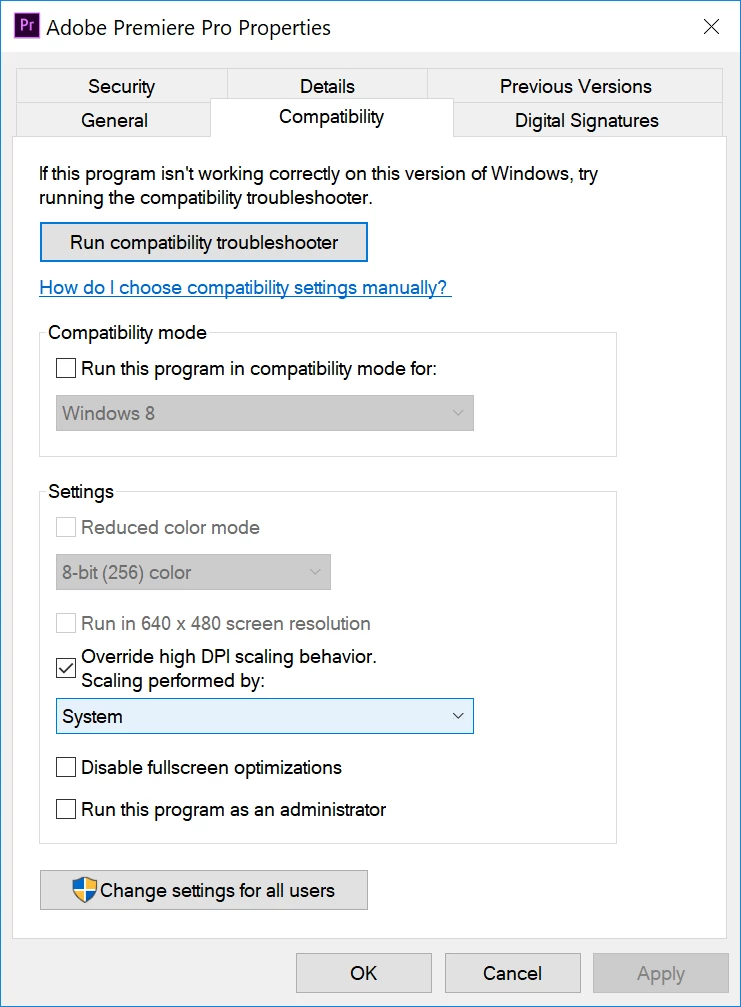
1. Right click Adobe Premiere Pro Application and select "Properties"

2. Under "Compatability," check the box "Override high DPI scaling behavior. Scaling performed by:" and choose "System"

*You also may need to reset the Color workspace in Premiere after applying these changes.

​Hopefully this works for you!

2 replies

cbehbaCorrect answer
Inspiring
November 29, 2017

I have the same problem.

Dell Precision 5520

4k screen

Windows 10 Pro

Intel i7 7820

16GB RAM

512GB 960 m.2

​Edit: I was able to fix the problem by

1. Right click Adobe Premiere Pro Application and select "Properties"

2. Under "Compatability," check the box "Override high DPI scaling behavior. Scaling performed by:" and choose "System"

*You also may need to reset the Color workspace in Premiere after applying these changes.

​Hopefully this works for you!

Participating Frequently
November 30, 2017

Thank you for the tip!

Yes it "fixed" the issue but... now it looks a bit fuzzy compared to the way it looks when the application scales the screen!

So not fully a solution

When you use system scaling, does your premiere render sharply or does it get blurred (like the usual windows shenannigans)?

Inspiring
November 30, 2017

There are some text items that are a bit fuzzy, but I'd rather have that than a shifted color wheel!

Yeah I don't think there's anything else to "fix" the problem unless Adobe patches it specifically for this scaling issue. It seems like it only has to do with 4k and scaling, and not anything with your/our computer hardware.

Hopefully they can address this somehow, and fix Lightroom while they're at it...

R Neil Haugen
Legend
October 25, 2017

There was another user had this, and ... you're the only two I've ever seen with this! Blessed, aren't you? 

Maybe Trent Happel​ or Kevin-Monahan​ could help with this ... that's ... just ... wrong!

How about listing the full hardware setup for them to check ... OS/RAM/CPU/GPU/vRAM, the GPU driver, the monitor, and any other hardware you've got connected there.

Neil

Everyone's mileage always varies ...
Participating Frequently
October 25, 2017

Very blessed indeed.

AMD Threadripper 1950X

MSI X399 Gaming Carbon Pro

Gigabyte Aorus 1080ti xtreme

Corsair Vengeance 64GB Ram

Samsung 850? pro sata sdd

Samsung 960 pro M2 sdd

Win 10 pro x64

Monitor is LG 27UD68 4K monitor.

I also have an old Dell 1080p monitor as a secondary that I leave off most of the time and sometimes turn on.

I did have an issue where Premiere went crazy but found a thread about resetting preferences and it seemed to fix things, and now I avoid using the second monitor.

(The issue was after I enabled second monitor as a playback monitor using mercury transit, NO video would play at all, audio would load but no video would play.  Reset preferences and it was fixed).

I already tried resetting preferences and updating to latest.

Participating Frequently
October 25, 2017

That is very odd and something I have never seen before. Off-hand, all that I can think of is to make sure Premiere is 100% in the 4K monitor and not extended to the second monitor (not even by a small amount).