hmdigiart.com
Participating Frequently
April 16, 2019
解決済み

Error retrieving frame **** at time **

  • April 16, 2019
  • 返信数 58.
  • 267560 ビュー

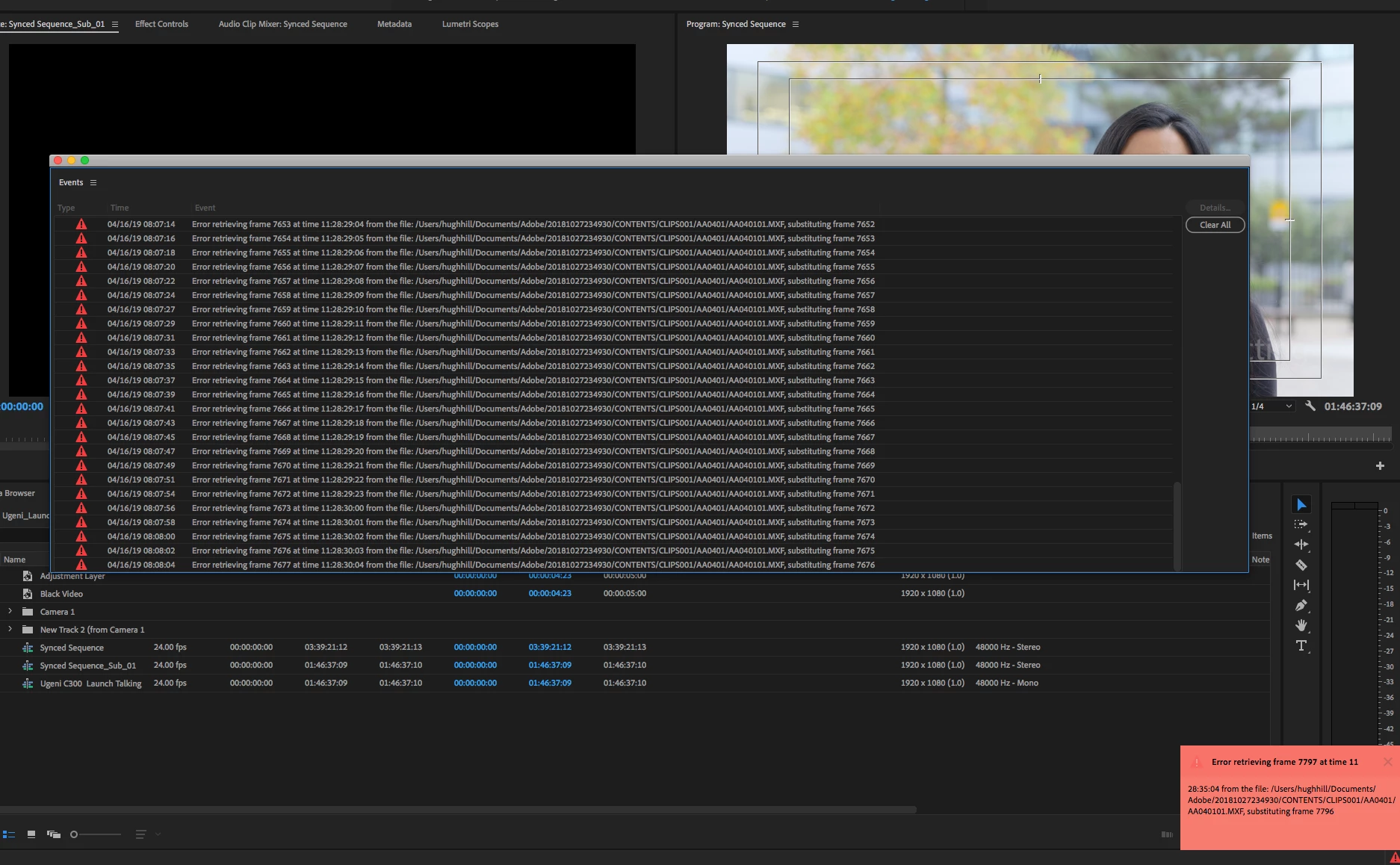
I am trying to footage taken at a recent event that I shot with one camera, I imported it into premiere pro cc 2019 and then exported it only to get this error message every few seconds.


"Error retrieving frame **** at time **:**:**:** from the file"


The footage was shot on a C300 at 24 fps, in full HD, the sequence is 24 fps 1920x1080 which is a match./

it's only when I try to export it out that I start getting the error.


Please help.


Thanks


H&M


included is a screen capture (hope it helps)


解決に役立った回答 Jens Trimmer

Here's an updated article with some troubleshooting steps to try if you are experiencing the error: https://videowithjens.com/premiere-pro-error-retrieving-frame/


If you prefer watching a video, I've made that too: 

返信数 58

Participant
November 17, 2019

Been getting the same issue with PP 2020

Participant
September 27, 2019

This error is happening to me too now with Prores proxies generated by Premiere. Reding thouth htis thread it doesnt seem there is a reasonable solution. I can't remember the last time I started a Premiere Pro job and didn't have to spend the first day or so ironing out bugs. The last time, it was a small project so I switched over to Resolve and finished the job in less time I had spent fixing Premiere. I'm going to have to do it with this project too. Then that's it, I'm switching to Resolve full time. Its not without its quirks but at least it can display footage, something Premiere is struggling to do right now.

I've used Premiere since it was first released but all this downtime is just not sustainable.

Participant
September 22, 2019

As soon as I can get away from Adobe, I am leaving. This constant "Frame substitution recursion attempt" error is finally pushing me to figure out how to get away from Premiere and finally try DaVince or even FCP. I keep getting this error on many of my projects after I think my project if finished and ready to go.  I edit music videos and I find this error happens a lot whenever I do quick, flashy cuts. Everything will run fine if the clips don't have any quick, short cuts, but once there's a point where I want the video to transition and I cut a clip into small parts for a flashy effect, it starts freezing up on those spots and then I'll get this "Frame Substitution recursion attampt aborting" message along with the "Error retrivine fram 1 at time, blah blah blah".  

Premiere Pro used to work so smoothly for me. Of course it was never without it's little problems, but it was still workable. I have been trying to finish up a final draft for a client this evening that should have been done hours ago when I thought it was all ready to export. But once I render everything to watch it through, I get this message in certain parts and I just want to pull my hair out!!!!! 


The way I've gotten passed it is......... I take the same clip that I'm getting the error on, and I replace it with the matching raw clip and then add all my same treatment to the new clip. So it's like I removed the old damaged one and replaced it on the timeline with a fresh new one.  After I add my treatments on the new clip, I render it for smooth playback and it usually will play back fine. But tonight I've just had enough!!  I can't watch my whole 4 minute clip back without getting 10-20 of these errors, whever I do detailed quick cuts.  So I have to top and replace all those little cut-up clips and replace them with fresh ones and it's just time consuming and frustrating.


Adobe........ if you're listening or reading these comments...........you have to do something about this!!! It's obviously been a problem for a lot of people and I just can't understand how you can keep letting it happen. If you can't do anything about I will soon start considering Premiere worthless and will figure out a way to stop paying every month for a program that I'm wasting WAY too much time with.  Trust me, I'm already working on getting out.  This has been the last straw.  

patrickEvans730
Participant
August 16, 2019

Has this been resolved yet by Adobe?  I just completed a shoot today - and am entering the post-production phase of my project.  Since Adobe continues to have this footage import issue - I have made more time on the schedule to trouble-shoot broken software that no longer performs as it has in the past.  I've always been a strong supporter of the Adobe Suite, but unfortunately I think those days may be numbered....  Fix it now, people.  The mass migration is about to happen.

Participant
August 9, 2019

I am using video from an Canon XF100 and I am having the same problems with Premier CC 2018 and 2019 with same error messages from MXF files. When I import the same file into Final Cut X no problems. Its only occurs  where the camera has placed two files in the same same canon folder. When you mention the Canon Utility which one is it?  This is crazy that Adobe can't fix this issue. For the amount of money we pay in subscription fees this be fixed quickly. As I do a lot of documentary work I can't afford to have this happen. Final Cut X is looking pretty good. IS any one else having same problem with files from a Canon XF100?

Mike

Participant
August 3, 2019

I am having the same issue.  I'm simply trying to edit a video recorded in Snagit. Initially, Premiere Pro added large green and purple bands on the lower half of my video and kept crashing every 2-3 minutes giving me an error message that my graphic card needed to be updated.  According to HP and Microsoft my graphics card was updated, but I went ahead and applied the graphic card driver update that Adobe suggested.  I'm now receiving the 'Error retrieving frame ____' message. I am by no means an expert at Adobe products. I simply use Premiere Pro to cut out unwanted content in clips and add PNG files, nothing complicated, but I can't do anything now and have missed my product release date. 

I've already tried editing the files from both internal and external drives with no luck. 

Very frustrating and extremely costly to my business.

augustm26089509
Participant
July 11, 2019

I'm having this same problem from the moment I import any videos into my timeline. Infuriating. Developers need to get this fixed.

crabspanner
Known Participant
July 18, 2019

Still persists in version 13.1.3. No improvement.

Looking forward to a client review session later where I'll be closing and re-opening projects every 5 minutes. Filed another bug report and hoping someone is listening. Get this fixed Adobe!

Legend
July 9, 2019

Seeing this issue when exporting to ProRes 422. Workaround is to set sequence previews to DNX, but still export PR.

miket24511498
Inspiring
July 10, 2019

Can I offer a reminder that I have exactly the same errors, but I'm not exporting anything and I'm not (knowingly) using ProRes 422 (everything is H264 4.2.0).

I see the problem pop up after the program has been in constant use for about 6 hours, and shutting down and restarting sorts it out for another 6 hours or so.

I suspect that, like the export issue, this is a symptom of something deeper that takes my workflow much longer to trigger.

msausen
Participant
June 30, 2019

ANSWER FROM ADOBE THAT WORKED... kind of... I have been instructed by an Adobe Tech to copy all media (Graphics, Audio, Footage) onto my internal drive on my computer, relink the files, then export.  It worked for me on a small test but won't work for much in the future because we have a 300TB SAN and only 1TB internal drive.  It's ridiculous that they are telling me that it will only work on internal drives???  For me it is an issue with PNGs and JPGs not rendering currently even though if you see in the error window it shows the error coming from "Camera 6".  The only work around that I found that work without copying media was to turn off all PNGs and graphics, export a "Clean" file and then import that into Premiere and place the same graphics over the new export and then it works fine.... Stupid.  I have an active ticket with Adobe because those "solutions" aren't good enough.  We don't pay $$$ for the software to have it perform like this.  I will post any updates or solutions I find. 

tobywallwork
Participating Frequently
August 7, 2019

Thanks for post. I have no choice but to try this.

Even if it does work, this is an entirely unacceptable situation from Adobe.

Pressing on. Thanks for the tip.

Participant
June 18, 2019

I have recorded with HEVC and without, I have been doing simple movies, no edits... just dashcam vids for a few years. Only have fades in and out (beginning and end). The moment I updated to latest PP 2019, the ERF errors immediately started, where there were zero errors before. Opening older projects that worked flawlessly also failed with this ERF error. And this was during my placing of the videos in the timeline and adjusting the colors. I couldnt get to the export because the errors froze up my machine.
I haven't been able to successfully create one video since May with this latest update. Only way I managed to was to reinstall old version.... but I wouldn't want to get sued now would I ??!?!

Perfect way to screw your customers... put out a crap product then don't let them revert back to the old product that works. I had less issues with my hacked software. I bought this crap to be legal and honest.

I could use the $58 a month for other crap that works.

Trying to learn DaVinci too.