



Community Manager
January 23, 2020
Answered

FAQ: How to solve Encoding/Export stuck at 0% with Premiere Pro/Adobe Media Encoder 14.0.1?

  • January 23, 2020
  • 27 replies
  • 51974 views

We are investigating an issue with Premiere Pro/Adobe Media Encoder (v 14.0.1) where the export gets stuck at 0%. This issue seems to be related to markers. Here are the steps that can be followed to address this issue.


Note: This procedure is only applicable if you are using makers in the sequence.


The easy way:

Select all the markers from the timeline that you are trying to export and delete them (https://helpx.adobe.com/in/premiere-pro/using/markers.html#find_move_and_delete_markers). Once the markers are deleted try to export (you may want to create a backup of the project with the markers before deleting them, just in case if you need those markers later).


If you wish to drill down to the specific issue:

  • Open the project file.
  • Navigate to the Markers panel (Windows > Markers).
  • Double-click on the marker thumbnail in the Markers panel to load its properties window or select the marker thumbnail and go to Markers (in the menu bar) > Edit Marker.
  • Check if you see any parameter named marker_guid listed in the Flash Cue Point section.
    (If you don’t find this parameter listed, check the next marker)
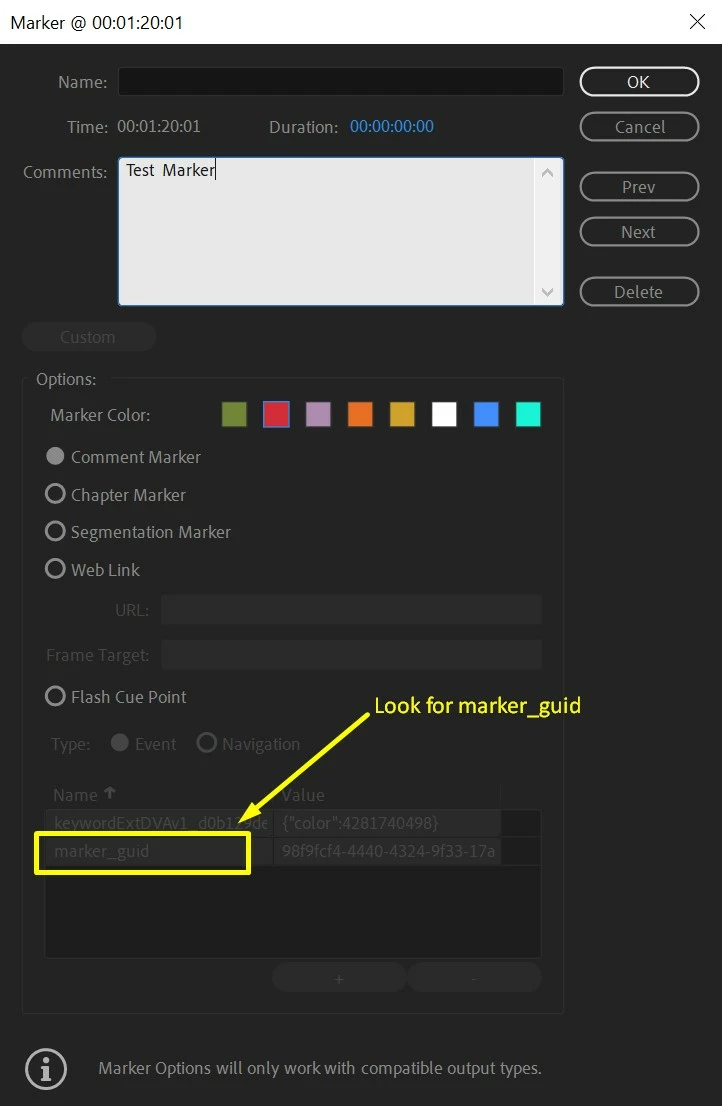


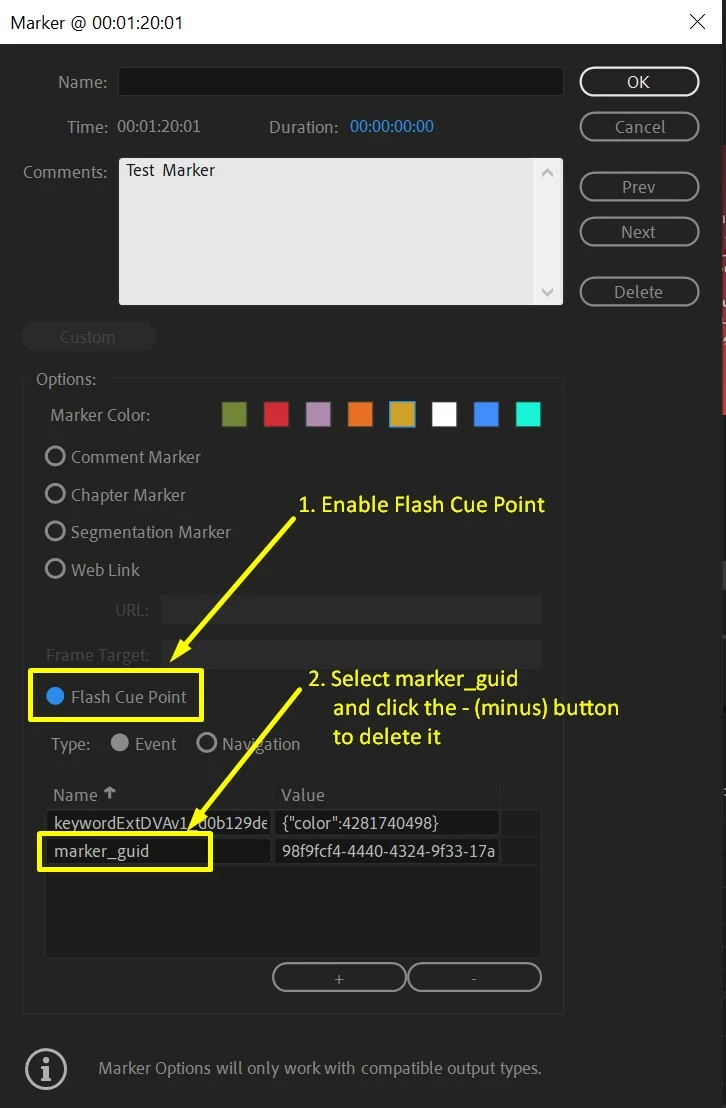
  • Once you find a marker that has marker_guid listed in the Flash Cue Point section, delete that entry.

    To do this enable the option for Flash Cue Point.

    Select marker_guid and click the - (minus) button.


  • Click OK and try to export.

Hope this helps in solving the issue. Let us know if you have any questions.


Thanks,

Sumeet

This topic has been closed for replies.
Correct answer Sumeet Kumar Choubey

Hi donika,


Yes, we are working on getting it sorted as soon as possible.

Thanks for your patience.


Sumeet

27 replies

Participant
July 16, 2023

16/07/2023 ! Still an issue after the latest update - encoder stuck at remaining time 00:00:00:00 this was after removing my titles that seemed to caused an warning " adobe media encoder missing kaushan script regular font" and the file would export but never the full 1 hour file !  When Canon stopped listening we moved to Sony in droves! Well guess what time to look elsewehere for stable software as wasted days trying to fix this.

rachelcenter
Legend
July 17, 2023

Open media encoder, and go to settings or preferences and uncheck “import sequence natively”.  Quit encoder and re open it. Now go back to premiere, hit export and press queue in encoder and it should work.

demi14
Known Participant
September 27, 2022

It's 2022 and I'm having the same problem. I have the latest update. So I guess this is not fixed?

rachelcenter
Legend
September 27, 2022

m1 chip macbook pro / laptop solution: Open media encoder, and go to settings or preferences and uncheck “import sequence natively”.  Quit encoder and re open it. Now go back to premiere, hit export and press queue in encoder and it should work.  sometimes it just sits there a painfully long time then it does its thing

rachelcenter
Legend
May 23, 2022
Inspiring
May 25, 2021

I just discovered this export issue, and I'm using version 15.2!

Deleting all the markers doesn't help.

This must be a new and unrelated bug.

Participant
July 16, 2020

I have this problem with essential graphics on version 14.3. I can't render my projects neither on premiere or encoder.

I'm currently using V_14.0.3 because all the new version have the same problem even though Adobe keeps on telling everyone that the problem is solved in the newest.

Known Participant
July 16, 2020

Reverting to media encoder 14 worked for me. I am some of the lucky people because the newest update does work for me finally. 

Participant
July 29, 2020

Reverting to version 14.0.0 on both Premiere and Encoder solved this same problem for me. I had the latest versions (as of July 28, 2020) and could not encode a simple 30 second video that had no effects, no markers, etc. In troubleshooting the problem, I observed that both new versions took forever to load on my computer - either one took up all available RAM (as identified by Task Manager) for many minutes before finally settling down. From there both versions were very unresponsive. With the 14.0.0 versions both programs took a normal amoiunt of time and RAM to load. I suspect the problem is not with the encoding or the linking but in the programs themselves. I'm sticking with 14.0.0 for now.

Participant
July 8, 2020

No markers, nevertheless no export ... 
Aucune fenêtre de communication ne s'ouvre après avoir cliqué sur exporter->média....
J'adore vos mises à jour Adobe! Aucun avertissement préalable, des bugs partout... Super, la relation client!  :ö(
Franchement peut mieux faire... Et oui, je râle car cela fait juste 1 jour de boulot de perdu et que je ne peux même pas donner une date au client pour la sortie de son média.
Car oui, moi j'essaye d'être proactive et de la garder ma relation client!!!

Community Expert
July 9, 2020

You can set Creative Cloud Desktop to not update automatically:  Settings > Apps > Auto-Update disabled.


What I am about to suggest is not ideal by any means, but could get you a deliverable for your client.


Superimpose an Adjustment Layer in your highest Video Track and extend it for the run time of your edit.  Apply the Invert effect twice (Effects > Video Effects > Channel > Invert) to the Adjustment Layer (the point is to force a render for your entire Sequence with the picture looking the same it would without an Effect applied).  Choose Sequence > Render In to Out.  Wait for the Render.  Copy the resulting Video Preview files to a new folder (leave the originals).  In a Duplicate Sequence, delete the Video, but keep the Audio and then do an Audio Only export.  Assemble the Video Preview files with the audio in a new Project. 


It's insane, I know, but it should get you to something that you can give your client.


Participant
July 9, 2020

Thanks a lot Warren. It's very helpful and ...insane!!! :))
You make my day.

Known Participant
June 29, 2020

Hi, i'm having this issue on my client's mac. They're still on 13.1.5 both PP and AME. 

Trying to Queue and Export Sequences with full length of AE DL Comp avg duration 2 minutes.

Some sequences have markers, some don't. But only Comment markers. Removing these markers are not solving issue.

AME Export never started.


macOS 10.14.6

PP & AME 13.1.5

H.264 Match Source 1080@25p

AME Settings:

  • Import Sequence Natively
  • parallel encoding enabled
  • HW accelerated encoding enabled


Appreciate any feedbacks

Cheers

Matt Peter Waltt
Participating Frequently
June 29, 2020

Hi there, I managed to solve the pb by… updating. So I think your client should update his Adobe softwares AND also his Mac to Catalina (10.15.5) which is the current issue of mac OS X. I couldn't find any other solutions, because Adobe knows the pb now (at last) and they have apparently solved it in the latest updates, which are, to my knoledge, in need of an updated mac environnement… 

Known Participant
July 5, 2020

Hi Matt, thanks for your reply. I will told my client to do so. I hope he has no issue upgrading to Catalina, since his mac got tons of on going projects on other VFX software and that vendor told him not to upgrade yet :))


anyways, thanks again. Glad it got fixed by the next update

Cheers!

Participant
March 2, 2020

This is not working for me.

My video never even had markers.


As a test, I started a brand new project, dragged in my source video file without making any edits, and tried to export at the same bitrate. Nothing. Encoder stuck at 0% while the export time shot up to 4+ hours. It was all working early last week but as of Friday I was having all sorts of issues and this has been pretty frustrating. 

Matt Peter Waltt
Participating Frequently
March 2, 2020

Yes it's quite annoying indeed ! Bugs on exports should never happen, because whatever you do, you get stud and cannot finish your work…

Time_Bas
Participating Frequently
February 28, 2020

Dear Adobe,


Clearly the problem is not markers.

I shall describe what was happening to my project which was stuck at 0%.

The solution was: waiting.


I render long term timelapse projects; which have a lot of 6k sequences underneath the edit.

My project was not rendering; stuck at 0%.

I tried deleting markers, disabling plugings new timelines, etc etc.

Then after all else failed I just tried to add one piece of edit at a time, and see if it would render.

With every piece of edit I added, it got stuck at 0% longer, but in the end it rendered.

So, finally, when my whole edit was complete again, it took almost half an hour stuck at 0% and then it rendered on the fly.


You guys have changed something in the approach of rendering in 2020. I have similar projects from the past that never showed this kind of rendering problems being half an hour at 0%.


So for everyone that seems to get stuck. Try to render some small pieces of your edit from the beginning. When they render, there is a big chance that your whole project will render, but will be stuck at 0% for god knows how long.


Matt Peter Waltt
Participating Frequently
March 2, 2020

Hello everyone, there was a recent update of both Premiere and Encoder, does anyone know if the problem is solved ? 

Participant
March 2, 2020

Hi,


I currently have version 14.0.3 and I'm having the same issue. It took about 10 hours to export a project that is only 2 and a half minutes. I tried downgrading to version 14.0 and I had the same issue. It is not giving me any error, it just takes way too long to export. A week ago I exported a project with similar characteristics and it took about 15 minutes. I hope Adobe fixes this asap. 

Time_Bas
Participating Frequently
February 28, 2020

I updated to 14.0.3, deleted al my markers but on this one project my render is still stuck at 0%

Convergnt
Inspiring
February 28, 2020

Have you also tried disabling hardware acceleration on the render, to rule that out as a problem?


Does it proceed with a software render? 

Matt Peter Waltt
Participating Frequently
February 28, 2020
Why ? The render acceleration won’t work either ?

Mathias Walter
www.mathiaswalter.fr
0607615148