
Inspiring
December 10, 2019
Answered

Glitchy preview on a Macbook Pro 16" in Premiere 2020

  • December 10, 2019
  • 8 replies
  • 3735 views

Hi all,


Just like the AE GPU glitches that were happening Here and here and that were fixed 17.0.1

Premiere 2020 is experiencing the same glitch when zooming in on the program monitor.
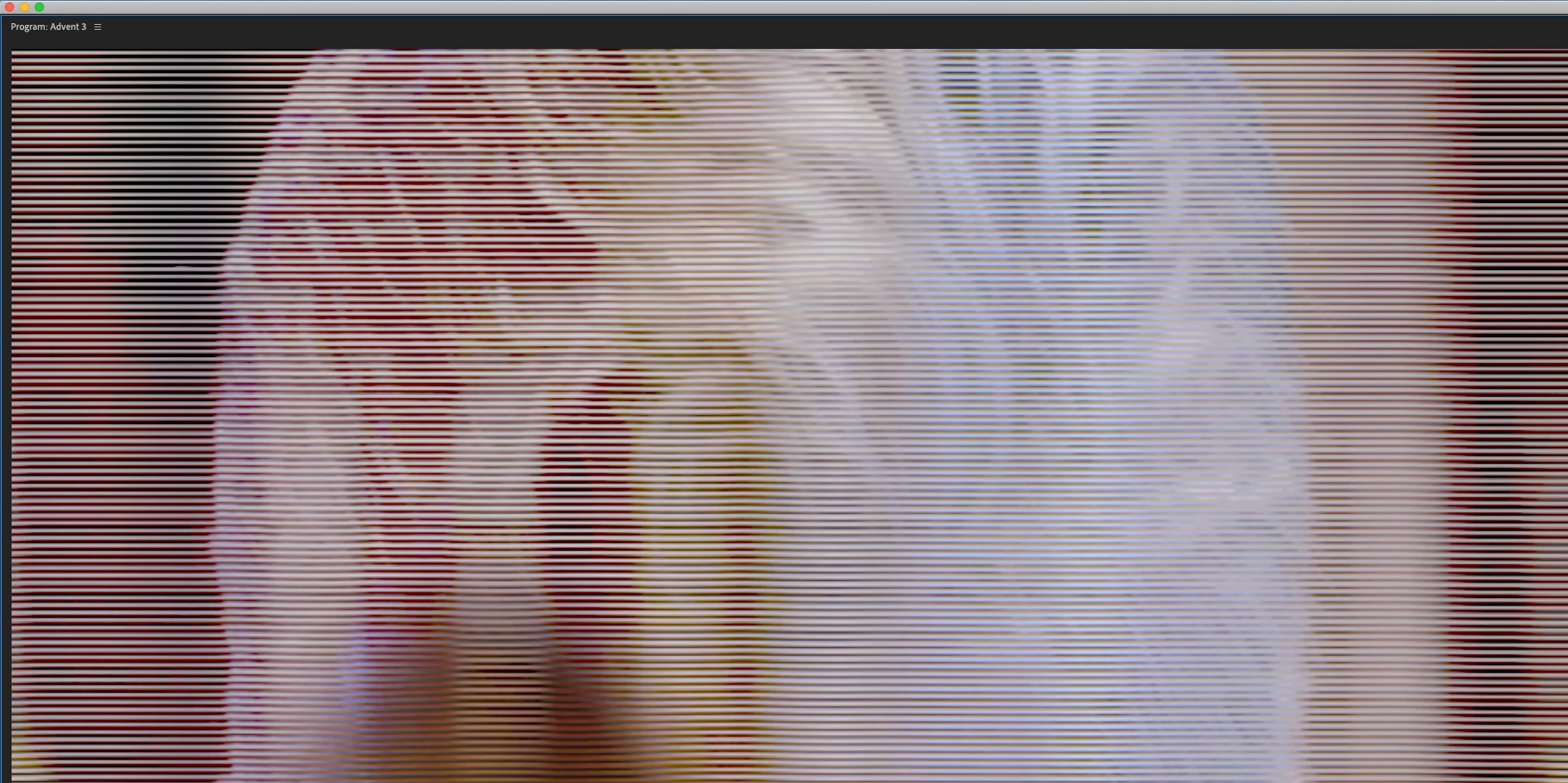


Since this was just fixed for AE I hope a Premiere fix can be made easily. FYI, a temp fix is to disable GPU acceleration in the project settings.


Thanks,

Rog

This topic has been closed for replies.
Correct answer johnm11376824

Looks like the latest Premiere update finally fixed it!

8 replies

johnm11376824AuthorCorrect answer
Inspiring
February 26, 2020

Looks like the latest Premiere update finally fixed it!

Community Expert
February 26, 2020

Great to hear! Is this the new 14.0.3 update?


WM

-------------------------------------------------------------------------JVK | Editor/Designer/Software Instructor. Pr, Ae, Ch, Ps, Ai, Id
Participating Frequently
September 23, 2020

The update has not soolved it.  I am still experincing it.  I have also foudn that my exports play back with glitches in certain situations. I have the PPro 2020 14.4.0 build 38 and am running Catalina 10.15.6 on a 16" MBP

Participating Frequently
February 21, 2020

Same issue. It has rendered Premiere Pro unusable on one of the most common configurations for nearly 2 months. You'd think that the latest MacBook Pro would be a configuration you want to support with your software...


What is going on Adobe, have you totally lost it?

Participant
February 14, 2020

Hey Adobe!

Using this work around of using OPEN CL instead of METAL.


Is there a patch coming soon tho? This glitch is really rough for:

1) the crop tool

2) zooming in you program panel

3) scaling up footage


I'm experiencing this issue in both AE & Premiere since I've gotten my 16in macbook pro. 


Please help us with a patch! 😞

Participant
February 9, 2020

Got the same problem! Hope this is resolved soon, been waiting months already. Adobe dynamic link also doesn't work for me.

Participant
February 10, 2020
the band-aid solution right now is to switch your renderer in the project
settings to Open CL instead of Metal
Community Expert
January 29, 2020

Hi all--

Apple just released a new Catalina update (10.15.3). Does someone with the 16" MBP want to upgrade and see if there's a GPU fix for this issue?


WM

-------------------------------------------------------------------------JVK | Editor/Designer/Software Instructor. Pr, Ae, Ch, Ps, Ai, Id
Participant
February 4, 2020

Just updated my MBP 16" to 10.15.3 and nothing, it is still doing it.


***UPDATE*** changing the GPU acceleration (METAL) back to OPEN CL (Deprecated) In the project settings and it works fine. I am able to zoom in and out of my program monitor without glitching. Which is fine even when rendering I switch it to OPEN CL, METAL just really sucks right now it's slower and useless. 

Participating Frequently
February 4, 2020
My is also the same as it was.
Participant
January 23, 2020

Like the others, I'm on a 16" MacBook Pro.  The issue is easily reproducible when I zoom in on the canvas (Fit and 10% are ok, but at 4K 25% overflows the Preview window and the image scrambles into the lines).  Also an example is the Crop effect, I can crop one side, two sides, but when I bring in a third or sometimes the fourth edge, it scambles again.

nikom335787
Participant
January 23, 2020

Exactly the same for me...it's a bit embarassing...

vaneickelen
Participating Frequently
December 14, 2019

Hello, ive got my MBP 16 and im currently experiencing the same glitch.

Premiere Pro 2020 Version 14.0.0

Kartika Rawat
Community Manager
Community Manager
December 16, 2019

Hi Sebastian!

Thank you for updating us. This issue is under investigation by our engineering team. 

Let us know if you have any other questions.


Best,

Kartika


Participant
January 14, 2020

Hi, have you got a solution yet?


I hope so... it's been nearly a month since this was first reported. Suffering with clients by my side. NOT COOL.

Kartika Rawat
Community Manager
Community Manager
December 11, 2019

Hi Rog,


Thank you for keeping us updated! We'll get the issue tested at our end. We need to check if the issue is reproducible.

Is there anything else you'd like to mention? Like if it happens with a specific media files or projects.


Let us know.


Thanks,

Kartika


Participating Frequently
January 21, 2020

I have the same issue too v14.0.1 and top spec 16" MBP :