oliverh63763482
Inspiring
June 30, 2020
Answered

Hardware encoding not working on premiere pro 14.3 (Seriously.)

  • June 30, 2020
  • 2 replies
  • 4618 views

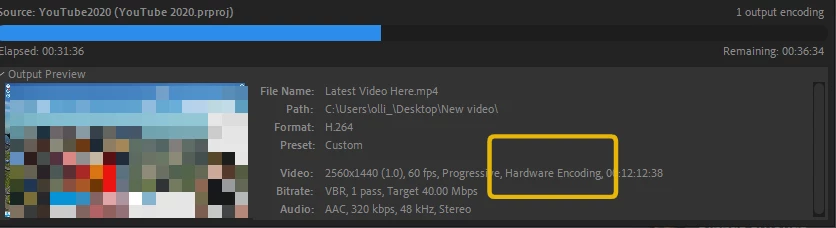
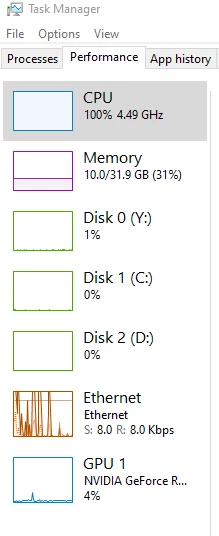
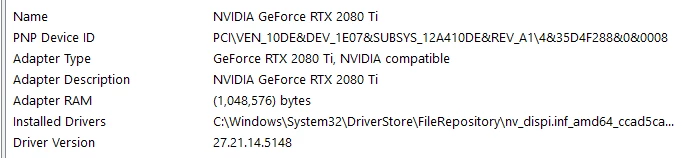
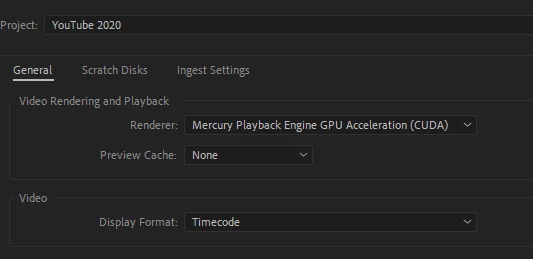
Hardware encoding is not working on premiere pro 14.3. Despite having a 2080ti and Hardware Encoding enabled, whilst rendering my task manager shows using 100% CPU and 4% GPU and the rendering time is massively extended. 


A 10 minute video, which used to encode at almost realtime is now taking over an hour. 

I moved to Davichi Resolve whilst the OBS import bug was making things painful and I've come back to 14.3 only to find premiere is actually getting worse. 


I know there's a lot of posts with issues so I'll post screenshots showing that I have ticked all those boxes and that (I don't think) missing anything. 

Like I said above, this encode (same raw files edited rendering) used to be almost real time and now its taking over an hour. Something must be wrong, surely. 


Tried new projects/sequences and I'm using all the lastest drivers and updates - checked before posting this.
 

This topic has been closed for replies.
Correct answer oliverh63763482

To follow up on this a third time, I've tried installing the BETA software from CC and the render results are much more what I would expect. And watching task manager, it's now using the GPU which is great! 


I'm not sure if its an install error on the original PP but it was a new install when I installed it last week.


For now, beta version for me! (Hopefully its stable)


2 replies

Averdahl
Community Expert
Community Expert
June 30, 2020

Start with downgrading the graphic driver from 451.48 to 442.92 Studio Driver since the latest driver has many issues with Premiere Pro. Link is here: Nvidia Studio Driver 442.92


When installing, do a Clean install of the drivers. (important)

1. Launch the installer

2. Click Next until you come to the Options section

3. Chose Custom (Advanced) and click next

4. Check the Perform a clean installation

5. Click Next and install the drivers

Legend
June 30, 2020

That's not the OP's problem. The image is pixelated out on purpose in the above screenshot. The OP has performance issues, not image issues, to begin with.


And the reason for the DaVinci Resolve performance being "artificially" fast is simple. The free version does not make full use of anything higher than a budget 4-thread CPU to begin with. What's more, the free version of DaVinci Resolve has had some of its quality features nerfed, especially in recent versions (that is, one would need to purchase the full, paid version in order to even get many of the features that were formerly in the previous free versions). And one would definitely need to purchase the full, paid version just to make use of more than about 8 threads on the CPU.

Averdahl
Community Expert
Community Expert
June 30, 2020

That's not the OP's problem. The image is pixelated out on purpose in the above screenshot. The OP has performance issues, not image issues, to begin with.


I do get that the image is pixeled out by purpose. But fact is that people has issues with the latest driver that the OP uses and it is at least worth trying to downgrade from a bad driver to a good driver. It may help a tad, it may not help at all. I do not expect the GPU to use 100% all of a sudden but i do have seen even wierder issues being better performance wise by using older, or newer drivers.

Legend
June 30, 2020

Your expectations are way too optimistic. The RTX 2080 Ti really needs an astronomically expensive ultra-high-end CPU just for the performance to be balanced. It sounds like you tried to compensate for a relatively weak CPU with a monster GPU. Well, it just does not work well or at all that way. Video editing programs, especially Premiere Pro, really need the relative performance of both the CPU and the GPU to be close to one another.


And who in the right mind would want to pair a CPU that has no more than 4 total threads with such a monster GPU?


By the way, although it sounds like what I described above, I cannot be certain of that until you tell us the exact CPU you're using in that PC.

oliverh63763482
Inspiring
July 1, 2020

I'm running a 7700k which has 8 threads. It's not a 'relatively weak CPU' as you mentioned. 

If you read the post, I mentioned that I used to get next to real-time renders (WITH THIS PC) which isnt the case anymore.

I've been editing videos on this machine for a few years. 


Thanks,