
christopherB10720062
Participant
July 10, 2015
Answered

Heads up on Premiere with El Capitan

  • July 10, 2015
  • 22 replies
  • 47651 views

I know it's probably a dumb thing to do, but I'm a rather technical dude -- and I do have my system backed up. But anyway, I installed Mac OS 10.11 El Capitan Public Beta 1 on my MacBook Pro.

Everything seems to be working fine, except for Premiere. When video is STOPPED it has horrible video glitching. Now, when the video is playing, it looks just fine... and it also renders out OK. It's just when it's sitting on the timeline.

I wanted to give everyone a heads up in case they're thinking about installing the beta. Remember, you have been warned.

Any way - here's a screen shot of what it looks like. Maybe someone knows a fix?
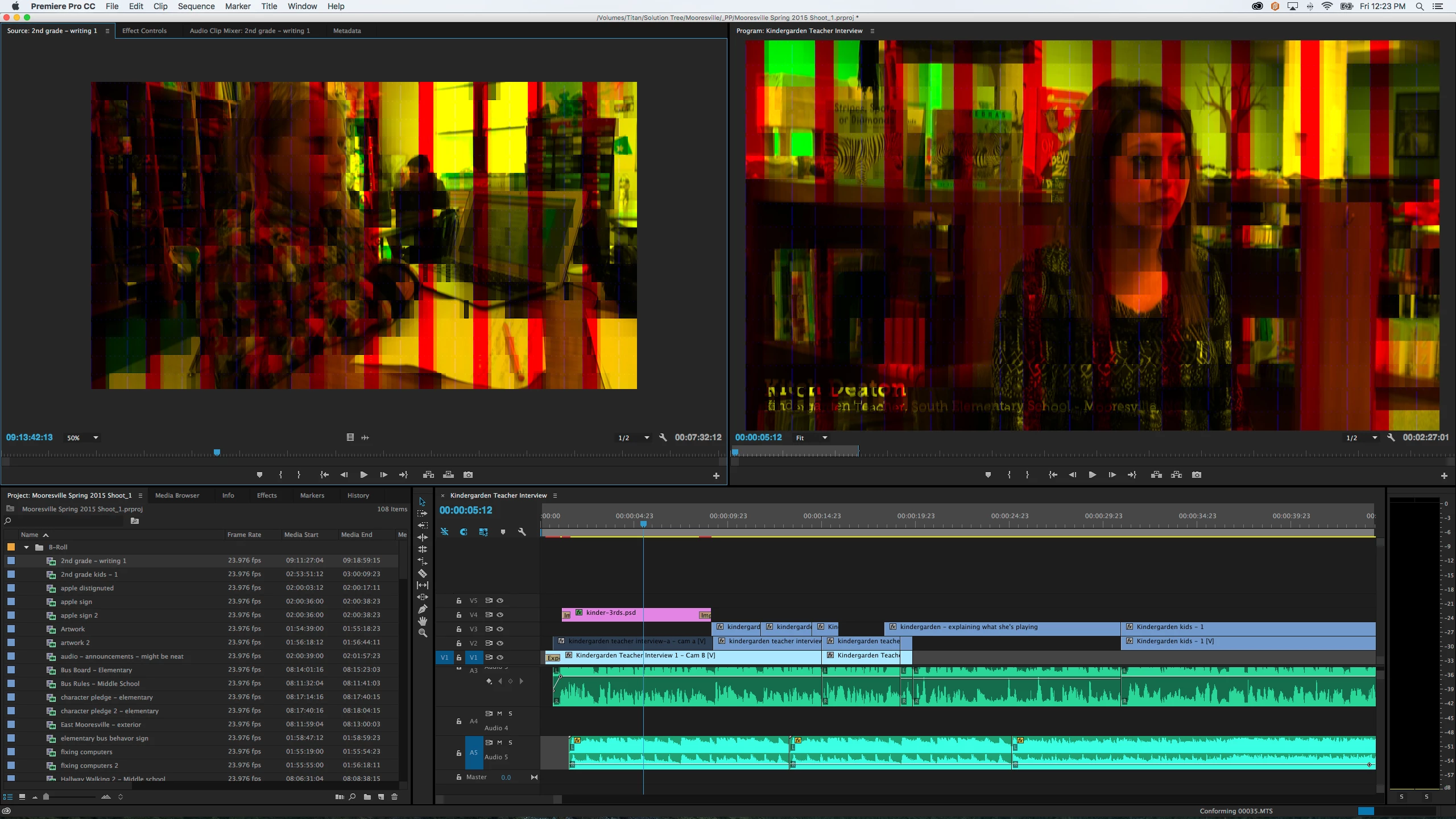
    This topic has been closed for replies.
    Correct answer Kevin J. Monahan Jr.

    The solution for this issue is to update to OS X 10.11.1

    Thanks,
    Kevin

    22 replies

    Known Participant
    October 21, 2015

    BTW : The latest update of El Capitan 10.11.1  shows "Nvidia Web Driver 346.03.02f02 not compatible" meaning in the Nvidia Driver Manager (for those of you who have it installed) the OS X Nvidia Default Graphic Driver is automatically selected and can not be changed for now

    Participating Frequently
    October 21, 2015

    Looks like we're almost up and running again with the El Capitan 10.11.1 update that rolled out today. The previews display like normal with OpenGL, however, I'm still only able to go full screen once before it starts acting buggy.

    Participant
    October 21, 2015

    I installed the update (10.11.1) and opened a project with OpenCL rendering enabled and can't repeat the problem.  Like others, I had to turn OpenCL off to avoid the yellow/red stripe overlay glitch. 

    I'm curious if you're still having the problem or if "starts acting buggy" means something else?  When you say that you went full screen, are you talking about hitting the Tilda key when the Program Monitor is active?

    I'm happy to say that I can't duplicate the issue by going full screen using Tilda from the program monitor, or changing the program monitor resolution.  For now, the issue seems to resolved.

    Participating Frequently
    October 21, 2015

    I thought the yellow/red stripe was gone with OpenCL, however, I just noticed some weird stripes overlaid on a Red Giant Transition I used so I'll continue sticking to the Software only render.

    I hit Control+Tilde key to make the video full screen but it would only allow me to do it once. If I tried it again, it wouldn't work and, subsequently, the playback would become laggy and I'd eventually get the spinning pinwheel (of death). Essentially, I'd have to restart the program.

    Participant
    October 13, 2015

    Ok.. so I didn't jump on the El Capitan upgrade ship... but now my machine is having a major RAM leak.  I was talking to an adobe tech via twitter and he threw me in here.  Not entirely sure why.  It effects both media encoder and Premier Pro during exports.  I have tightened the amount of RAM allocated to the Adobe App family, and I have changed to the renderer to "Mercury Playback Engine software only" which is so very slow.  Crippling for my normal workflow. 

    I am running version Premier Pro 9.0.2 (6) Build,

    on a 27" late 2012 iMac with 3.4 Intel i7, 32 gb 1600 Mhz DDR3, NVIDIA GeForce GTX 680MX 2048 MB


    Please help!

    Participant
    October 13, 2015

    I was having the same issues on the late 2013 iMac. It ended up being a graphics card issue and was had to be repaired by Apple. I'd suggest checking out with their tech support.

    JonG1993
    Participant
    October 6, 2015

    I just updated to mercury playback engine software only and it did the trick, had to render everything, but at least it works again, so far...

    wish I could uninstall el capitan though, I reverted to a backup before the update but it wouldn't uninstall it, annoying

    j_41
    Participant
    October 6, 2015

    Is anyone having an issue when toggling to full screen? I had the bars before while paused, fixed it by changing to "Mercury Playback Engine software only" but i can only toggle to full screen once. After, Premiere won't toggle back to full screen and i'll get the frisbee before premiere crashes.

    Participant
    October 7, 2015

    Yes. When I toggle to full screen (holding control, clicking `), Full Screen will work only once (and there's a short pause before it finally goes to full screen).

    Ever subsequent time I hold CONTROL and click ` to toggle to full screen, it freezes the picture and allows audio to continue. It's not until I hold CONTROL and click ' again that the picture resumes as normal.

    It's almost as if the computer thinks full screen is going (which is why it freezes the picture, but allows audio).

    Anyone know a work-around to this? Should I uninstall Premiere and Re-Install it...?

    I updated to El Capitan today. Running latest version of CC

    MacBook Pro (Retina, 15-inch, Late 2013)

    2 GHz Intel Core i7

    8 GB 1600 MHz DDR3

    Intel Iris Pro 1536 MB

    Uxomi
    Participant
    October 6, 2015

    I fixed this by installing the updated Nvidia driver here: NVIDIA DRIVERS Quadro & GeForce Mac OS X Driver Release 346.03.02

    This installed the Nvidia Driver Manager, a new program I hadn't had before, which gives you the option to keep your drivers updated directly from Nvidia's servers as opposed to the flawed Cuda Driver Panel. Hope this helps!

    October 1, 2015

    Hi guys,

    Had exactly the same problem with El Capitan and NVIDIA 650M - as described swapping to Mercury Software Rendered does fix - but the render times are a bit slower. However, I went to NVIDA, downloaded the latest CUDA driver, restored Premiere, went to PROJECT SETTINGS and the CUDA option appeared (was not there previously.) Swapped over the the CUDA Playback and it was all fixed.

    Just to note that the previous version of CUDA I had installed on my Macbook told me there were no driver updates inside the CUDA system pref pane. Had to physically go to the website to get the latest version.

    Cheers,

    Dave

    Participating Frequently
    October 1, 2015

    I'm kicking myself for upgrading to El Capitan today without backing up beforehand. I found that Premiere didn't jibe well in exporting still images in my timeline, as they would look the same way they did in the preview monitor, all weird and glitchy-like. My workaround has been to use "Replace with After Effects composition" on the still image.

    Participant
    September 30, 2015

    Now is ready the official version of El Capitan OS X.. please update the post with news.. I have the Yosemite OS X and I work everyday with Adobe.. I don't know if do upgrade or not.

    Kevin J. Monahan Jr.
    Community Manager
    Community Manager
    September 30, 2015

    Hi Hippy,

    Now is ready the official version of El Capitan OS X.. please update the post with news.. I have the Yosemite OS X and I work everyday with Adobe.. I don't know if do upgrade or not.

    Stay tuned to the team blog: Product Focus | Premiere Pro work area

    As a fellow video editor, it's always best to avoid updating your OS in the middle of any project. If you are at a good point in time to update, I'd still hold off for news.

    Thanks,
    Kevin

    Kevin Monahan - Sr. Community and Engagement Strategist – Adobe Pro Video and Audio
    Community Expert
    September 30, 2015

    Any news on this subject? I do too have this problem. And it is running using Mercury...

    Kevin J. Monahan Jr.
    Community Manager
    Community Manager
    September 30, 2015

    Hi Matthijs,

    Any news on this subject? I do too have this problem. And it is running using Mercury...

    None yet. I would actually hold off from what we've seen from the beta version. We'll release some news soon on the team blog: Product Focus | Premiere Pro work area

    Thanks,

    Kevin

    Kevin Monahan - Sr. Community and Engagement Strategist – Adobe Pro Video and Audio
    TroutmaskBen
    Participant
    September 30, 2015

    Hey Kevin,

    I tried the El Capitan release version and I have the same problem with Premiere. Should I go back to Yosemite then? It will only take a few hours to revert.