New Participant
June 16, 2017
Answered

How I make the Right Click Menu display completely?

  • June 16, 2017
  • 15 replies
  • 22819 views

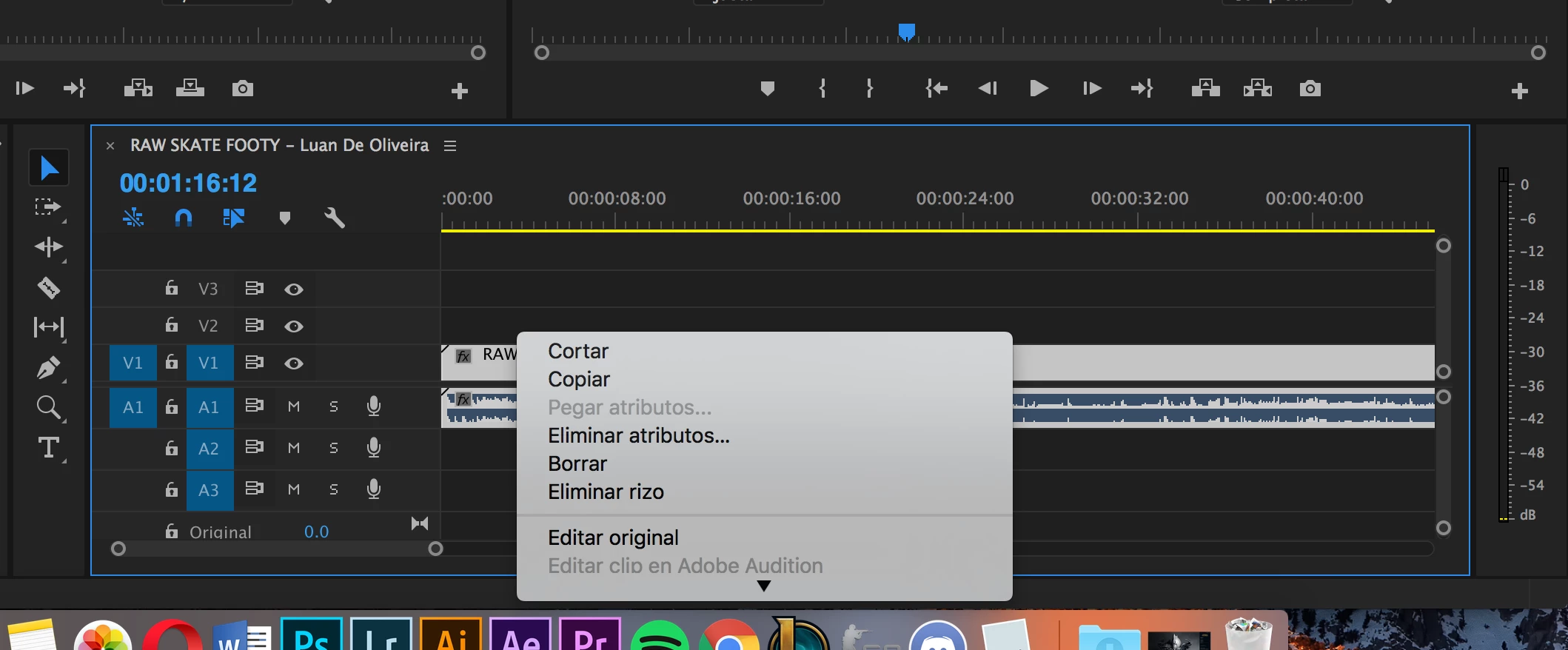
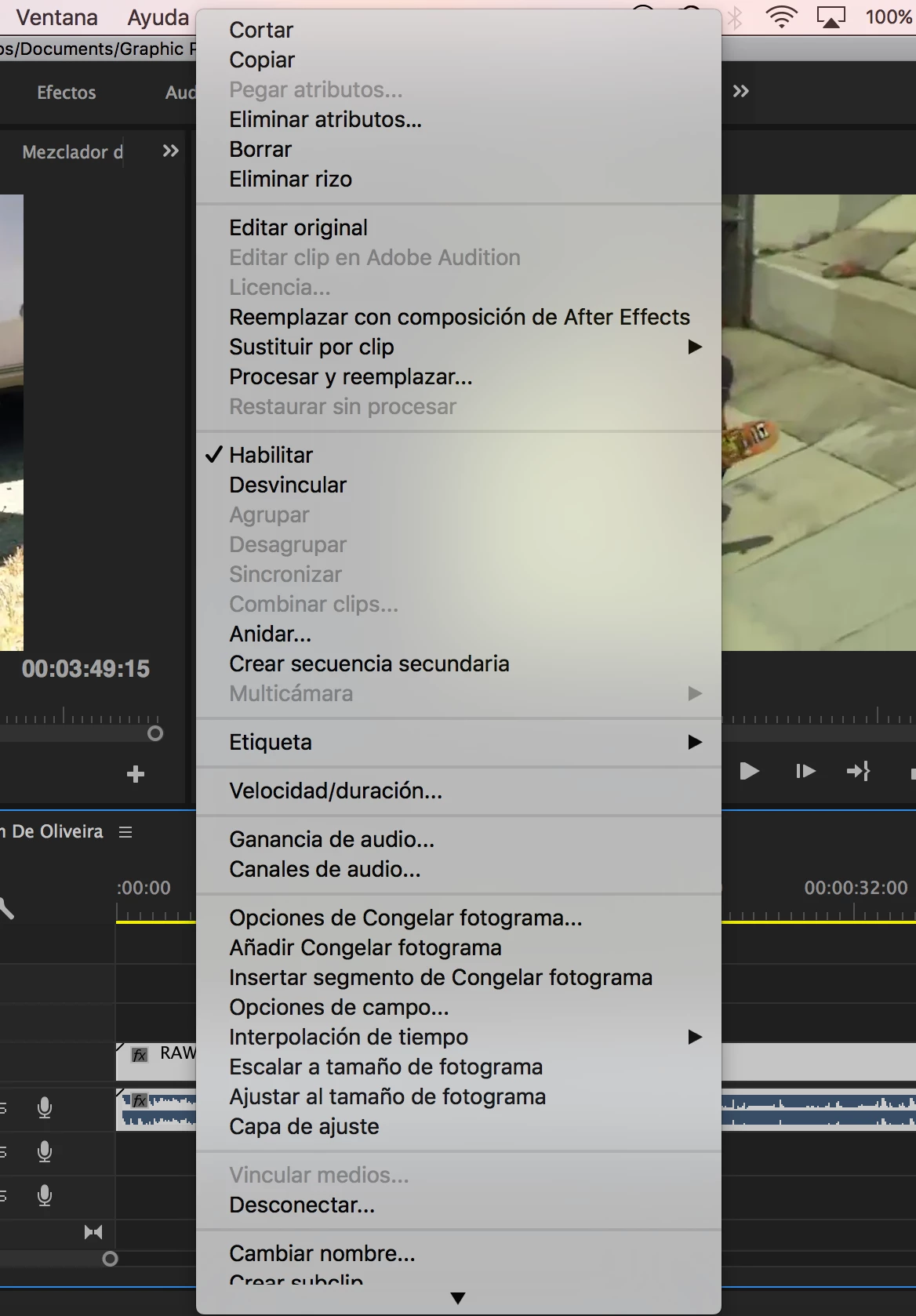
I know it's a silly one but I'm working on Premiere and sometimes I use that menu. It opens downwards from where I click and since I click it only when I'm on the bottom of the screen, the menu only shows some options and an arrow down to display the rest. What I want to do is to make the menu open using all the screen it needs in order to show every option. I know that's possible, I mean every other app does that.

If it wasn't clear enough I leave some photos. (ignore the language).

This is how it opens:
And this is how I want to open directly without me having to scroll down:
Correct answer Vincenzo Gatt28681377kexz

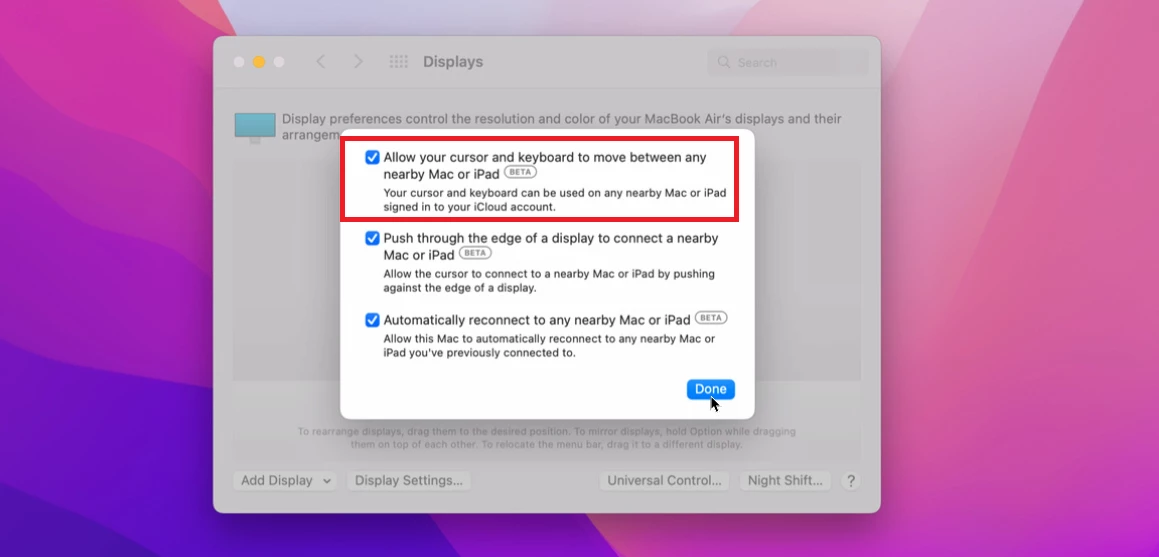
I have solved the problem simply disabling to screen menu the option to move the mouse on a near mac.
When this option are enabled i have a partial right menu' in many application Adobe or other  

15 replies

Participating Frequently
November 19, 2025

I have the same problem, I have tried EVERY tip in this thread and none of them work.


I'm on a M2 MacbookPro. This is obviously something Adobe has to fix.

New Participant
August 20, 2025

I find a sollution.

IN ACCESSIBILITY/TEXT/MENU BAR SIZE click on LARGE, (

DEFAULT is default 🙂


New Participant
October 19, 2024

I see that if you work on full screen (when the dock ain't visible), then the entire list of option will show-up at once. Hope this works for you. 

Kombi Life
Inspiring
March 7, 2024

Whilst this has been marked as resolved for a Mac on Windows it is still an issue and has been for the past few releases. 

WORKAROUND
On a Mac I can just use the scroll wheel on the mouse to quickly open the hidden menu features. 
On a Windows machine, I find pressing the UP Arrow once opens the bottom times that are hidden 'Reveal in Project' etc.
hope that helps someone

pedrog85622442
New Participant
April 22, 2025

Thank you! That simple workaround, opening the menu and then scrolling the mouse, shows up the whole menu quickly. That helps a lot!!

New Participant
December 13, 2022

I've recently transfered to mac from windows and facing the same problem. In fact the size of the bar depends on how far is the selectable object to the bottom of the screen. It opens TO the bottom, but not FROM the top. And of course the resolution has nothing to do with this.


It seems like a problem which is not fixable, right? Or has anyone found a solution?

kenanc70890913
New Participant
December 30, 2022

The problem is that the contextual right-click menu drops down until the Dock. I moved my Dock to the right side of the screen and adjusted the Display setting to "More Space", and I never see the smaller menu. I think the logic behind is that the menu you open up by right clicking has to start from the point of the cursor and drop down until the dock. 

New Participant
March 2, 2023

I have solved the problem simply disabling to screen menu the option to move the mouse on a near mac.
When this option are enabled i have a partial right menu' in many application Adobe or other  

Joost van der Hoeven
Community Expert
Community Expert
November 22, 2022

The minimum resolution for Premiere Pro is 1920 x 1080, make sure you set your screen to this resolution. More info
The 14" M1 Mac Book Pro's default resolution is 1512 x 982 (even though the native resolution is 3024x1964.) So you'd need to change the default resolution to use the Premiere Pro interface optimally, or attach a second screen.

Note: Discussions is a user to user forum where we users help each other. The Adobe engeneers do not always read everything here. If you feel strongly about a (bug) fix or a (new) feature /idea please post it as such. This keeps the discusions here to the point.

More info: filing bug report or a feature request 

New Participant
July 24, 2022

14" M1 Pro MacBook Pro here having the exact same issue and it's absolutely messed up my work flow. If anyone with the same model/display/res has a solution I'm all ears. This sucks 😕😕

Colton Bachar
New Participant
November 22, 2022

I am also having this exact same "right-click menu" issue with M1 max macbook pro.


Super frustrating Adobe! Workflow is key and it takes a lot of extra time to scroll after every right click instead of the menu just fitting to the screen!

pwmiller
Participating Frequently
July 5, 2022

I discovered when you put premiere in full screen mode on a mac, right clicking a clip shows the entire menu.

New Participant
July 24, 2022

Seems like the full screen trick does not work on my 2022 14" Macbrook Pro. 

New Participant
March 7, 2022

It's 100% a bug and its a real issue - wastes a lot of time. Check this out:
(All with my menu hiding @shezad5FAD  - the 2 examples are at almost the exact height position in the screen/ platform)
Contextual menu on a bin/ folder - it's fine:

Contextual menu on a file:


New Participant
September 21, 2021

I HAVE FOUND A WORKAROUND 

It's s to do with the dock options on macbook

you just need to turn the hiding (on) in the the dock preference and then maximise the premier pro window thats it...

Richard van den Boogaard
Community Expert
Community Expert
September 21, 2021

As I don't have a mac, I don't know if this is the right solution. Hopefully those before you in this thread will confirm it as a working solution.

nickb2175248
New Participant
September 24, 2021

I think this just solved his specific case because of the monitor size he was working on. Still having the same issue. Seems like the line-height on the right click menu could be a lot more truncated in order to fit everything in. Anyone know any scripts or areas to condense context menu line height?