Wallison1
Participant
Jun 19, 2020 2:54 PM UTC
Answered

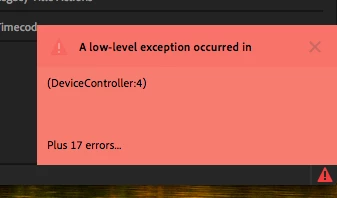
How to fix "a low level exception occurred in: DeviceController:4"

Last night I upgraded the Premiere for the last version and this message started to happen when I tried to edit a video. 

"A low level exception occurred in: DeviceController:4"


The screeshoot below shows the error
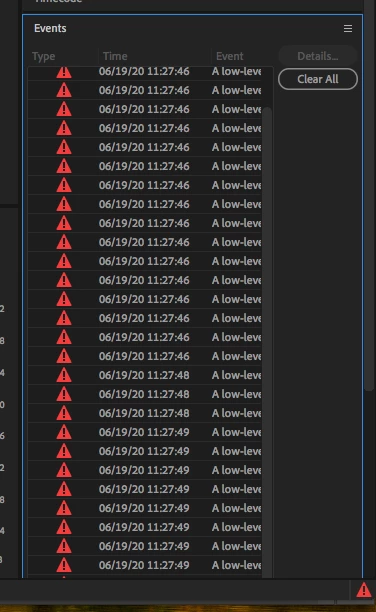
 

Now I can't add titles or do many things.


Tried some things like this and didn't work. 

https://community.adobe.com/t5/premiere-pro/how-to-fix-quot-a-low-level-exception-occurred-in-h-264-exporter-4-quot-please/m-p/11148457#M272520


Can somebody help me?

This topic is closed to new replies. Start a new post to keep the conversation going.
Mitch W
Mitch WCorrect answer
Participating Frequently
Oct 7, 2020 4:40 PM UTC

The issue only occurs in 10.13.6 and happens anytime the preferences are touched. It's irratating, but otherwise harmless. Update the Mac OS to resolve.

67 replies

Participant
Mar 6, 2021 2:12 AM UTC

Hi !

I have the same problem, kind of every time I'm doing something, and it's shutting down my computer. 

and right now specially when I want to render or export my files.... 


I have update my Mac computer as you said but the problem still occurs.

I also changed the settings to "none" on the device controller. 
same ... 


please help me, I need to give the project to my clients ... 


thank you 

Translate
Participant
Jul 27, 2021 6:54 PM UTC

Since I reset my preferences in Premiere Pro I get this error message. Using Premiere 14.4 and thingking of rolling back to 14.3 will I be able to open 14.4 files?

Translate
Participant
Jan 9, 2021 3:54 PM UTC

Tive o mesmo problema / suspresa.

Acho péssimo não conseguir exportar um vídeo por causa da versão do Sistema Operacional.

Meu Mac não atualiza mais e é um absurdo que eu ter de comprar outro com o Sistema atualizado por causa de um erro de Software. Sem contar que agora na pandemia, está tudo mais caro.

Uma solução que encontrei foi usar este atalho no canto superior direito (ícone com a seta para cima) para fazer uma "Exportação Rápida"


Translate
Participant
Jan 9, 2021 3:53 PM UTC

Tive o mesmo problema/suspresa.

Acho péssimo não conseguir exportar um video por causa da versão do Sistema Operacional.

Meu Mac não atualiza mais e é um absurdo eu ter de comprar outro com o Sistema atualizado por causa de um erro de Software. Sem contar que agora na Pandemia, está tudo mais caro.

Uma solução que encontrei foi usar este atalho no canto superior direito (ícone com a seta para cima) para fazer uma "Exportação Rápida"


Translate
jamieroko
Participant
Dec 3, 2020 8:22 AM UTC

I am getting the exact problem on my PC.  How can go back to an older version of Premiere.  I literlly can't do anyting, and it comes up every 2 minutes.  Adobe contact email jamieroko@yahoo.com

Translate
Mitch W
Participating Frequently
Dec 4, 2020 12:14 AM UTC

@jamieroko

Sending you a personal message to help try to get to the bottom of the issue.


~ Mitch

Translate
Participant
Dec 6, 2020 3:11 PM UTC

I've been having the same problem. I'm trying to troubleshoot with the advice given here but everytime I select None on Device, it returns to the $$$ choice whenever I check again.


Can't really finish any work with this since I am unable to import material. I've tried upgrading my Mac OS to Mojave (since that's the latest my Mac Book Pro can upgrade to I think) but no dice.


Really need some help here.

Translate
Mitch W
Mitch WCorrect answer
Participating Frequently
Oct 7, 2020 4:40 PM UTC

The issue only occurs in 10.13.6 and happens anytime the preferences are touched. It's irratating, but otherwise harmless. Update the Mac OS to resolve.

Translate
Inspiring
Oct 9, 2020 3:18 PM UTC

Hello Mitch,


Can you test this please before you release this version !!!
And please inform your paying customers about this error in good time !!!


Greetings Ralf

Translate
Participant
Sep 6, 2020 3:36 AM UTC

I was having the same issue. But this is what I did and looks like it worked!

Go to > Premiere Pro > Preferences > Device Control > Devices > None 

Then press OK

Translate
Participant
Sep 3, 2020 1:35 AM UTC

Hi, Wallison - when you say " Just found out that is Gráficos HD Intel® 3000. ", can you clarify for a newbie what it is you mean? I'm having a similar error message but mine ends in "device controller" instead of "device 4".

Translate
brendan42069333
Participating Frequently
Aug 31, 2020 8:00 PM UTC

This worked for me a few weeks ago on a late 2013 iMac, running OSX 10.13.6 and Premiere 14.3 (I forget the build number; have updated since). 


Go to PREFERENCES > DEVICE CONTROL > then select NONE from the dropdown and click OK. Save your project again and re-open it. 

The error messages went away, however when I go back now on 14.3.2, it has reselected the option $$$/MediaCore/DeviceControl/DeviceControlFirewire/DVHDV_DeviceControl=DV/HDV Device Control. But again, I have updated Pr to 14.3.2 (Build 42) since and haven't seen this error yet. 


Haven't had any issues on my 2019 iMac, running OSX 10.15.6 with Premiere 14.3.2 (Build 42). 


This error message never really prevented me from doing anything though. I work with AE comps (titles, 2D animation), footage (fx: Lumetri color, speed ramping; blend modes), audio (fx: Tube Modelled Compressor, Multiband Compressor; volume automation)... no issues aside from the error message. 

Translate
Inspiring
Aug 8, 2020 2:43 PM UTC

I have the same Issue and more!

Hello,

I have the following view under Project Settings - General and not the selection DV / HDV!

How can that be?

Device control is not available!

Under File - Record - Settings - Edit, Premiere Pro immediately crashes with a fatal error!

Under File - Record - Recordsettings from Windowmenu, Premiere Pro immediately crashes with a fatal error!

Under File - Recording - Settings - Device Control "none" is selected and in the white window above there is no HDV or DV, as it was in the previous versions! Older versions of Premiere Pro are working well so far.
This version also works on another iMac under OS 10.14 Mojave, at least without
these errors!

Under Preferences - Device control "None" cannot be saved, "DV / HDV device control“ always appears!
And
all older versions of Premiere Pro have now adopted this behavior !!!

And don't forget the error "a low level exception occurred in: DeviceController:"!


iMacPro - OS 10.13.6 - PrPro 14.3.1

Greetings from Germany

R. Stephan

Translate
Participant
Jul 19, 2020 3:49 AM UTC

I have this problem when did this happened to you?? I am really worry


Translate
Participant
Jul 22, 2020 2:59 AM UTC

Hi!

It happened after last update.

Thanks! 
J


Translate
Inspiring
Jul 22, 2020 3:08 AM UTC

Is there any solution to this.  This is BS.  

Translate