


Answered
lens distortion zooms in
I have a Fisheye footage. I want to use the effect "lens distortion" with a value of -33.
It works fine so far, but it zooms in a lot (i think more than 20%)
Is there a way to prevent the zoom in?

I have a Fisheye footage. I want to use the effect "lens distortion" with a value of -33.
It works fine so far, but it zooms in a lot (i think more than 20%)
Is there a way to prevent the zoom in?
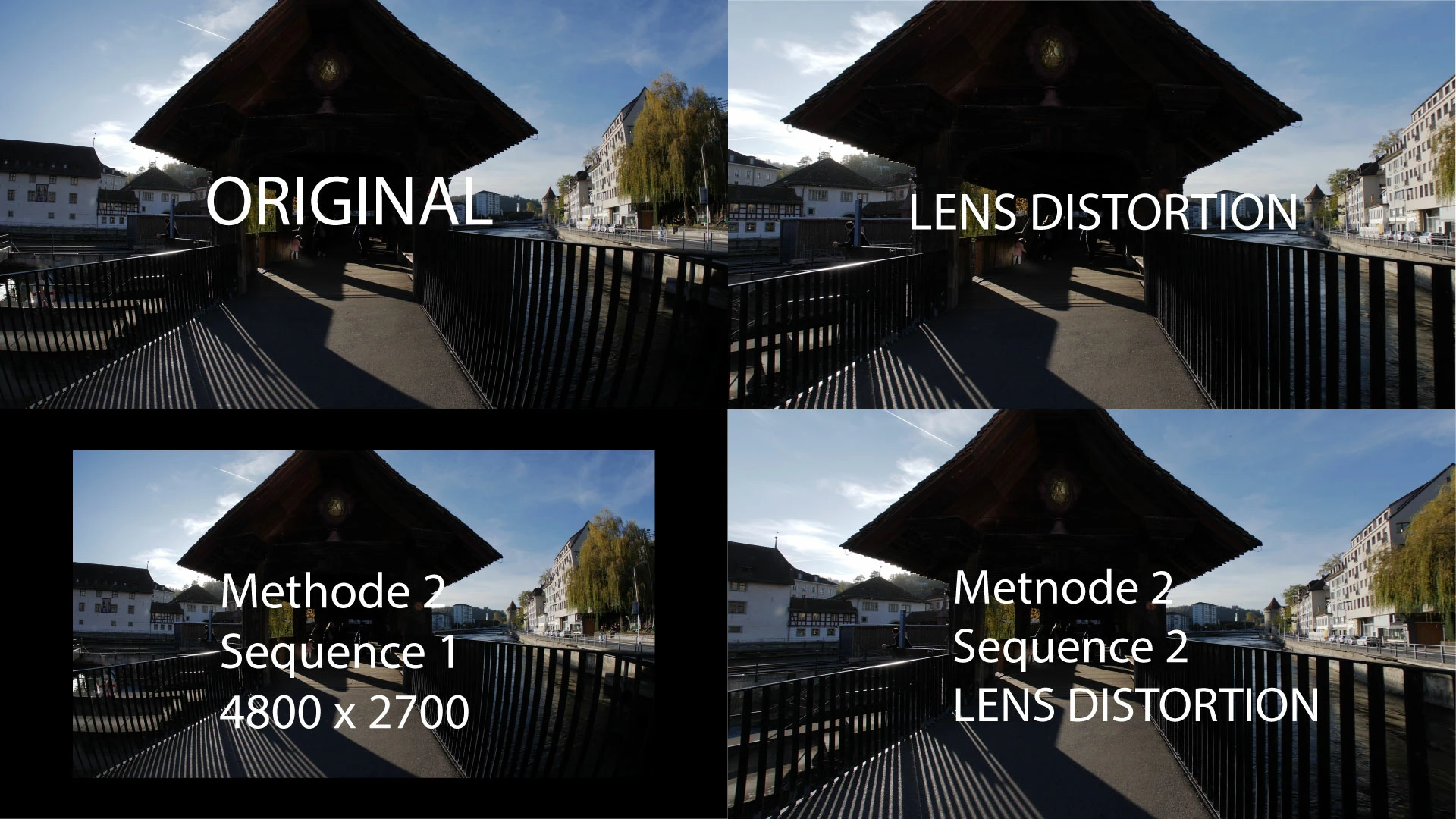
No, it zooms more in than neccessary.
In the first picture you see the original 4k footage.
The secend picture (top right) is with the Lens Distortion filter. It cros in a lot.
I found a method. First i create a bigger sequence with the original footage. (bottom left)
Then i import this sequence into another sequence. I then apply the Lens Distortion filter and set the scaling down to about 80%.
You see, there is a huge difference in cropping. It's sad that the Lens Distortion plugin don't allow to prevent cropping.
Already have an account? Login
Enter your E-mail address. We'll send you an e-mail with instructions to reset your password.
 AdChoices