


Participant
June 13, 2022
Answered

Opacity Problem?

  • June 13, 2022
  • 1 reply
  • 1867 views

Hi all,

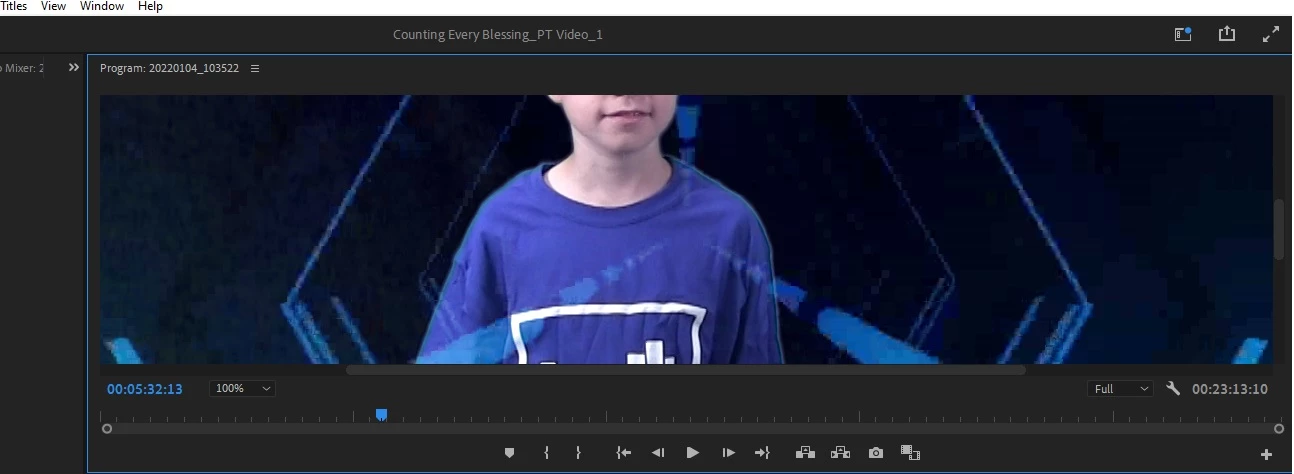
I just added a new clip to my green screen project and when I use the key frame, it's making the entire clip look like it's at 50% opacity. (see photo) You can see the background video through the actor. Everything is set to 100% opacity. I tested it on a separate clip in the same project and that one is working like it should be. They were both filmed in front of the same green screen. I'm not sure why this new clip is giving me an issue? Is it the opacity? What other settings can I look at on this clip to fix this?
FYI: I have tried rebooting and that didn't work.
This topic has been closed for replies.
Correct answer Phillip Harvey

The first thing I would look at is how clean your key is. You may have opacity at 100%, but if the key isn't super clean (gray values in the alpha view) then you'll essentially be creating lower opacity. Also worth checking to see if there's a Blending Mode aside from Normal.

1 reply

Phillip HarveyCommunity ExpertCorrect answer
Community Expert
June 13, 2022

The first thing I would look at is how clean your key is. You may have opacity at 100%, but if the key isn't super clean (gray values in the alpha view) then you'll essentially be creating lower opacity. Also worth checking to see if there's a Blending Mode aside from Normal.

BlendedAuthor
Participant
June 13, 2022

Is this what you're talking about? 

Community Expert
June 13, 2022

Yes, it does look clean. And there is no other blending mode in use on it?