


tmdavisart
Known Participant
February 17, 2017
Question

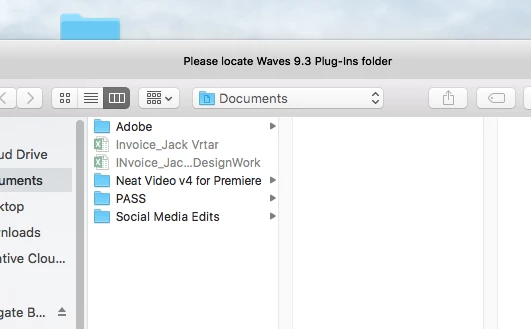
"Please locate Waves 9.3 Plug-Ins folder"

  • February 17, 2017
  • 3 replies
  • 3189 views

I am using Premiere Pro CS6

I've been doing my normal video projects at work, and I went to download a program to remove the noise and grain called Neat Video V4.

Before downloading it, I could open Premiere and render video fine, but since installing it, I've come across this message when I go to open Premiere CS6.

I've seen it before on the old Mac Pro I used to use at work, but this is the first time I've seen it on my newer Mac Pro that I switched to. They're both pretty old actually. Is there a reason I'm getting this message? Can I find the folder either within the software files or somewhere on the internet?

Just wanted to see if anyone had an idea here before I spent hours trying to figure it out.

Thanks!
    This topic has been closed for replies.

    3 replies

    brian704
    Inspiring
    February 17, 2017

    You could try looking through the audio files for the effect and delete it. The badges should help you to find it. Maybe you could try turning off the effects globally - not sure if you can do that for audio only

    brian704
    Inspiring
    February 17, 2017

    Waves is an audio plugin - it would most likely be in a folder called "VST".You may be able to ignore the error, if you are only working on the video and someone else is handling the audio

    tmdavisart
    Known Participant
    February 17, 2017

    Thanks! But the only problem is that I can't render the video now. It won't render in the Media Encoder ever since I downloaded the plug-in. It failed twice now. Restarting the program and trying again.

    Ann Bens
    Community Expert
    Community Expert
    February 17, 2017

    Waves is that not an audio plugin?