


Answered
Premiere 2018 to After Effects Frame Rate malfunction
Hi There,
In Premiere 2018,
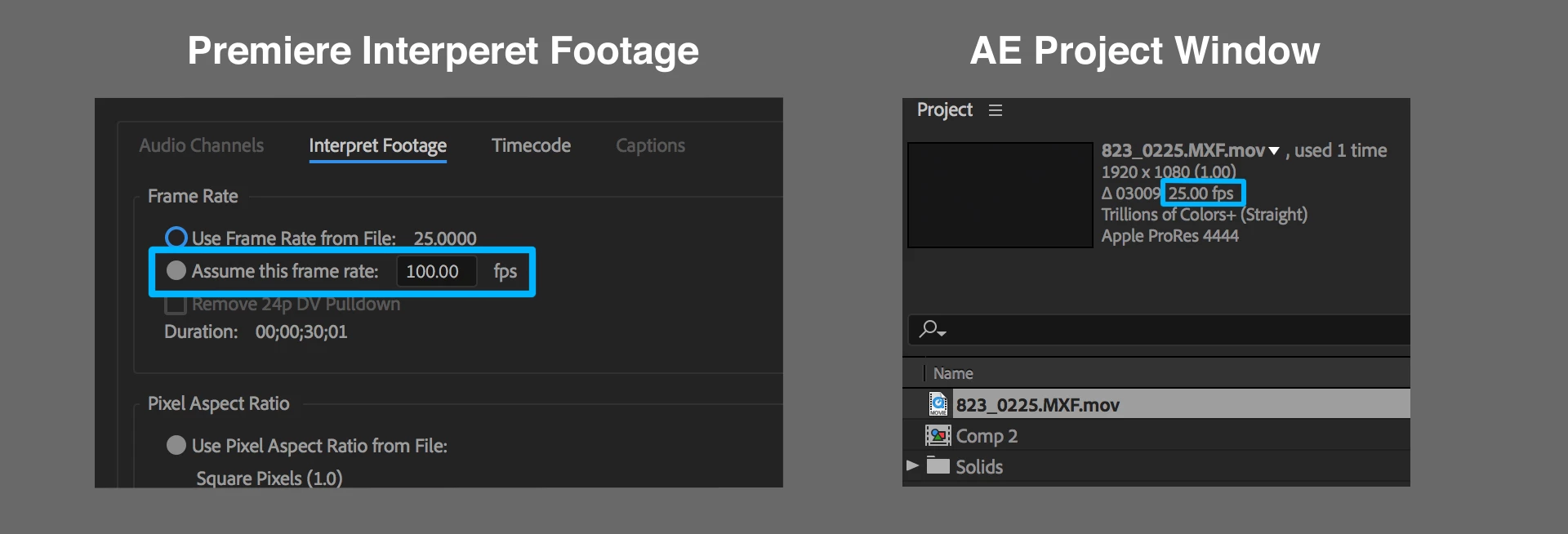
When copy pasting a clip, from premiere timeline to After Effects comp,
the frame rate that was set in premiere's interpret footage dialog is ignored.
My Clip in premiere is set to be 100 FPS,
it comes into after effects with the original frame rate,
25 FPS in my case.
The same thing goes when using Project Manager to trim and transcode
and also when exporting XML to use in DaVinci.
Obviously all the edit's timing and in-outs, become unusable outside of premiere.
Hopefully there will be an urgent fix for this.
Thank you,
Tal
My station is :
Os X El Capitan 10.11.6
Mac (Retina 5K, 27-inch, Late 2014)
Processor 4 GHz Intel Core i7
Memory 32 GB 1600 MHz DDR3
Graphics AMD Radeon R9 M295X 4096 MB
 AdChoices