



Bardia the teacher
Participant
August 12, 2021
Answered

Premiere does not load the exact srt timing

  • August 12, 2021
  • 2 replies
  • 438 views

Hi everyone


I've prepared a subtitle for a video in Subtitle Edit software and exported the srt file.


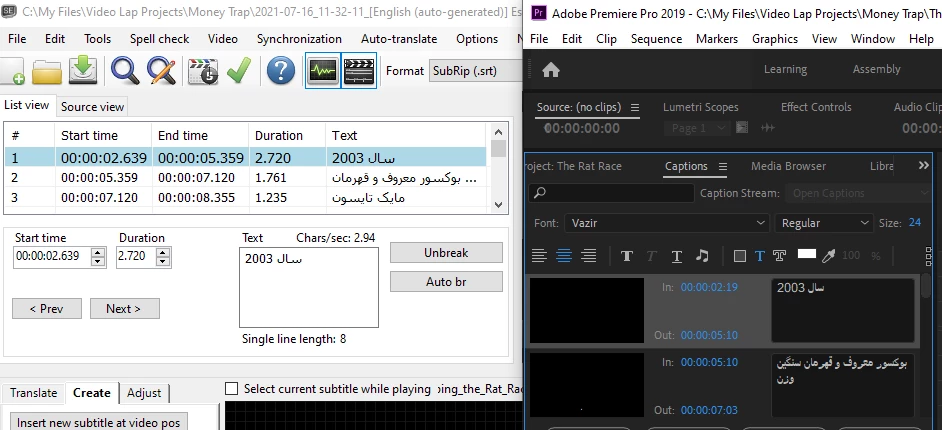
When I import this file into premiere, the timing changes slightly and it's not the exact timing in the original file.


So as you see in the screenshot, the timing for the first line starts at 00:00:02.639 in Subtitle Edit, however in Premiere the timing is changed to 00:00:02:19 and so on for all the other lines...
 

This topic has been closed for replies.
Correct answer Stan Jones

Bardia, I think what you are actually seeing is that the times are the same. 


Srt timecodes, in Subtitle Edit AND when exported from Premiere Pro, use milliseconds instead of frames. So the 19 you see is 639 milliseconds in 29.97 fps.


Stan


2 replies

Stan Jones
Community Expert
Stan JonesCommunity ExpertCorrect answer
Community Expert
August 12, 2021

Bardia, I think what you are actually seeing is that the times are the same. 


Srt timecodes, in Subtitle Edit AND when exported from Premiere Pro, use milliseconds instead of frames. So the 19 you see is 639 milliseconds in 29.97 fps.


Stan


Bardia the teacher
Participant
August 13, 2021

Hi Stan,

You're right, my bad!

This morning I took a closer look and noticed everything is alright.

Stan Jones
Community Expert
Community Expert
August 13, 2021

Thanks for reporting! I'm glad its working.


Stan


Kevin-Monahan
Community Manager
Community Manager
August 12, 2021

Hi,

Please try the automated speech to text function to see if that might give you a better result. Otherwise, kindly file your issue on the User Voice site. I will let the engineering team know about your problem, as well.


Thanks,
Kevin

Kevin Monahan - Sr. Community & Engagement Strategist – Pro Video and Audio
Bardia the teacher
Participant
August 12, 2021

Thanks Kevin.

Since the subtitle is not English, speech to text thing won't work for me...


By the way, I don't know if it helps, this subtitle is an auto-generated subtitle by YouTube that I extracted and then translated and edited in Subtitle Edit software.


The second thing is that when I manually try to change the timing, it does not change!