
Inspiring
November 17, 2018
Answered

Premiere Pro 2019 randomly using all system RAM and crashing?

  • November 17, 2018
  • 32 replies
  • 82486 views

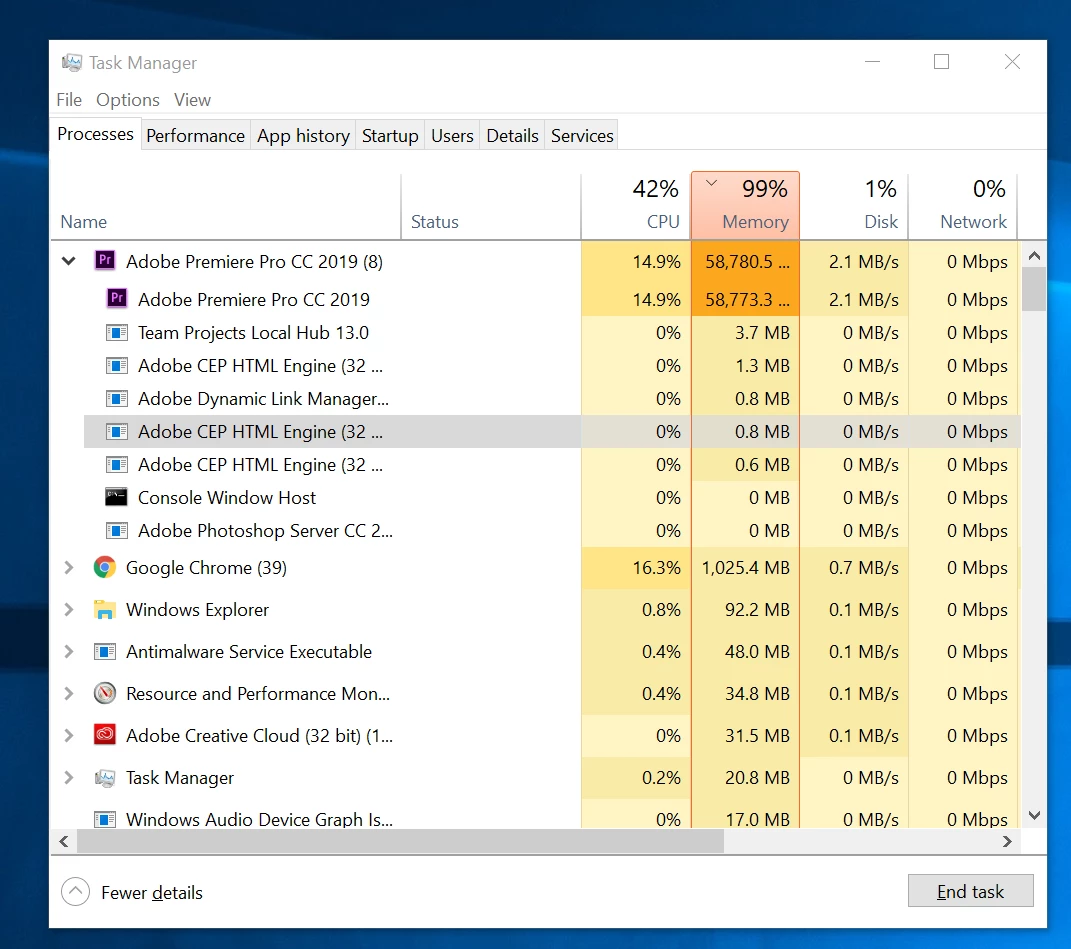
Recently I have been having a troublesome issue with Premiere Pro 2019 and was hoping to get some help. Without any reason I can find, in the middle of editing, Premiere will suddenly stop playing back any video. Occasionally audio will continue but that soon stops as well.  When this happens, within a matter of seconds, my RAM usage will basically sky rocket and max out my computer, going from 8 GB to around 55GB+ (see screenshot). At this point, I can only very slowly navigate the interface and save the project, still with no playback or frame updates when dragging or attempting to move the playhead. Usually, however, if I try to do anything, the program will crash. Strangely, if I leave my computer idle, after 10-20 minutes, playback may suddenly resume and RAM usage quickly drops to normal as if nothing happened. I can continue working at that point until it happens again. Sometimes I can get 2 or 3 hours of work, sometimes only 5 minutes, until the issue returns. I am not doing anything complex at this point. So far, I've just been importing footage, cutting and nesting different takes, and putting a few multicam sequences together. As such, I've mostly noticed this issue simply when playing through source material.

I tried doing several steps to fix this already all with no luck. I deleted my unused media cache in the preferences menu. I reset all preferences. I turned off GPU acceleration. I made sure I had the latest driver for my GPU. I imported my project into a new project. Closed unused programs. Restarted my computer. Uninstalled and redownloaded Premiere. Etc. Still no solution.  This is my first project with Premiere 2019 but it is also my first time using my new machine. I was concerned it might be an issue from my video footage (.MOV files with h.264 compression from my Canon 80D) but I didn't experience this problem before on a different machine with Premiere 2018.

Does anyone have any idea what the issue might be? Is it a bug in Premier? I am especially concerned as this is my first time on my custom build and was unsure if this may be a hardware related issue (although this only happens in Premiere, so I find it unlikely that my computer is at fault).

My build is as follows:

Windows 10

Cpu: intel i7-8700k

GPU: NVIDIA RTX2080Ti

RAM: 64 GB DDR4

Storage: 500GB Samsung evo 970 (program files & disk cache), 1TB Samsung evo 860 (source material, project, scratch disks, etc.)

I would truly appreciate any help as this is consuming an immense amount of my time!
This topic has been closed for replies.
Correct answer CMRB

Been having a the same problem too. Lost about 3 days because of that...

But it seems Robbo338 saved my day - I deleted all photo files from my project and now it's working fine again. Will have to add them at some point back again though - will let you know what happens.

Working on:

MacOS 10.14.2. - MacBook Pro 2017 - Premiere CC 13.0.2.

32 replies

infinityphotorob
Known Participant
January 25, 2019

This was my work around. I manually created a multicam sequence an hid clips with hidden tracks. Took forever but got it done. Still had issues. But would generally resolve in a couple min.  This project really kicked our ass.  Makes me remember why I like using multi cam to edit.

CMRB
CMRBCorrect answer
Participant
January 18, 2019

Been having a the same problem too. Lost about 3 days because of that...

But it seems Robbo338 saved my day - I deleted all photo files from my project and now it's working fine again. Will have to add them at some point back again though - will let you know what happens.

Working on:

MacOS 10.14.2. - MacBook Pro 2017 - Premiere CC 13.0.2.

Inspiring
November 1, 2019

How is this the "correct answer"? It's a "workaround". MEanwhile, I have zero photos in my project and it's crashing. 

vitof21601116
Participating Frequently
December 12, 2019

Exactly!!!

Wes Howell
Adobe Employee
Adobe Employee
January 17, 2019

Is anyone able to share a project - preferably a smaller test project with media?

Otherwise, breaking the projects down into smaller test projects for the sake of isolating the core issue is an effective way to learn more.  

Happy to lend a hand,


Wes

Participant
March 2, 2021

Hi I am having this issue too. Premiere, Media Encoder or after effects, they produce a memory spike. I have removed all CC apps, several times, contacted Support, they have made remote login, and everything is still the same.


Just by opening any of this app's, memory start's filling up until the software crashes.


😞

armeenAuthor
Inspiring
November 29, 2018

I'm still having problems with this... Is there any chance someone from Adobe has seen this?

Wes Howell
Adobe Employee
Adobe Employee
December 4, 2018

Just came across this thread today.  I work on the Premiere team at Adobe.  If anyone on this thread would like to help me isolate the cause of this issue, I am here to help.

Ideally, if we can reproduce this with a smaller project and certain actions, that would be ideal. 


Reading the info above, it sounds like some issues could be related to media type or possibly the use of Lumetri?  Does anyone have more insight on this?

Is anyone interested in sharing a project with Adobe engineering?  I could ship a drive or if it's possible to reproduce issues with a smaller project that can be shared via Dropbox or Google drive that might be faster.

Is anyone able to reproduce any of these issues consistently with specific actions?

All details for each report are extremely helpful and will allow us to make progress here.   Machine config, media types, filters, and any available details that help to reproduce the problem are welcome.

@alvin_nari Re: Memory preference.   Maxing this preference can make things worse.  I'd recommend leaving around 8 GB reserved for other applications.  I don't think this will resolve the issues as you've reported them but a lower setting may help.

erica123456789123456789
Participant
December 5, 2018

I can provide my file! Since it’s corruption and lagging I’ve moved back to 2017. Now that won’t open, so fixing 2019 bugs would be ideal.

Not sure what specific actions cause issue, but I can try a new project and mark down what I do and when issues start to occur.

armeenAuthor
Inspiring
November 25, 2018

I tried downgrading my file to 2018 and it unfortunately didn't work. I haven't used any lumetri effects in my project so I wish I could say it was a result of that, but it doesn't seem to be my case! I don't know what else to try! I'm not a computer expert, but is there a way that I could identify the exact process that's causing the memory leak through the resource monitor? There are specific PID numbers in the wait chain when my RAM spikes but those PID numbers change each time I reopen premiere, so I'm not sure how to pinpoint it to a more tangible process.

Participant
November 22, 2018

So I think I may have found the culprit of my problems. It has been relatively stable over the past few days, until I started fiddling with Lumetri Color and it completely bombed out again.

I haven't gotten stuck into the new Lumetri features of 2019, but I know that they made some changes/additions to the feature, which leads me to believe it is may be buggy.

Let me know if you have had a similar case

Mo Moolla
Legend
November 22, 2018

Try to stay away from the secondaries on Lumetri. They are buggy. Use the Hue/Sat on Primary which should help achieve the same coloring as secondaries until the bug is fixed. R Neil Haugen I remember An mentioning this in another post. Do u happen to remember the post. If you do please post  a link to it

Mo Moolla
Legend
November 22, 2018

R Neil Haugen​ Ann posted (sorry I typed An) and couldn't edit the post hence this new one

armeenAuthor
Inspiring
November 21, 2018

I went ahead and filed a report at suggested. The amount of RAM I have designated for Adobe is at around 60 GB. I have tried closing all other applications, turning off WiFi, etc., with no luck   I have looked at Premiere's wait chain in the resource monitor when it spikes in RAM and it seems there are a few threads listed on the tree that Premiere is supposedly waiting on but the only description is "Adobe Premiere Pro.exe"

Also, I can't say for sure, but I do have a suspicion that the issue is triggered by certain video files? It seems like there are some clips I encounter more problems with than others, but even so, I'm eventually able to make it through if the RAM doesn't suddenly spike again. 

R Neil Haugen
Legend
November 21, 2018

It would be of use to know ... if you could determine ... which video files, especially if they're something a bit different than the other files. Is it always a certain type of file, or ... just certain specific files?

Neil

Everyone's mileage always varies ...
armeenAuthor
Inspiring
November 22, 2018

The only reason I didn't mention it before is because I've always been able to make it through a video file that might have felt like it caused crashes more than others. As such, I wasn't really sure if it was just bad luck or the video file itself All the video I work worth at the moment were shot with the same camera as well, so I can't point out any differences unfortunately!

I'm at the point where I think I'm just going to try one of those methods to change my project file to a 2018 version. Maybe Premiere 2018 will work out until one of the developers can identify the problem with 2019!

Mo Moolla
Legend
November 20, 2018

Guys how much RAM have you allocated to Premiere?

Also are you running any other Adobe Apps at the same time (remember Adobe Apps share RAM)

Did you close down everything else on task manager?

R Neil Haugen​ I have seen this a few times before on Windows machines which were infected with a virus. I had the guys reinstall a fresh copy of Windows and go from there.

Participant
November 20, 2018

I'm only running 8gb which was always fine for my purposes, which is why I don't think increasing your amount of memory will help the issue.

However, this issue did encourage me to order another 8GB anyway.

armeenAuthor
Inspiring
November 20, 2018

I tried using the CC cleaner tool again and selected the option to remove all apps/files. I shut down my PC and just tried re-downloading premeire. Sadly, the issue is still there and might actually be worse. Now I can't even get a minute or two of playback. Almost as soon as I launch the program and hit play, my RAM reaches 99% usage. I have been closely watching my task monitor to see if there are any indications as to what might be triggering this, but I can't seem to figure it out. I still have multiple instances of the CEP engine running as well. I'm dying over here!

R Neil Haugen
Legend
November 20, 2018

This is just painful.

I'll see if I can get someone to ask on this.

Oh, gave you already filed a bug on the UserVoice system? If not, please do! All reports there go directly to the engineers system.

Neil

Everyone's mileage always varies ...
Participant
November 19, 2018

Out of desperation (after about 12 hours struggling with this) I uninstalled ALL Adobe apps, then ran the CC Cleaner tool to remove all Adobe apps. Rebooted and installed only PP 2019 (and Media Encoder by default).

It seems better but I'm not holding my breath.

Participant
March 3, 2020

hows it holding up so far had that same kind of issue with premier 2020

rebooted the pc and the server and have been good