



AndrewTheGreat
Known Participant
December 5, 2024
Question

Premiere Pro 25.1 - iGPU stopped decoding my footage

  • December 5, 2024
  • 68 replies
  • 52935 views

Ok, just updated to v 25.1 opened my projects in progress to find out that none of them uses my iGPU to decode.

Went on checking it with different formats that are decoded (h264 8-bit 4:2:0, h265 8-bit 4:2:0, h265 10-bit 4:2:0, h265 10-bit 4:2:2) by the iGPU - all of them show 0% load.
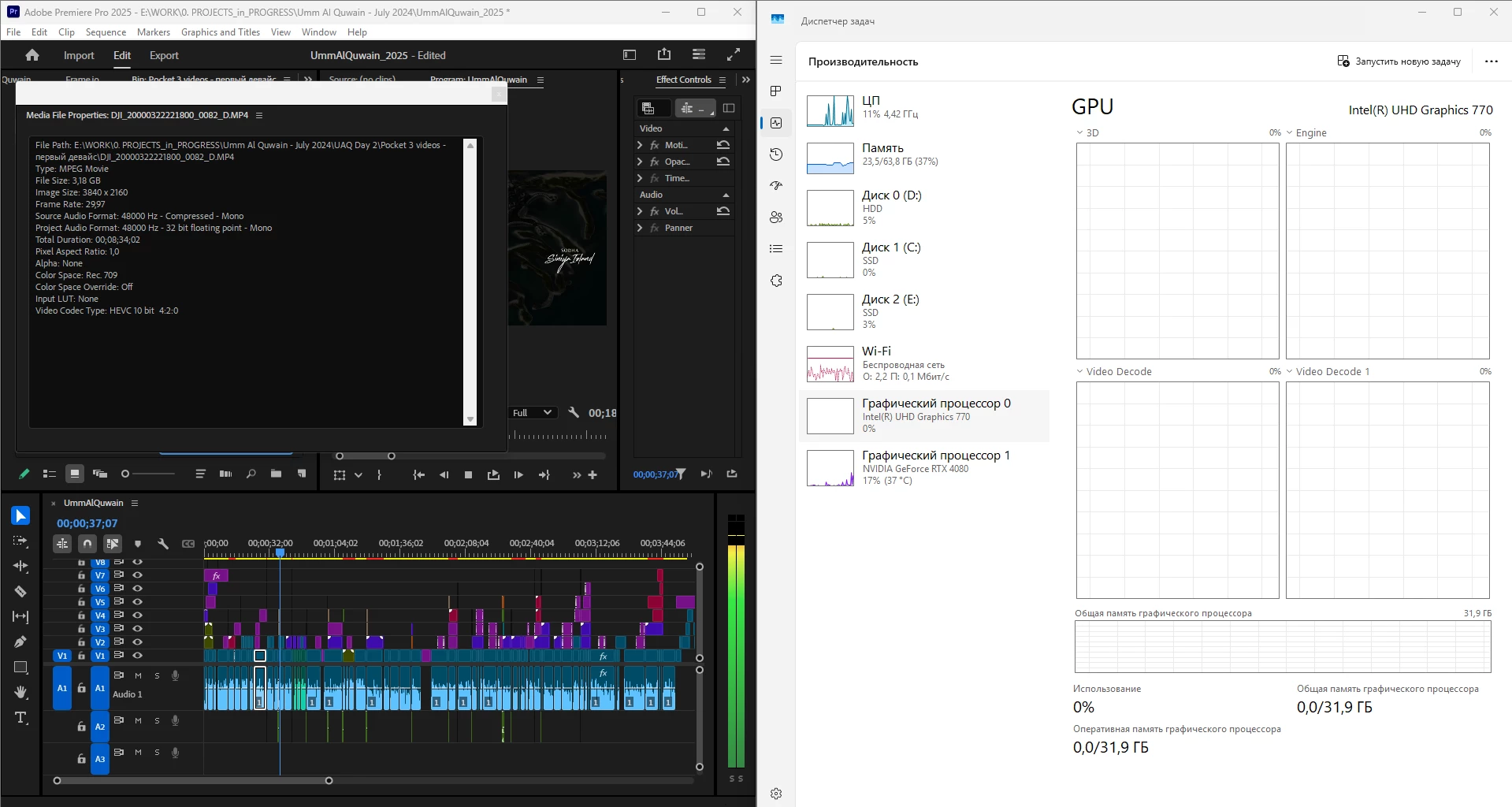
 

What is going on, guys? Why is it "new version - new bugs" thing every time? My CPU immediately started being loaded more, like by 60% all the time, even though my GPU does the decoding, whereas on the previous versions the average CPU load was 20-30% with the iGPU doing all the decoding job.


Yes, I tried reinstalling both Premiere Pro (as well as resetting its cache, preferences and plugins via the start+shift menu) and all the drivers. 


Steps to reproduce? Open a project or create one, import a knowingly decoded video, put it on your timeline, press Play. Watch the the Windows Task manager - Performance graphs.


i7 14700K, RTX 4080, 64 Gb ram, SSDs, Win 11 24h2

68 replies

JonesVid
Community Expert
Community Expert
December 17, 2024

Latest official statement received from ASUS today after I raised this iGPU/dGPU problem with them as an ASUS motherboard user.


Unfortunately at the moment there are no updates on this problem. We and Microsoft are working on a resolution for this issue and it will be provide with a further update when available. Please note that we share the same resources on all levels of support so even if you get in touch with Level 2 you will receive the same answer. Once a fix for this will be available a notice will be posted on the Microsoft website and a new update implemented. 

https://learn.microsoft.com/en-us/windows/release-health/status-windows-11-24h2


For the moment the most reported chipset was Z890 but as it is a problem coming from an Windows Update it is not limited just that. Other products motherboard, laptops, desktop, can encounter the problem as well.

So I will kindly ask you to wait for a newer update for the Windows 11 24h2.


I was hours away from wiping the W10 PC (after disk Image saved on external back up disk) )  to load a new W11 24H2 install when I came across this post. I have since stopped all actions to do this until 2025 when we hopefully get some fixes.


To complicate matters further, it would also appear you cannot go back to a previous W11 23H2 fresh installation with ISO image or Media Creator Tool as Microsoft in their wisdom have removed access to these on Windows 11 downloads.  .......Great.

Take note.

Any more news for us @mayjain7130546  ?


Participating Frequently
December 17, 2024

I have similar problems. Decoding on UHD only works for H.265. For H.264 it does not work on UHD, but it works on NVIDIA. If you disable decoding on NVIDIA in Premiere Pro settings, decoding on UHD for H.264 starts working, but does not work for H.265.

My PC:
CPU-12600K
GPU-1080 TI
RAM - 32GB DDR4 3200

Driver UHD - 32.0.101.6314
Today I tried the new driver 6325, decoding did not work on it at all.
NVIDIA driver - current studio

R Neil Haugen
Legend
December 17, 2024

Crucial data left out: which Windows build are you on?

Everyone's mileage always varies ...
Participating Frequently
December 17, 2024

Windows 23H2, 22631.4541
It all started with an update of Premiere Pro from version 25.0 to 25.1. At the same time, other components of system did not change.

AndrewTheGreat
Known Participant
December 17, 2024

Another update. Don't know if it's related or not. Here's a screenshot of Premiere Pro doing the transcription via the iGPU. And it's not a video it's decoding. It's a wave-file. There's no video in the project at all.

R Neil Haugen
Legend
December 15, 2024

The newest Win11 update has turned off iGPU use for several users. Who had to go into the BIOS to turn them back on. That may be an issue here.

Everyone's mileage always varies ...
AndrewTheGreat
Known Participant
December 16, 2024

Hi, @R Neil Haugen 

I went to Bios and it was on. I turned it off and on again and it didn't help.

R Neil Haugen
Legend
December 16, 2024

Then it's something flipping else on your rig. Dang.

Everyone's mileage always varies ...
Legend
December 15, 2024

Another update on my system:


When I ran Puget Systems' decoding test, I discovered that with Premiere Pro 25.1 running on Windows 11 24H2 on my main Intel i9-14900K system with an Nvidia GeForce RTX 4070 Ti, the hardware H.264 (AVC) decoding defaulted to the Nvidia GPU while H.265 (HEVC) decoding defaulted to the Intel iGPU. (This was with the Premiere Pro hardware decoding set to the default of both Intel and Nvidia enabled.) The other GPU, in either instance, showed zero usage.


As for the 24H2 feature update to Windows 11 disabling or wiping out the iGPU selection in the BIOS, it turned out that neither of my two systems had that problem. In other words, some - but not all - Windows 11 24H2 systems suffer from that problem.

AndrewTheGreat
Known Participant
December 15, 2024

Looks like - either because of some changes in Premiere Pro or in Windows or even the drivers - the system is forced to use the dGPU istead of the iGPU in all cases. I only saw the Encode graph of the iGPU loaded, obviously when exporting,  but the Decode graph does not show any load at all unless you turn off NVidia in Premiere's preferences. 

You can also try and install Shutter Encoder and run transcoding to ProRes

- this way the iGPU is forced and in my case I always get this error:


AndrewTheGreat
Known Participant
December 13, 2024

Yet another update. A strange one. Below are 4 screenshots:

1) Premiere Pro 25.1 with OpenCL renderer ON and NVidia decoding turned OFF in Premiere Pro Media Preferences, MOV H.264 4:2:0, Windows 11 24h2 with the UI in a non-english language, the one I'm using it in now:

See the graph - it shows the 3D load. See the Importer.MP4 data in Premiere Pro console -  it shows Hardware decoding frame count and UHD: 1 (one).


2) This is the same Premiere Pro settings and the footage used, but the UI is set to English:

See the graphs - Video Decode has appeared apart from 3D. See the Importer.MP4 data in Premiere Pro console -  it shows Hardware decoding frame count and UHD: 2 (TWO!).


Now I turn ON the CUDA renderer in File > Project Settings, and activate the NVIDIA hardware decode in Preferences > Media. This is the non-english Windows UI:

The iGPU graphs are flat. The Console shows ZERO UHD though there's the hardware decoding frame count. So the whole decoding of this file is done solely by the dGPU which is RTX 4080. In all the previous versions the decoding was done mostly by the iGPU with the dGPU as a helping hand. 


4) And here's the same Premiere Pro preferences and file rolling, but the Windows UI is set back to English:

See what changed?

Community Manager
December 13, 2024

Hi All,

I wanted to share a quick update. I upgraded one of my Windows laptops to Windows 11 24H2 and noticed that the iGPU is working just fine with Premiere 25.1. Please find the screenshots attached below for reference:-

I’ll continue monitoring this and will discuss it further with my team. Sorry for the trouble. 

Thanks,
Mayjain

AndrewTheGreat
Known Participant
December 13, 2024

Hi, @mayjain7130546 

Can you share this exact footage you tested it with? (in PM maybe). Also I can see your Windows is Enterprise, mine is Pro.

BTW today I even tried reverting the previous bios update with which my iGPU did work. And it's the same, flat in the decode graph...

Community Manager
December 13, 2024

Hi@AndrewTheGreat @JonesVid ,

Here’s the link to the footage I was working on: https://f.io/IHptfope
Let me know if you have any questions. I will continue investigating this and discussing it with my team.

Thanks,
Mayjain

Legend
December 12, 2024

For those people running Windows 11 24H2, we will have to wait until the January Cumulative update at the earliest in order to determine if this behavior is fixed. The December cumulative update has no new fixes — only security patches.


We will also have to wait until the next point release of Premiere Pro in order to find out whether the broken auto-hardware-decoder-detection in the current version 25.1 and/or the broken multi-simultaneous-decoder support since at least version 25.0 is fixed.

AndrewTheGreat
Known Participant
December 12, 2024

Hope, they'll introduce at least some fixes in the January update. Due to the specifics of my company's workflow we all have to be as up to date as possible, so I'm going to suffer. At least till January.

JonesVid
Community Expert
Community Expert
December 12, 2024

I don't know if this is significant @AndrewTheGreat  for the Windows 24/H2 iGPU problem - but I just noticed your iGPU driver is 31.0.101.4953 dated 7/11/2023.

Ive just updated iNTEL 770 iGPU on my machine to the latest driver from Intel Support site - 32.0.101.6314 dated 26/11/24.

I overwrote the ASUS OEM driver months ago as it was way out of date.

Running an encode on my recent project encoding a timeline with H265 media and Previews on ProRes 422 - I was producing a master ProRes 422 export using ProRes422 previews already rendered.

You can see the Intel 770  iGPU hammering away on Windows 11 23/H2 (H265 decode) as well as NVidia 4080 Super doing the encode. I assume this is the ProRes422 encode process, although not sure the split is that simple.


I can't use Win 11 24/H2 yet as I am avoiding it until we all get clear answers !!

Intel site for updates : https://www.intel.com/content/www/us/en/support/intel-driver-support-assistant.html

Anyway - just a thought... it maybe worth trying for you. I know you said you had updated drivers so I was a bit puzzled by that.

Jazzborn
Participating Frequently
December 12, 2024

I don't know if my problem is directly related to iGPU or anything, upon updated to 25.1 my H265 encoding is entirely nerfed. It was all good until 25.0 and I had to roll back. I didn't do any windows update recently (I usually pause windows updates until there's something critical) and I use W10 x64

Nothing fancy on my timeline either, 80p footage with some overlays etc. - anything that is fancy I pre-render them.

Usually, when I do a h265 export, my computer utilizes both CPU and GPU at maximum capacity and it takes ~20 minutes to render a 40m timeline. after 25.1 it went up to 3 hours. both CPU and GPU not very utilized at all even fans went back to casual speeds.

I checked hardware acceleration both in project settings and in media encoder, it looks normal.

I hope we can have a hotfix soon.


AndrewTheGreat
Known Participant
December 12, 2024

This may be related. This whole case looks like some crucial processes have been disrupted with both Windows and Premiere Pro Updates. May be the drivers are also involved. I've never seen so many coplaints about Premiere Pro from people here, on Reddit, in my communities like it is now since v. 25 was introduced. Like something cracked and it's now a snowball. 

JonesVid
Community Expert
Community Expert
December 11, 2024

Nothing on Microsoft support site about this?.

Windows 11, version 24H2 known issues and notifications | Microsoft Learn


Some more people on Microsoft Community reporting same issues on iGPU being ignored on Win 11 24H2.