


Eduard Pitka
Participating Frequently
October 5, 2020
Question

Premiere Pro Copy Paste **BS**

  • October 5, 2020
  • 2 replies
  • 383 views

Hi there,


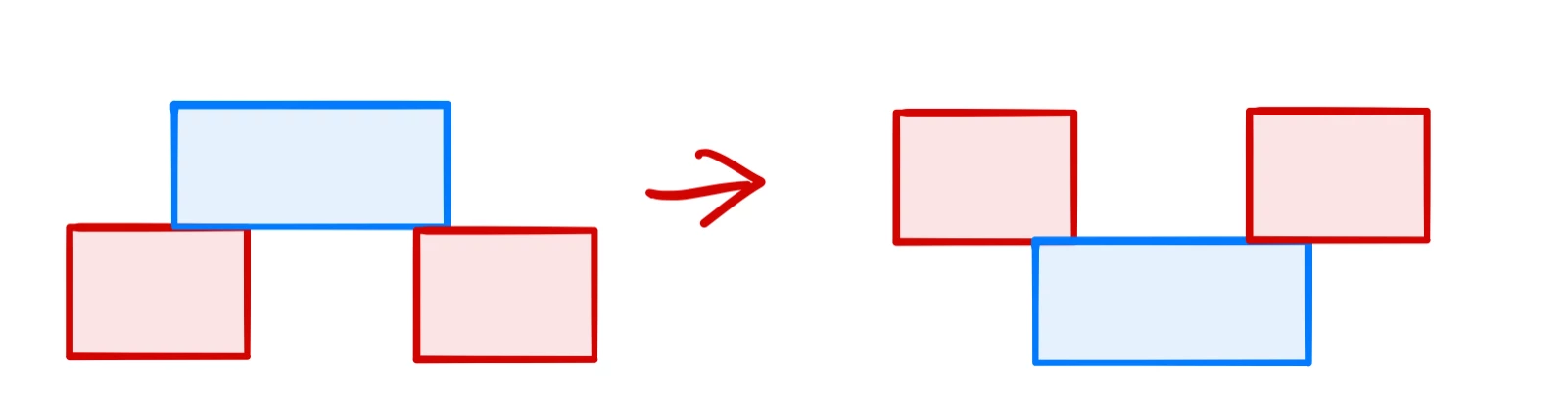
i have been working with a very complex sequence withs lots of shots. All these shots were in Seq1, when i copied them from Seq1 to Seq2 i have noticed (after 6 hours of work) that those clips have fliped as shown on the pictures. First of all, how is this even possible? Could have i been involved in flipping it? It just made me waste 6 hours of my time...


Thanks for any response.
This topic has been closed for replies.

2 replies

Peru Bob
Community Expert
Community Expert
October 5, 2020

???

There have been feature requests for the ability to reorder track positions and you had it happen unwittingly!

Eduard Pitka
Participating Frequently
October 6, 2020

You know I do beta test new features even before they are out in alpha, beta or any other test. 😄

Legend
October 6, 2020

what if you copy each track individually.  Maybe add a one frame slug at the beginning of each track and at the end of each track to make sure everything stays in synch...  am I making sense?  It's been a long day.


Frequent crashes may be a hint that something else is going on... do your sequence settings of both settings match?

R Neil Haugen
Legend
October 5, 2020

Wow! Years of working with Premiere, copy & paste sections of sequences regularly, and never had that happen ... nor heard of it "here". Trying to puzzle out what could have happened.


Neil

Everyone's mileage always varies ...
Eduard Pitka
Participating Frequently
October 5, 2020

I dont know what could be the problem. I know that After Effects are select direction sensitive, however I have tried to select it from top to bottom and the other way around and still got the same effects. It is 2 am and I am not finished... Have been working on this project from almost 2 pm... Numerous Premiere Pro crashes, it almost seems like Adobe hates me.