


chris baths97188845
Participant
May 28, 2019
Answered

Premiere Pro Timeline Window

  • May 28, 2019
  • 2 replies
  • 435 views

Dear all

I am just learning the basics in Adobe Premiere Pro. In the timeline window, I can shrink sequences using minus button. But I cannot enlarge sequences using plus button (I am using Danish Keyboard, NOT US). I was trying to follow the tutorial where these particular manoeuvres were suggested. Can anyone help?

Best regards

Chris
    This topic has been closed for replies.
    Correct answer Averdahl

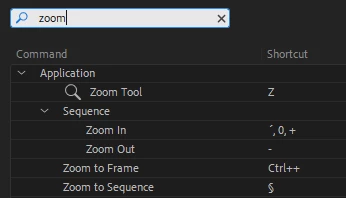
    In Premiere Pro go to Edit > Keyboard Cumization and do a search for zoom. The command you are looking for is Zoom In. I live in Sweden and i see the same issue here as well, iow that Zoom In is not properly mapped as it was before.

    2 replies

    chris baths97188845
    Participant
    May 29, 2019

    Thanks. Great help. In this window, I can reconfigure zoom to respond to plus button.

    Averdahl
    Community Expert
    AverdahlCommunity ExpertCorrect answer
    Community Expert
    May 28, 2019

    In Premiere Pro go to Edit > Keyboard Cumization and do a search for zoom. The command you are looking for is Zoom In. I live in Sweden and i see the same issue here as well, iow that Zoom In is not properly mapped as it was before.