Inspiring
October 11, 2018
Answered

Render issues - error code: -1609629695

  • October 11, 2018
  • 18 replies
  • 216963 views

I have issues with exporting clips I edited some months ago. I have these issues in Premiere Pro as well as with the Media Encoder.


  • Interestingly, Premiere and Encoder are sometimes able to render the clips, sometimes not.
  • When I export the material in full HD, the video looks OK, but when I export in HD the video looks grainy
  • When the Media Encoder is unable to render the video, closing & reopening seems to help sometimes. However, after one or two clips, I get the issue again.


Unfortunately, I have to export about 25 clips and will have to export them several times for iterations.


Fehler beim Export

Fehler beim Kompilieren des Films.


Fehler bei beschleunigtem Renderer


Frame kann nicht produziert werden.


Schreiben mit Exporter: H.264

Schreiben in Datei: \\?\F:\Export\02 - Genium EN.mp4

Dateityp wird geschrieben: H264

Um Timecode: 00:00:06:15 - 00:00:06:21

Rendering bei Offset: 8,880 Sekunden

Komponente: H.264 vom Typ Exporter

Selektor: 9

Fehlercode: -1609629695


I tried:

  • switching to CPU rendering only
  • copying the content of a sequence to a new sequence
  • downgrading premiere and encoder, but then I was unable to open the document because I already saved it with the newest Premiere version.
  • Removing Lumetri Color correction


System: Win 10, i7-7700, Nvidia Gtx 1060


Thanks!
Correct answer Mikay²

What is the bug? how do you solve it?


In my case, the bug was - as described - that the Media Encoder cannot handle the screen locking.

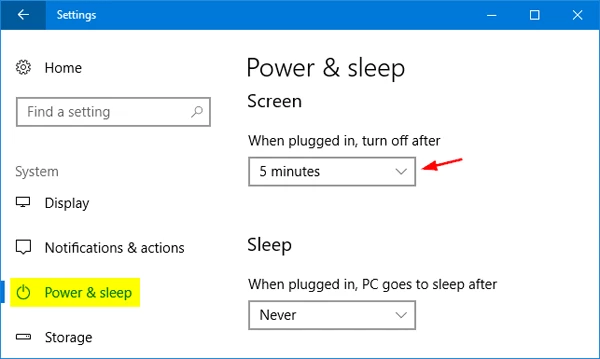
Thus you should prevent that Windows locks the screen. 


In the Windows settings, set "turn off after" to "never"


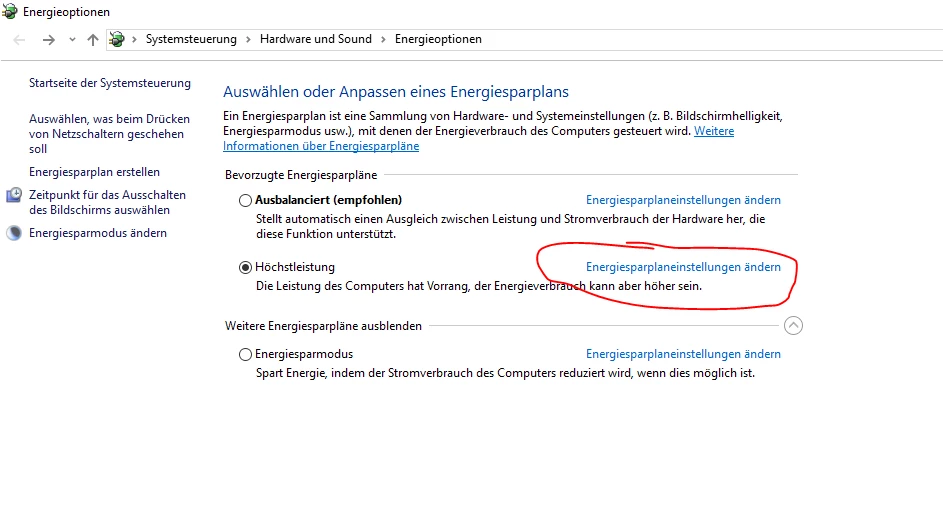
Or go to your power plan settings in windows ...

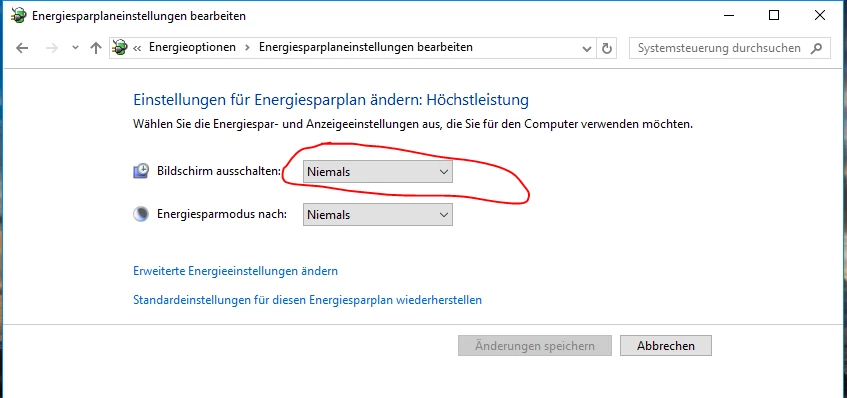
...and set it to never:


18 replies

Inspiring
May 24, 2024

Same problem here... tried all of the solutions but nothing is working for me here.


Exporting from Premiere to Media Encoder. It may be because of a FPS mess problem. Footage was shot in 23.976 and I have to deliver in 29.97 drop-frame. I put my 23.976 sequence in a 29.97 one and took off the extra frames to get to the right video lenght.


It is always crashing at the same spot. Tried exporting .mfx and mov, same thing always...


Can someone save me? 😭


Tried exporting right from Premiere, same probleme but further in the video (crashed at about 60% instead of 15% before)


Participant
February 23, 2024

Esse erro aconteceu comigo quando Atualizei o Driver da minha GPU, quando voltei para versões anteriores a exportação voltou a funcionar normalmente.

Participant
October 31, 2023

I made an account to say thank you! This solution worked for me.

Participant
September 26, 2023

Hello, my friend.
I also solved this problem. The solution is as follows.
The reason why this happened to you is that you probably stabilized a clip that has a different FPS than what you have set in the sequence. For example, your RAW clip has 50fps but your timeline has 24fps. When you stabilize, you do get a field count, but one frame disappears. You probably lost one frame somewhere in that clip and then a black spot was created. You need to cut out this ''empty'' frame. After cutting, the error message no longer appears.
That's all. Good luck 🙂

Participant
January 11, 2022

I'm getting this message as soon as my export hits any graphics made with the new Text tool. I can render out only if I turn off the hardware acceleration or export as an AVI.


I already have my power settings set to to never sleep, etc... I cleared the cache, deleted all render files, restarted Premiere, restarted Media Encoder, power cycled the computer. It happens at the exact same time or frame, if I adjust anything it always happens the first frame the graphic is one screen, every time.


It does it if if I try to just export directly out of Premiere instead of queueing to Media Encoder, too.


I also notice that when exporting the primary monitor will flicker. This has never happened to me before and doesn't happen on other projects that I export without graphics created by the Text tool that I have noticed.


This clip is less than 60 seconds long and has no color correction applied. It has one motion applied that scales the video down to reveal the text underneath, other than that, no effects are applied.


Everything driver wise is up to date.

Premiere Version 22.1.2 Build 1.

Media Encoder Version 22.1.1 Build 25

Windows 10 Home, i7-7820HK 2.90GHz, 32 GB RAM, NVIDIA GTX 1070

Inspiring
September 16, 2021

Getting this error as well 2021.  Years later, nice.  I spend more time finding workarounds than I do editing with Adobe.  Brand new machine 5950x, 3080ti, Gen 4 M2s, 64gb RAM and still the same old errors and now new ones.  Mine has something to do with warp stabilizer, it reports areas where it failed and even when deleted, the errors continue.  Beyond frustrating.  I'm now editing a presser piece by piece because of this hot mess. 

Inspiring
September 17, 2021

Almost all my clips required warp stabilizer (no motion) and almost all of them failed with GPU errors.  I was using a template project that was updated but must be a problem for Premiere as creating a new project accepted the clips and I used that project solely for stabilizing then replaced the clips in the original project to deliver. 

MRowan
Participating Frequently
August 3, 2021

Check this Solution  - hope it works for you.

".....So the video eventualy rendered by doing this:

toggle all the video/ audio targets OFF>

then try export as usual

hope this works for you.."

Kevin-Monahan
Community Manager
Community Manager
April 14, 2021

All,

Top thread showing this error. It is therefore catching many potential solutions to this issue.


Thanks,
Kevin

Kevin Monahan - Sr. Community & Engagement Strategist – Pro Video and Audio
Participant
December 28, 2020

I have same problem , i'm using premiere pro version 14.7 and i get error message like @ellenw37115119 during exporting file at h.265/h264 including transitions and effects.
I found somthing interesting, if i use export media with queue 'media encoder' the export file is sucsseed.

This is issue that very disapoint me in premiere pro and i hope that in the next update this bug will fixed.

Participating Frequently
October 26, 2020

Got this error while rendering an AE project with Media Encoder. Solved by clearing disk cache & restarting both AE & ME.