


SRT Subtitles 1-frame offsync
I'm mastering a feature film and just ran into an annoying subtitle issue. We were pretty meticulous to match subtitle cuts with video cuts, since being 1-frame off looks like a jump cut. We have over 2000 subtitles, so I exported the English subs as an SRT and sent that off to multiple translators to get all the different language SRT's.
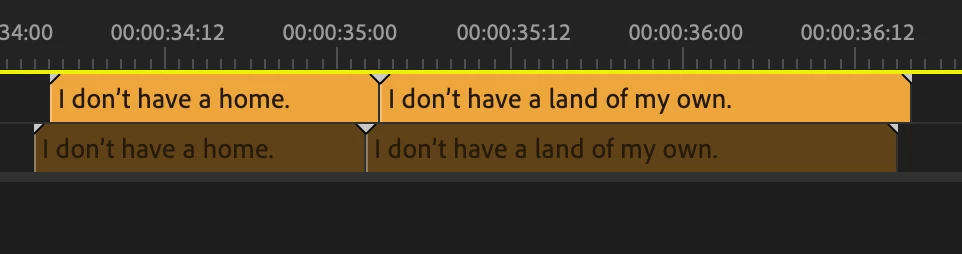
As a test, I just reimported my original English SRT back into my sequence and it's 1-frame off. To be clear, the disabled subs on c1 were original and c2 were just round-tripped back in. I open both SRT's in textedit and the timecodes are identical.
In the bin, Premiere lists the SRT framerate as 30:00 and the project is 23.98, but I'm under the impression that this doesn't matter since SRT's are based on frame timecode, not framerate. Plus I don't see an option to adjust this.
I see no reason why Premiere would mistranslate it's own SRT... Any ideas on why this would happen or a possible fix? I've used timecode shifter apps, but want to understand why it's happening because I'm about to deal with 10+ other languages coming in.
(I’m on Premiere 24.6.8 Build 3, I can not update versions this late into the project)
Thanks
 AdChoices