

Participant
July 31, 2022
Answered

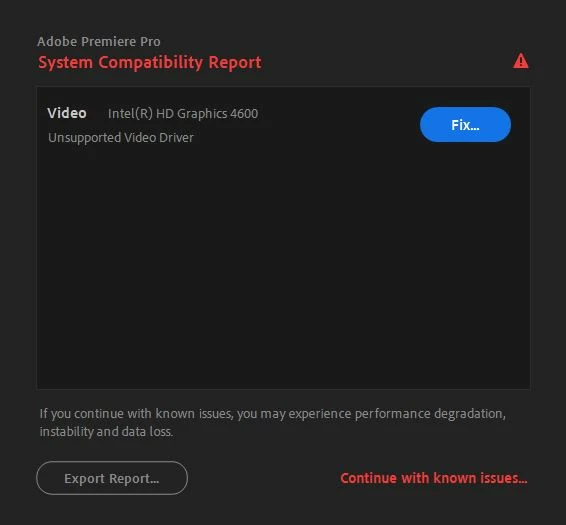
unsupported video driver

  • July 31, 2022
  • 4 replies
  • 982 views

Hi

I have aproblem...I have the latest graphic driver by Nvidia...but premiere goes to intel hd graghics 4600 on my computer...what can i do?

Thanks

Yossi
This topic has been closed for replies.
Correct answer RjL190365

That cannot be fixed anymore. Intel has completely discontinued all driver support for all 4th- and 5th-Gen CPUs at the end of June of last year. Therefore, only archived drivers are available from Intel.


And Adobe has absolutely nothing at all to do with this, other than the fact that it must comply with the hardware manufacturer's (in this case Intel's) support requests. Which means that Adobe must also discontinue support for most older hardware.

4 replies

RjL190365Correct answer
Legend
July 31, 2022

That cannot be fixed anymore. Intel has completely discontinued all driver support for all 4th- and 5th-Gen CPUs at the end of June of last year. Therefore, only archived drivers are available from Intel.


And Adobe has absolutely nothing at all to do with this, other than the fact that it must comply with the hardware manufacturer's (in this case Intel's) support requests. Which means that Adobe must also discontinue support for most older hardware.

Participant
August 16, 2023

It was fixed from my side by downgrading Adobe Premier version to 23.4 and installing NVDIA driver that supports the laptop GPU https://www.nvidia.de/download/driverResults.aspx/189369/us 


Legend
August 16, 2023

Your problem was completely unrelated to this discussion. This topic referred to the drivers of the integrated Intel HD Graphics 4xxx and 5xxx series. Not Nvidia drivers.

Ann Bens
Community Expert
Community Expert
July 31, 2022
quote

..what can i do?


By @Yossi254610713zut


Nothing. Its obselete. Disable in bios if possible.

John T Smith
Community Expert
Community Expert
July 31, 2022

Use BIOS https://community.adobe.com/t5/Premiere-Pro/quot-could-not-find-any-capable-video-play-modules-quot-error/td-p/4270497 to select a display adapter


My motherboard automatically shut off the Intel graphics in my i9 processor... looks like your motherboard needs to be set manually

Community Expert
July 31, 2022

What happens if you press fix?

Participant
July 31, 2022
Hello
when i press fix it links to
https://helpx.adobe.com/x-productkb/multi/drivers-video-win-intel.html
my computer technician told me that it's a major problem to start messing
with the computer driver ...and I have the lates version of nvidia graphic
card
Community Expert
July 31, 2022

The problem is with the Intel graphics driver and not the Nvidia. If this error message is causing a problem, as has been suggested, disable the Intel graphics in the startup bios.
