



Question
Vertical lines in video
Greetings!
I am working on a video project. Last week while working on the project my computers motherbord crashed and I ended up having to buy a new computer. When I open the project in the new computer I am getting these virtical lines on the preview window.
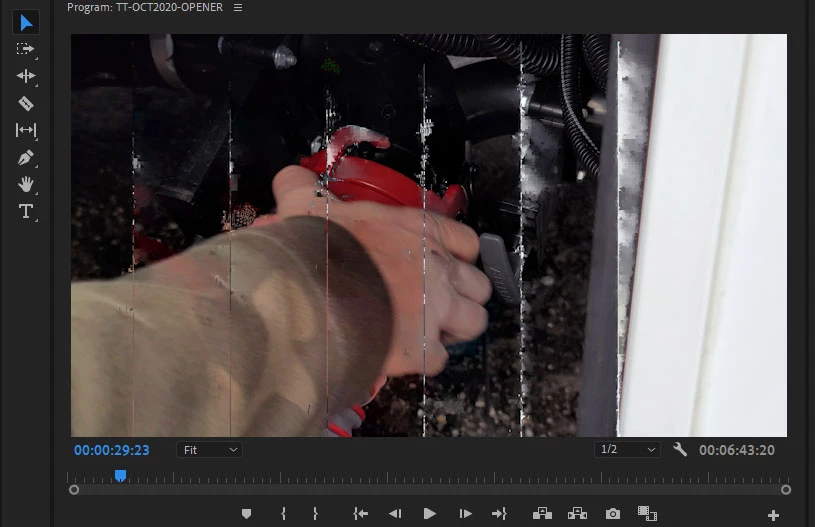
This is not happening on all the video assets. This only appears to be hapening with the video assets taken on a Samsung Galaxy Note 20 in 8K @24fps. Which leads me to think it is a HEVC codec issue? However, I downloaded the latest HEVC codec from the microsoft store and rebooted the machine and the results are the same. I did not have this issue on my other machine working on this same project & same assets. Any ideas?
Computer Specs:
- GE75 Raider 10SGS
- Microsoft Windows 10 Home 64-bit
- Intel(R) Core(TM) i7-10875H CPU @ 2.30GHz-5.1GHz
- 32 GB RAM @ 1600 MHz
- NVIDIA GeForce RTX 2080 Super, 8192 MB
Video Specs
- Type: MPEG Movie
- File Size: 110.77 MB
- Image Size: 7680 x 4320
- Frame Rate: 24.01
- Source Audio Format: 48000 Hz - Compressed - Stereo
- Project Audio Format: 48000 Hz - 32 bit floating point - Stereo
- Total Duration: 00;00;11;16
- Pixel Aspect Ratio: 1.0
- Alpha: None
- Video Codec Type: HEVC 4:2:0
- Variable Frame Rate Detected
 AdChoices