


Participating Frequently
January 27, 2020
Question

Viewing titles of clips as list?
  • January 27, 2020
  • 3 replies
  • 632 views

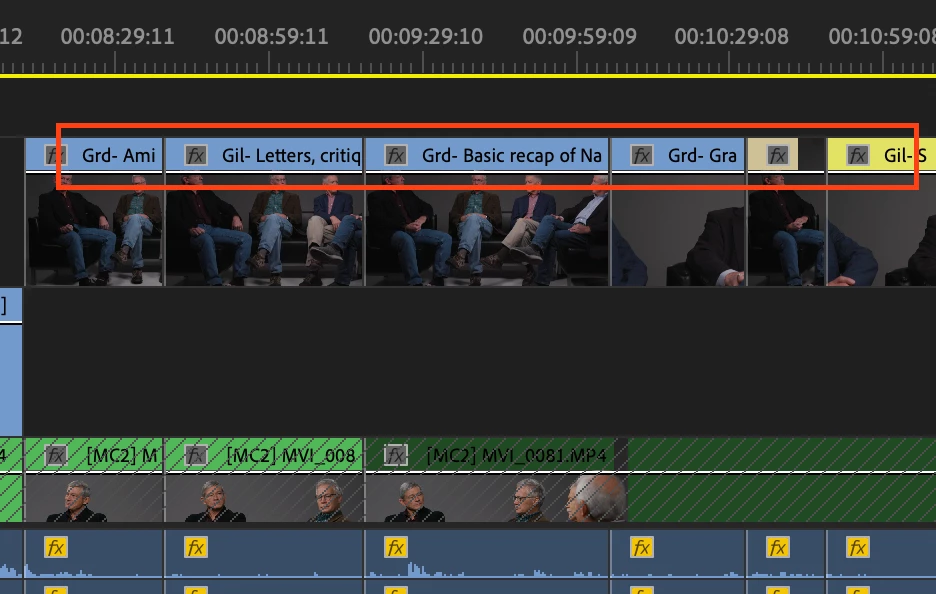
The first main step of my workflow for editing long interviews into shorter pieces is to annotate clips in this fashion, cutting the entire interview clip into shorter clips on a timeline. Is there any way of browsing these renamed clips (or, I guess, portions of clips) in a sequential list, organized by in/out time, in order to see all topics covered as text only? 

This topic has been closed for replies.

3 replies

R Neil Haugen
Legend
January 28, 2020

If you have made subclips of those, then ... you could go into a bin of subclips in List view in the Project panel ... click on Media Start heading to sort by start time-code.


Would that do what you need?


But ... they would need to have been set as specifically subclips ... which it looks like you may have done?


Neil

Everyone's mileage always varies ...
Inspiring
January 28, 2020

what a great question.

Oddly, it is what editing is about in the most basic form. Shoot a master, shoot coverage of a 'scene'.

Then cut it up so you go from wide master to closer shots ( medium, tight, etc.) and use the sound that is best from what you recorded ( sometimes called J and L cuts etc. ).


I use paper to make notes if something is complicated ( lots of source material to scrub through and start making decisions... I make notes about the clip name or number and use forms I made in some kind of word processor or quark xpress or whatever... in other words I use what I have to use to keep track of what I saw already.


I'm a slob maybe... cause I end up making notes about sound and effects etc. in the margins of those forms as I go along ... scrubbing through what I'm making and getting the timing down and so on...


Eventually it's the timeline that describes the timeline... the images and sound and the overall product as it progresses.

Not some printed out list of subclips, in out points, multiple cuts in and out of master and close ups... that is the product, to me, not the names of the clips ( notes like chapter markers or timeline markers etc.)


This sounds like you made a movie, and now you want to write a book from the movie and use some auto process to describe what you did in another medium.


WeAreMoose
Inspiring
January 27, 2020

Hm, that's not how I'd organize this, but have you tried dragging all clips from the timeline into your browser?


They should come up there with their name. Then you can sort by start timecode and you should be good?


Thanks

Jannick

NickRSAuthor
Participating Frequently
January 27, 2020

I didn't know you could do that... that's good to know! Unforunately, however, this didn't work as it just brings up several instances of the original filename. The color coding comes through, but not the renamed clips.


How would you organize it?