


Participant
December 3, 2018
Question

What does this exporting error mean?!

  • December 3, 2018
  • 2 replies
  • 471 views

Hello!
I have been searching the forums about exporting errors and there is an overwhelming amount of information. However, I can't seem to find a list of export error codes to understand what my specific issue is. I am attempting to export a 25 minute sequence in H.264 High Quality 1080p HD. It does not even begin to load before I get the following error message. What does error code 3 refer to? This is the first major project I have exported in Premiere and am not familiar with the ins and outs of exporting. I've been super frustrated with Premiere's performance on my Mac and don't know what to do.
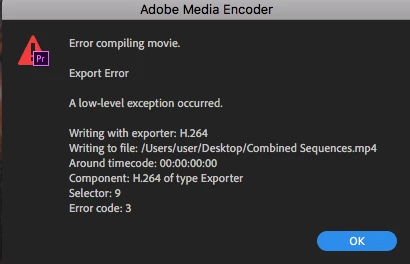
Thanks!

This topic has been closed for replies.

2 replies

R Neil Haugen
Legend
December 3, 2018

You might also try High Quality Adaptive bitrate. For some people that has fewer issues.

Neil

Everyone's mileage always varies ...
n_khuranaAuthor
Participant
December 3, 2018

No luck with High Quality Adaptive bitrate. Alas- I keep searching! Adobe, please help!

R Neil Haugen
Legend
December 3, 2018

Try setting an in point at the second or third clip, and see if the export works.

It could be there's an issue with something off in the first clip or the effects used there or the media cache/database for that clip or section of the timeline.

If that export goes through that tells you there's something wrong at the beginning. You could then delete everything in media cache/database folders and/or rebuild the first clip or two.

Neil

Everyone's mileage always varies ...
John T Smith
Community Expert
Community Expert
December 3, 2018

Error Compiling Movie... some past discussions and ideas

May be caused by . in name https://forums.adobe.com/thread/2166620

-1st, create a new project and import the project that has errors and see if that fixes the problem

-http://helpx.adobe.com/premiere-pro/kb/error-compiling-movie-rendering-or.html

-and a long discussion https://forums.adobe.com/thread/1240823

n_khuranaAuthor
Participant
December 3, 2018

I saw this posted elsewhere. Looking through the long discussion is quite time consuming and some of the solutions aren't really feasible - as I am working within 'team projects'. I am looking for answers about those who have experienced that specific error code (#3) and what that means.