


Participant
July 5, 2021
Answered

Zooming in timeline problem (Mac OS and Logitech MX Master 3)

  • July 5, 2021
  • 8 replies
  • 9845 views

I'm using the Logitech MX Master 3 on a MacBook Air M1.


I have mainly 2 problems...


1 - When I zoom in a timeline with the Alt+Vertical Scroll, the timeline zoom all the way without any issues, at any speed. But when I try to zoom out fast, it goes all the way out and sudently goes all the way in very fast at the zoom. It's very annoying because when I wanna see all the project by zooming out, I have to do it very slowly. (In the video: 00:00 - 00:13)


2 When I use the the zoom in/out with the Alt+Horizontal Scroll of the MX Master 3, the "stops" are not quite smooth. Between one and another stop the change is too much abrupt... (In the video: 00:13 - final)


Any solutions for this problems?
Correct answer SCrompto

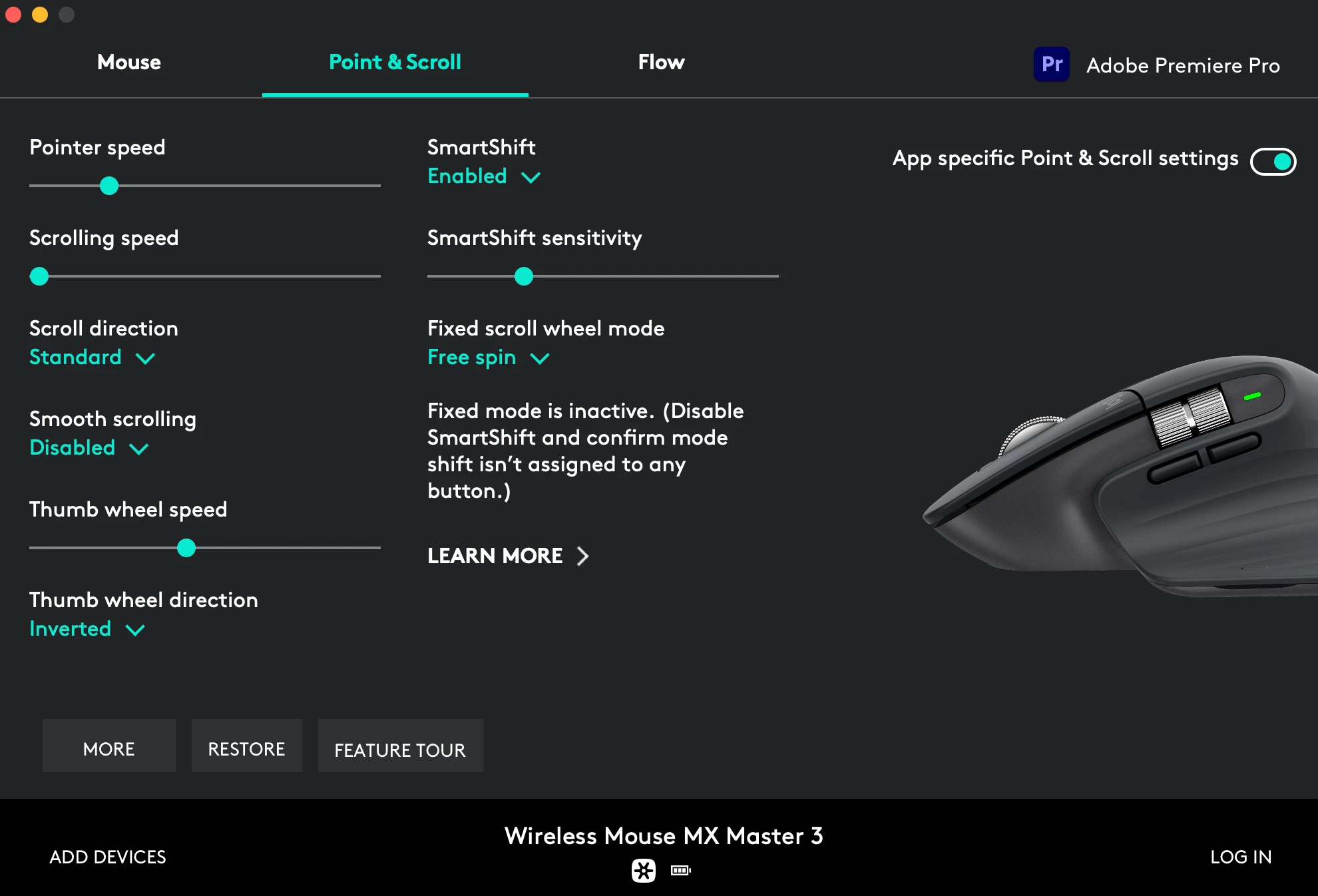
I had this issue on my 2020 iMac. I found that if I changed the scroll speed to the minimum for premiere pro it would fix that issue. 

 The main issue I'm having with this mouse is that now my timeline navigation doesn't work, but I'm pretty sure it's unrelated. It worked last week, but when I started working this monday I could no longer control the playhead with my thumbwheel, or use the side buttons to go frame by frame.

8 replies

Participant
April 13, 2026

Hi all,

I'd like to file (yet another) report on a bug that has been reported by multiple users on this forum since at least June 2021, and is still fully reproducible on the latest Premiere Pro 26.0.2 (Build 2). I'm posting here because Adobe Japan support told me that for issues like this, the English Premiere Pro community forum is the fastest and most direct channel to reach the engineering team.

The bug When holding Option (⌥) and scrolling the mouse wheel to zoom the timeline in or out at anything more than a very slow, single-notch pace, the timeline immediately jumps to the maximum zoom level — regardless of whether I'm trying to zoom in or zoom out. Both directions snap to fully zoomed in. Only an extremely slow, one-notch-at-a-time scroll behaves correctly.

Environment

  • Adobe Premiere Pro 26.0.2 (Build 2)
  • macOS Tahoe 26.4.1
  • Logitech MX Master 3S (also reproduced with MX Anywhere 3S)
  • Reproduced on both Logi Bolt USB receiver and Bluetooth
  • Logi Options+ 2.1.854977

Steps to reproduce

  1. Open any sequence in Premiere Pro.
  2. Hold Option (⌥) and scroll the mouse wheel to zoom the timeline.
  3. Scroll slightly faster than a slow, single-notch pace.
  4. → Timeline snaps to maximum zoom in a single gesture, in either direction.

Scope of the issue (what I've tested to narrow it down)

  • Does NOT happen with Logitech G502X on the same machine, same project, same Premiere Pro build. → Rules out OS, Premiere Pro alone, and the project.
  • Does happen with MX Anywhere 3S as well. → The issue is specific to the MX Master / MX Anywhere line.
  • Reproduced on both Bluetooth and Logi Bolt receiver. → Not a connection/transport issue.
  • Does NOT happen in After Effects 2026, even though After Effects uses the same Option + scroll zoom shortcut, with the same mouse, on the same machine. → This strongly suggests Premiere Pro is interpreting scroll deltas differently from After Effects.
  • The bug also occurs before SmartShift / MagSpeed free-spin engages, while the wheel is still in normal ratchet mode, so the high-resolution scroll behavior itself is not the direct cause.
  • I have personally been hitting this bug for at least two years, across multiple versions of Premiere Pro, Logi Options+, and macOS. My workaround has been to swap to a G-series mouse every time I open Premiere Pro, which is obviously not a real solution.

My hypothesis Logi Options+ appears to send scroll events that Premiere Pro, when combined with the Option modifier, interprets as an extreme zoom delta, causing the timeline to snap to maximum zoom in a single gesture. Since the same mouse works correctly in After Effects, the way Premiere Pro consumes scroll deltas seems to be a key part of the problem.

This is a known, long-standing issue — please don't close it as "set the scroll speed to minimum"

This bug has been reported on this forum repeatedly since at least 2021, across MX Master 2s / 3 / 3S, and across Premiere Pro v24, v25, and now v26. Some of the prior threads:

In every one of these threads, the response from Adobe staff has been to suggest the workaround of lowering the per-application scroll speed in Logi Options+ to its minimum. That is a workaround, not a fix. Five years of identical reports across three major versions of Premiere Pro, on a mouse line that is one of the most popular among Premiere editors, with the same mouse working correctly in After Effects, makes a strong case that there is something on the Premiere Pro side of the scroll-delta handling that needs to be addressed.

Logitech side I have also reported this directly to Logitech support and they are looking into it from the Logi Options+ side. I'm reporting it here in parallel so both teams are aware, and so that whichever side actually owns the root cause can fix it properly.

Reference for Adobe staff Adobe Japan support case ID for the same report: ADB-44814476-B7H9 (case has been closed on their side and escalated internally; they directed me to continue here on the English forum).

I'm happy to provide a screen recording, logs, or test any builds. Given how many users this affects and how long it's been outstanding, I would really appreciate it if this could be properly escalated to engineering this time rather than closed with the scroll-speed workaround.

Thanks,
Hiro

Participant
July 14, 2024

I had this issue on my Macbook Air M1. Please look for scroll speed on your mouse controller application. In my case It was LinearMouse. Please change the scroll speed to the minimum. I was looking for a solution to this for 2 hours and just found it lmao don't waste time xD

Participant
December 1, 2023

It happens to me with MX Vertical and the lastest Logi Options+, it's very very annoying....

Participant
December 1, 2023

Just as a workarround you can install Smooze Pro and activate the smooth scroll for adobe premier with the following settings: vertical lines: 1.00, acceleration: 0.0, hold alt to divide lines by: 3, duration: 50

Participant
August 4, 2022

I had the same Issue on Windows 10.
Wasted a whole load of time trying different things.
I beleieve the issue started after I updated to the latest utility (Logi+), so I rolled back to a previous version (9.70.68) and all functionality has returned, thankfully.

traviss54220837
Participant
January 24, 2022

I have this same issue. I downloaded the new Logitech MX for mac BETA software and it fixed my issues. Recommended!

Warren Heaton
Community Expert
Community Expert
July 13, 2021

The Logitech Options application was recently updated for Big Sur.


On my M1 Mac Mini, my Logitech MX Anywhere 2 Mouse works as expected in a Premiere Pro with or without the drivers installed. 

Participant
July 13, 2021

I don't know if it was the update or the scroll speed, but now it's working much better, thanks!

SCromptoCorrect answer
Participant
July 8, 2021

I had this issue on my 2020 iMac. I found that if I changed the scroll speed to the minimum for premiere pro it would fix that issue. 

 The main issue I'm having with this mouse is that now my timeline navigation doesn't work, but I'm pretty sure it's unrelated. It worked last week, but when I started working this monday I could no longer control the playhead with my thumbwheel, or use the side buttons to go frame by frame.

Participant
July 13, 2021

That solved my problem apparently, now is much better, thanks for the help!


Inspiring
July 6, 2021

No solution, but as much as I like my MX mice, Logitechs Mac software/drivers are (in my opinion) not good.

Have they updated their software to support M1's? Or are they running in emulation mode ... that might be part of the problem.

Check to see if they have any updated software.

I can only suggest that you use the '+' & '-' keys for timeline zooming and the backslash key to return to full timeline width.

Not what you want but still a (alternate) fast way to navigate the timeline.

Participant
July 7, 2021

Everything is up to date, unfortunately...


Maybe is a problem with the M1, hope they fix it, Im using the timeline bar to navigate now, but it's a lot more time consuming