


Inspiring
October 2, 2019
Question

 character auto-added to random topics during Frameless (Orange) generation

  • October 2, 2019
  • 21 replies
  • 2120 views

Environment

RoboHelp 2019 (New UX - v2019.0.9)

Windows 10

Chrome, Firefox, etc.
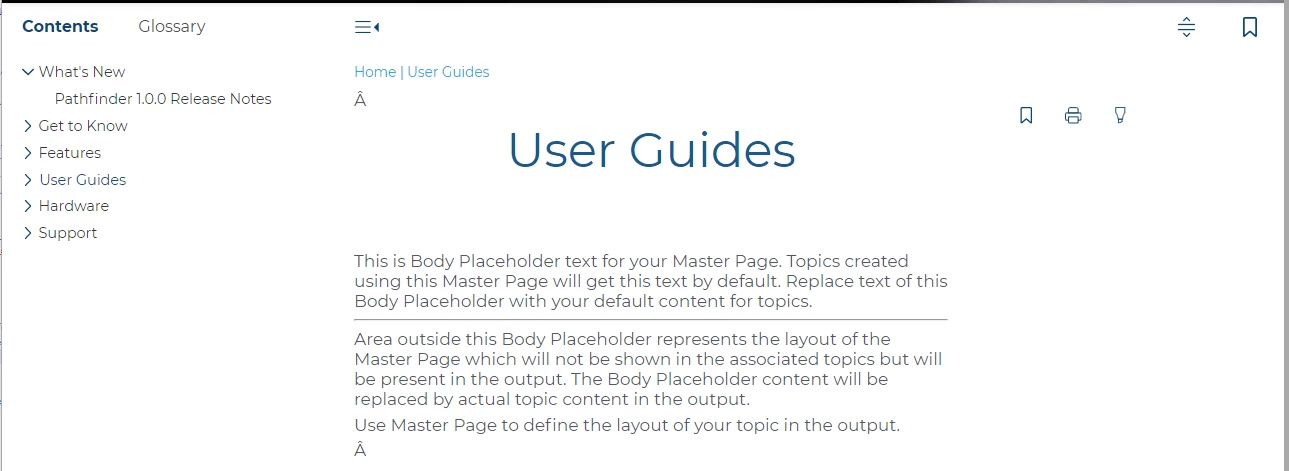


It doesn't appear on all topics. And there's no pattern to which topics it appears on. To make it even more confusing, it often changes which topics it appears on each time I compile. If I edit a topic/htm file in a text editor, this is where the character is being inserted (red, bold text below - note that it appears twice in this example):


<?xml version="1.0" encoding="utf-8" ?>

<!DOCTYPE html>
<html xmlns="http://www.w3.org/1999/xhtml"><head>
<meta http-equiv="X-UA-Compatible" content="IE=edge"/>
<meta http-equiv="Content-Type" content="text/html; charset=utf-8"/>
<meta name="viewport" content="width=device-width, initial-scale=1, maximum-scale=3, user-scalable=yes"/>
<meta name="generator" content="Adobe RoboHelp 2019"/>
<meta name="version" content="2019.0.8"/>
<link rel="StyleSheet" data-skin="true" type="text/css" href="../../template/light/layout.css"/>
<link rel="StyleSheet" data-skin="true" href="../../template/light/userstyles.css" type="text/css"/>
<title>User Guides</title>

<link rel="shortcut icon" type="image/png" href="../../logo.png"/>

<link rel="stylesheet" type="text/css" href="../../assets/css/default.css"/>
<meta http-equiv="Content-Type" content="text/html; charset=utf-8"/>
<meta name="generator" content="Adobe RoboHelp 2019"/>
<title>User Guides</title>
<meta name="topic-status" content="Draft"/>
<link rel="stylesheet" type="text/css" href="../../assets/css/default.css"/><meta name="template" content="../../assets/masterpages/test.htt"/>
<meta http-equiv="Content-Type" content="text/html; charset=utf-8"/>
<meta name="generator" content="Adobe RoboHelp 2019"/>
<title>light-footer</title>
<meta name="topic-status" content="Draft"/>
<link rel="stylesheet" type="text/css" href="../../template/light/default.css"/>
<meta name="template" content="../../../assets/masterpages/home-page.htt"/>
</head>

<body class="rh-BODY-wrapper">
<div class="cookie-widget-holder" id="cookie-status-widget-holder"></div>
<div class="RH-LAYOUT-HEADER-container ">
<div class="RH-LAYOUT-HEADER-logo-box ">
<div class="logo-holder" id="logo-holder"></div>
<div class="topic-title-holder" id="topic-title-holder"></div>
</div>
<div class="search-placeholder-class" id="search-with-help"></div>
</div>
<div class="RH-LAYOUT-BODY-container">
<div class="RH-LAYOUT-SEARCHRESULTS" id="rh-searchresults"></div>
<div class="RH-LAYOUT-LEFTPANEL-container" id="rh-leftpanel"></div>
<div class="rh-layout-BODY-main" id="rh-layout-main">
<div class="RH-LAYOUT-TOOLBAR-toolbar-box" id="rh-toolbar"></div>
<div class="rh-layout-BODY-body">
<div class="RH-LAYOUT-CENTERPANEL-container">
<div class="rh-selectdetails" id="rh-selectdetails"></div>
<div class="RH-LAYOUT-CENTERPANEL-topic-box" id="rh-topic">
<div>
<p> </p>
</div>
<div>
<p class="home-title"><span data-field="title" data-format="default">User Guides</span></p>
<p>This is Body Placeholder text for your Master Page. Topics created using this Master Page will get this text by default. Replace text of this Body Placeholder with your default content for topics.</p>
<hr/>
<p>Area outside this Body Placeholder represents the layout of the Master Page which will not be shown in the associated topics but will be present in the output. The Body Placeholder content will be replaced by actual topic content in the output.<br/>
</p>
<p>Use Master Page to define the layout of your topic in the output.</p>
</div>
<div>
<p> </p>
</div>

</div>
<div class="RH-LAYOUT-BRS-container" id="rh-brs"></div>
</div>
<div class="RH-LAYOUT-RIGHTPANEL-container" id="rh-rightpanel"></div>
</div>
</div>
</div>
<div class="RH-LAYOUT-FOOTER-container" id="rh-footer">
<div class="section group">
<div class="col span_1_of_3">
<table align="center" cellspacing="0" width="300">
<colgroup>
<col style="width: 100%;"/>
</colgroup>
<tbody>
<tr style="height: 60px;">
<td>
<p class="DocInfo" style="margin-top: 0pt; margin-bottom: 0pt;"><img alt="Company logo" height="" src="../../template/light/drb-logo.png" width="75%"/></p>
<p class="footer-text" style="margin-top: 0pt; margin-bottom: 0pt;">3245 Pickle Rd.<br/>
Akron, OH 44312<br/>
Sales: 800.336.6338<br/>
Main Office Fax: 330.645.2299<br/>
Knowledge Center: 330.645.3299<br/>
Knowledge Center Fax: 330.645.4474</p>
</td>
</tr>
</tbody>
</table>
</div>
<div class="col span_1_of_3">
<table align="center" cellspacing="0" width="300">
<colgroup>
<col style="width: 100%;"/>
</colgroup>
<tbody>
<tr style="height: 60px;">
<td>
<p class="footer-heading" style="margin-top: 0pt; margin-bottom: 0pt;">QUICK LINKS</p>
<p class="footer-link" style="margin-top: 0pt; margin-bottom: 0pt;">Search Tips</p>
<p class="footer-link" style="margin-top: 0pt; margin-bottom: 0pt;">Terms of Use</p>
<p class="footer-link" style="margin-top: 0pt; margin-bottom: 0pt;">Copyright + Trademark</p>
</td>
</tr>
</tbody>
</table>
</div>
<div class="col span_1_of_3">
<table align="center" cellspacing="0" width="300">
<colgroup>
<col style="width: 100%;"/>
</colgroup>
<tbody>
<tr style="height: 60px;">
<td>
<p class="footer-heading" style="margin-top: 0pt; margin-bottom: 0pt;"><strong>IN●KNOW●VATION</strong></p>
<p class="footer-text" style="margin-top: 0pt; margin-bottom: 0pt;">The difference between a good car wash business and a great one.</p>
</td>
</tr>
</tbody>
</table>
</div>
</div>

</div>
<script type="text/javascript">//<![CDATA[

gRootRelPath = "../.."
gCommonRootRelPath = "../.."
gTopicId = "4"
//]]></script>

<script src="../../template/scripts/topicpage.js"></script>
<script src="../../whxdata/layoutconfig.js"></script>
<script src="../../whxdata/brsdata.js"></script>

</body></html>

This topic has been closed for replies.

21 replies

Mark_Noc
Inspiring
February 19, 2021

Stefan, the "edge" metadata is a part of the Orange skin it seems, as the actual robohelp HTML does not have that in it.


I've also found the issue... The initial landing page created by the frameless skin (the page with the ToC images) does NOT have a character encoding head meta as part of the template, neither do the half dozen other pages that also show the issue. The issue itself is in the footer, and the page that is used to create the footer DOES have the character encoding, but this appears to have been stripped out when the docs are built.


So, adding the correct metadata into the orange skin template file itself and re-building has fixed the issue, and I can now simply re-add the line back into the other pages that are missing it. I have no idea how the line was deleted in the first page from the main pages, as 99.9% of the rest of the docs have it, but I suspect it's simply a case of user error/inattentiveness rather than anything else... 😞


That said,  I think Adobe should look at updating the frameless templates to add character encoding to the main index page and remove the "edge" meta data if it's not required from all the other pages...


At least the issue is now solved, and it's thanks to your very helpful tips!

Mark_Noc
Inspiring
February 19, 2021

Hello Stefan! Okay, so, Notepad++ encoding shows the doc is indeed UTF-8 (no BOM), and the base HTML has the XML declaration at the top:

<?xml version="1.0" encoding="utf-8" ?>

and the metadata line:

<meta http-equiv="Content-Type" content="text/html; charset=utf-8" />

However, checking the firefox debugger shows that you are correct and it is indeed being parsed as non-unicode, since the "text encoding" section of Firefox shows "Western" and not "Unicode". Switching to Unicode in the Firefox menu fixes the issue. Checking this same property in Chrome (using the console "document.characterSet") shows UTF-8. Knowing this, I'll continue to investigate, and thank you for the pointers!

Community Manager
February 19, 2021

Interesting. I would have expected especially Firefox to properly detect that the file is Unicode. Change the encoding of the files to UTF-8 with BOM. That should force Firefox to read it as Unicode.

Any specific reason why you have


<meta http-equiv="X-UA-Compatible" content="IE=edge"/>


in the file? You do not really need this, unless you are explicitly addressing an audience that is on Pre-IE11 (IE 10 or older). And for IE11 users, <!doctype html>  already forces IE into Edge mode.

I could imagine that the presence of the X-UA-Compatible somehow confuses Firefox and makes the engine assume that it's "probably" not a Unicode file.

Community Manager
February 19, 2021

The  character usually appears in browser rendering when a Unicode encoded file (usually UTF-8) is parsed as non-Unicode.

In your case it appears in the part that is coming from the topics.

Check the corresponding topic file, it should also start with

<?xml version="1.0" encoding="utf-8" ?>

and has this line in the head:

<meta http-equiv="Content-Type" content="text/html; charset=utf-8"/>

If that is there, and is still coming wrong, check if the file is "really" a UTF-8 encoded file: Open it in a free text editor like Notepad++ and check to which encoding the file is set. If it is not UTF-8, change the encoding it UTF-8 – preferably to UTF-8 with BOM (Byte Order Mark).

Peter Grainge
Community Expert
Community Expert
February 19, 2021

See what else gets posted but if there's nothing useful, I would contact Support to see if anyone else has contacted them about this. See https://helpx.adobe.com/contact/enterprise-support.other.html#robohelp for your support contact options.


Depending on what they say, you could also create a bug report. Please follow this link to report bugs. https://tracker.adobe.com

If you are only seeing this if you publish rather than when you generate, it might be worth doing a full republish.

________________________________________________________
See www.grainge.org for free Authoring and RoboHelp Information

Use menu (bottom right) to mark as Best Answer or to Highlight particularly useful replies. Found the answer elsewhere? Share it here.
Mark_Noc
Inspiring
February 19, 2021

Hi Peter! I'm on 2020.3.32. I saw the issue marked as fixed in this topic and the other one linked here, which is why I'm posting here to bump the issue and see what others say... It's kind of weird as it's ONLY Firefox I'm seeing these characters on and both Chrome and Edge display the documentation fine. It's also only on a very few pages, while most are okay, which is again a bit weird. So not quite the same issue in terms of reproducability, but very similar.

Peter Grainge
Community Expert
Community Expert
February 19, 2021

What update are you on? I thought that issue was fixed.

________________________________________________________
See www.grainge.org for free Authoring and RoboHelp Information

Use menu (bottom right) to mark as Best Answer or to Highlight particularly useful replies. Found the answer elsewhere? Share it here.
Mark_Noc
Inspiring
February 19, 2021

Going to bump this as I'm having the same issue... Using the Frameless Orange skin (but heavily customised) and using RoboHelp 2020. On Firefox I'm getting random Â characters added to pages (on chrome this doesn't happen).., for example:


Firefox: 

Chrome (and Edge):

That part of the page is actually generated from a single footer file, so all pages should be the exact same, however on FireFox I'm seeing random pages with that Â symbol inserted... It's all from the same source so it makes no sense to me at all. Not sure whether I should file this as a bug or not...? Anyone else seen this happen? It's odd that it's only visible on one browser, but not on others.


Adobe Employee
October 16, 2019

Hi,

We have fixed this issue and it will be part of Update 10 which is due in November.

Thaank you for your support.

Regards,
Surbhi Maheshwari

Peter Grainge
Community Expert
Community Expert
October 14, 2019

Adobe have posted in another thread that they have been able to reproduce the problem and are working on a fix.


https://community.adobe.com/t5/RoboHelp/Robohelp-inserting-empty-paragraphs-divs-and-characters-on/m-p/10667835#M126799


Use menu (bottom right) to mark as Best Answer or to Highlight particularly useful replies. Found the answer elsewhere? Share it here.
RoboFanAuthor
Inspiring
October 10, 2019

Files have been sent! Thanks for the suggestion, Peter!