

Marc M.
Inspiring
March 24, 2021
Answered

Activate reviews are gone after sharing

  • March 24, 2021
  • 7 replies
  • 735 views

Hello Adobe-Community,


We are currently in the testing phase with Robohelp 2020 and are testing out the possibility of reviews.
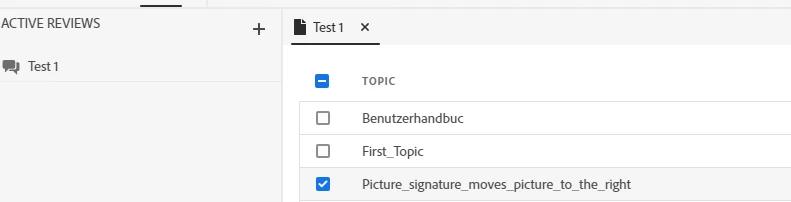
We create a new group for active reviews and then select the content to be assigned to this group.
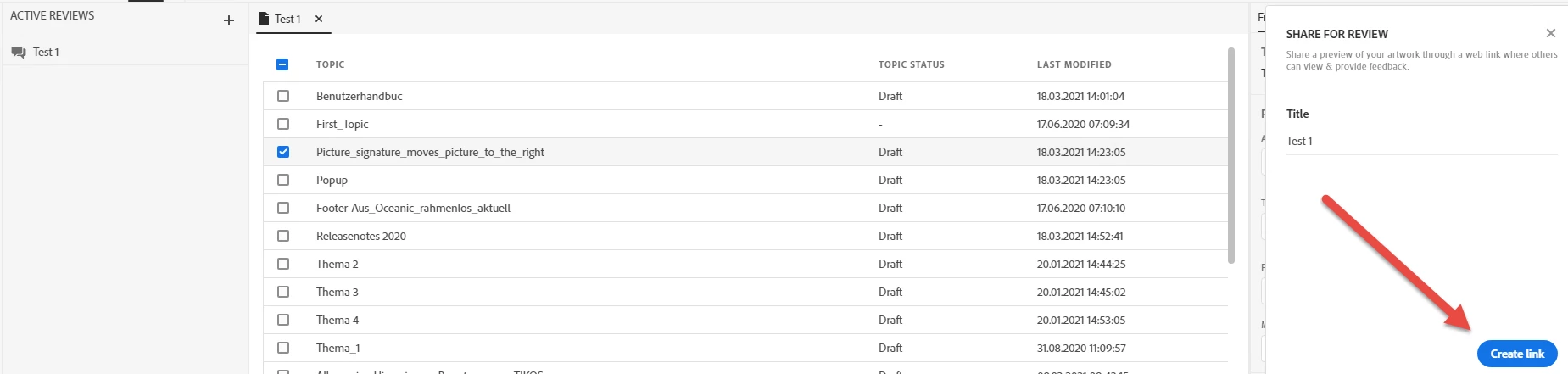
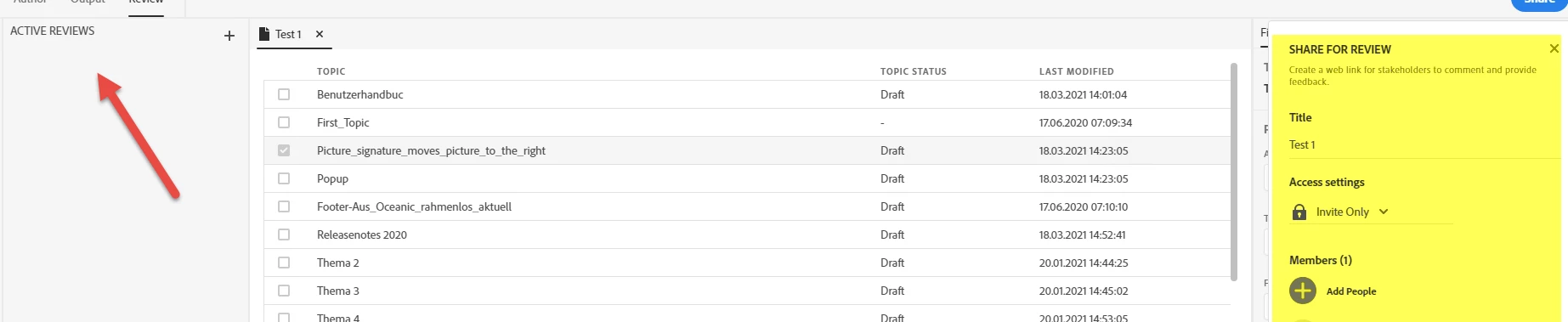
After that, we then share this review group. As soon as I have invited two employees, I no longer see the group in the overview.

Does anyone have a similar problem with this?

Step 1:
 

Step 2:
 

Step 3:


Furthermore, I haven't figured out how to change a group from "Active" to "Completed".

Thanks for the help from the community.


    This topic has been closed for replies.
    Correct answer Peter Grainge

    What has worked for me getting rid of earlier reviews and being able to add a new one is this.


    With the project closed I opened the RHPJ file and removed that line. Then I went to https://assets.adobe.com/cloud-documents and removed all the reviews from there.


    On reopening the project I was able to create a new review successfully and send an invitation. At the moment I haven't had a response but it is showing in the project and in the cloud.


    Try that and let us know how you get on. For me it was a throwaway project and it looks the same for you. If in doubt, backup first.

    ________________________________________________________
    See www.grainge.org for free Authoring and RoboHelp Information

    7 replies

    Peter Grainge
    Community Expert
    Community Expert
    March 26, 2021

    Marking a review as Complete is not there yet. It will be in a later update.

    ________________________________________________________
    See www.grainge.org for free Authoring and RoboHelp Information

    Use menu (bottom right) to mark as Best Answer or to Highlight particularly useful replies. Found the answer elsewhere? Share it here.
    Marc M.
    Marc M.Author
    Inspiring
    March 26, 2021

    Thank you for your quick targeted help!

    Peter Grainge
    Community Expert
    Peter GraingeCommunity ExpertCorrect answer
    Community Expert
    March 26, 2021

    What has worked for me getting rid of earlier reviews and being able to add a new one is this.


    With the project closed I opened the RHPJ file and removed that line. Then I went to https://assets.adobe.com/cloud-documents and removed all the reviews from there.


    On reopening the project I was able to create a new review successfully and send an invitation. At the moment I haven't had a response but it is showing in the project and in the cloud.


    Try that and let us know how you get on. For me it was a throwaway project and it looks the same for you. If in doubt, backup first.

    ________________________________________________________
    See www.grainge.org for free Authoring and RoboHelp Information

    Use menu (bottom right) to mark as Best Answer or to Highlight particularly useful replies. Found the answer elsewhere? Share it here.
    Marc M.
    Marc M.Author
    Inspiring
    March 26, 2021

    Hello Peter,


    this is really awesome... it works now!

    I have also installed Robohelp 2020 locally. Here the review works immediately. So I can imagine that a server environment could cause the problems here. But your fix works just as flawlessly. I hope that from now on we can work with the reviews without any problems.


    One more small question:
    At what point is a review set to "Completed".
    I have "resolved" all comments. But the review remains in the status "active"


    Peter Grainge
    Community Expert
    Community Expert
    March 25, 2021

    I am now seeing the same problem. I am liaising with Adobe and will post back when I know more.

    ________________________________________________________
    See www.grainge.org for free Authoring and RoboHelp Information

    Use menu (bottom right) to mark as Best Answer or to Highlight particularly useful replies. Found the answer elsewhere? Share it here.
    Peter Grainge
    Community Expert
    Community Expert
    March 25, 2021

    With your project closed open the RHPJ file in a text editor. Near the top there should be a  <cloudid>. Is there one? Don't post what it is, just wanting to know if that line is there.

    ________________________________________________________
    See www.grainge.org for free Authoring and RoboHelp Information

    Use menu (bottom right) to mark as Best Answer or to Highlight particularly useful replies. Found the answer elsewhere? Share it here.
    Marc M.
    Marc M.Author
    Inspiring
    March 26, 2021

    The line is there when i open the rhpj-file with an Editor.

    Dierctly after <title> the <id> is there with values.

    Marc M.
    Marc M.Author
    Inspiring
    March 26, 2021

    Of course i mean <cloudid> is there after <id>...

    Peter Grainge
    Community Expert
    Community Expert
    March 25, 2021

    The review folder is part of the project folders in Explorer so look there. If there is no review folder that wouldn't surprise me in this case.


    I don't think RoboHelp is supported on terminal server so that could well be the problem. Let me ask.

    ________________________________________________________
    See www.grainge.org for free Authoring and RoboHelp Information

    Use menu (bottom right) to mark as Best Answer or to Highlight particularly useful replies. Found the answer elsewhere? Share it here.
    Peter Grainge
    Community Expert
    Community Expert
    March 24, 2021

    I have been given this information


    When a review is created in a particular project for the first time, 

    1. a particular cloud id is generated for the project and that is stored in the project file.
    2. the list of active reviews for the project is fetched from the server using that cloud id (for that user)


    The possible scenarios where an incorrect or empty list appears in the review panel in RH.


    1. If the project file gets overwritten by another one which does not have said id, the review panel would appear to be empty.
    2. Also if the user logs in with another id in RH, he would not be able to see the reviews created with another id and again review panel would appear to be empty.
    3. Due to some intermittent network issues in communication with the server, the list may not completely load. 
      The list is refreshed at 
      a]project open
      b] creating another new review
      The list of all uploaded content (including all active reviews) can be confirmed at https://assets.adobe.com/cloud-documents
      Here there would be folders specific to each project, and the same list should reflect inside RH for the given project.


    Perhaps try closing the project and reopening first, then try a very different name? You might also try looking in the Review folder in File Explorer and trashing anything there before trying again.

    ________________________________________________________
    See www.grainge.org for free Authoring and RoboHelp Information


    Use menu (bottom right) to mark as Best Answer or to Highlight particularly useful replies. Found the answer elsewhere? Share it here.
    Marc M.
    Marc M.Author
    Inspiring
    March 25, 2021

    Hello Peter,

    first of all thank you for supporting me here with so much information. The problem we have here is very strange.

    When I click on your link, I find all my review groups that I have ever created. But none of them appear directly in Adobe Robohelp under Reviews.

    Where is the review folder in Microsoft? I can't find it right away.

    Could it be a problem if Adobe Robohelp is installed on a terminal server and the files and folders from a project are on a network drive?


    Peter Grainge
    Community Expert
    Community Expert
    March 24, 2021

    Have you looked at the Reviewing topic in the About RoboHelp sample project or on my site? Project Reviews (grainge.org)


    The reviewer has to have an Adobe ID and the invitation has to be sent to the email address associated with their Adobe ID. I don't think that is verified at the time you create the review though. Nonetheless check that.


    In looking at this I never saw the right panel show in yellow. Is that something you have done for the screenshot or the way it appears in RoboHelp?


    Beyond that, do you have all updates applied? You should be on 2020.3.


    "Completed" should be an option from the review menu. I suspect it may not be there until a reviewer has submitted their response.

    ________________________________________________________
    See www.grainge.org for free Authoring and RoboHelp Information

    Use menu (bottom right) to mark as Best Answer or to Highlight particularly useful replies. Found the answer elsewhere? Share it here.