


Inspiring
March 11, 2021
Answered

Best practice for assigning condition tags (RH 2019, RH 2020)

  • March 11, 2021
  • 3 replies
  • 399 views

Hi, Everyone.


In both RH 2019 and RH 2020, what is best practice when assigning condition tags? Specifically, I have two condition tags, based on the role of my end user:


  • Contractors
  • Employees


The DCF filter is working great. However, I have two questions.


  1. Filtering works the same way whether I apply the condition tag to each page in a TOC book or just the TOC book and none of the pages in that book. Which is best practice?
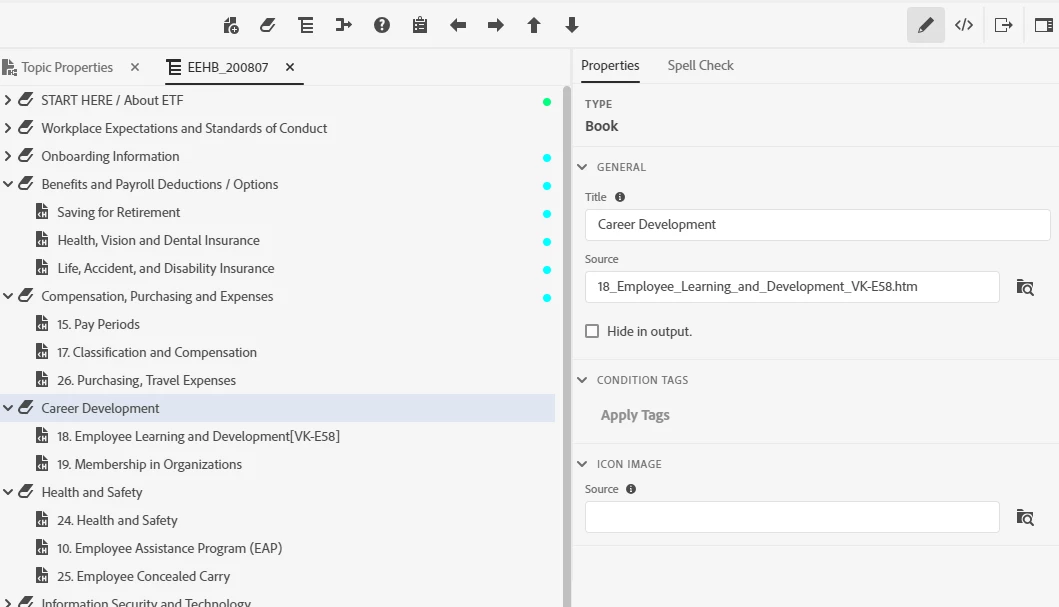
  2. If I assign no condition tag to a book or its pages (see screenshot), the filter treats those topics the same as if it had the "Employees" tag assigned. I have a vague memory of this behavior being either a default behavior or a behavior that I've configured. Is it okay to just leave it this way? (The filter is performing the way I want it to.)


SCREENSHOT


Thank you!

    This topic has been closed for replies.
    Correct answer Peter Grainge

    Depends what you want to do.


    Putting a topic in a TOC gets it into the build. If you want to exclude a topic from a particular build, then you would tag the topic and create an expression to exclude topics with that tag.


    Maybe though you have a lot of topics that need to be in the build but you only want them to be access from other topics. Putting them in the TOC to get them in the build is essential but you don't want the user to see a massive unwieldy TOC. In a simple scenario you would put them in the TOC and then select the Hide option. That will hide them from the TOC in every build. Sometimes though you only want to hide them in the TOC in certain builds. Then you would tag the topic in the TOC so you can use an expression that means it is still in the build but doesn't show in the TOC. They can be found by searching or the index, not the TOC.

    ________________________________________________________
    See www.grainge.org for free Authoring and RoboHelp Information


    3 replies

    Inspiring
    March 17, 2021

    Oh! Okay, I'm getting it, now. 

    Thanks much for that rundown, Peter. That's plenty for me to work out what I should do.

    Peter Grainge
    Community Expert
    Peter GraingeCommunity ExpertCorrect answer
    Community Expert
    March 11, 2021

    Depends what you want to do.


    Putting a topic in a TOC gets it into the build. If you want to exclude a topic from a particular build, then you would tag the topic and create an expression to exclude topics with that tag.


    Maybe though you have a lot of topics that need to be in the build but you only want them to be access from other topics. Putting them in the TOC to get them in the build is essential but you don't want the user to see a massive unwieldy TOC. In a simple scenario you would put them in the TOC and then select the Hide option. That will hide them from the TOC in every build. Sometimes though you only want to hide them in the TOC in certain builds. Then you would tag the topic in the TOC so you can use an expression that means it is still in the build but doesn't show in the TOC. They can be found by searching or the index, not the TOC.

    ________________________________________________________
    See www.grainge.org for free Authoring and RoboHelp Information


    Use the menu (bottom right) to mark the Best Answer or Highlight particularly useful replies. Found the answer elsewhere? Share it here.
    Inspiring
    March 11, 2021

    PS:  I apologize, I misspoke earlier. I didn't realize that, even though some books/pages in the TOC have no condition tags assigned, their underlying topics do have condition tags in the Contents Panel (screenshot, below).


    So my question becomes this:  what's the use of assigning condition tags to books/pages in the TOC when I've already assigned condition tags to topics in the Contents Panel? Which one has priority, if any?


    Also, what is best practice -- applying condition tags in the Contents Panel or the TOC?


    SCREENSHOT:


    Thank you!