


Participant
May 10, 2022
Question

Cover Page for epub eBook and question about xhtml doctypes for Index and Glossary

  • May 10, 2022
  • 5 replies
  • 628 views

Greetings,


I am evaluating different ebook editors and I am leaning toward RoboHelp 2020, however I have ran into a few issues.  The most important being the cover page for the epub book I would be creating.


I have put a cover page in the Front Matter that is a Topic with only the Cover Page image, see image.  In the Output eBook settings (set for epub) I have set the Cover Image to the same image.  When I compile for eBook there is no xhtml page and the epub does not have a cover page.  If I take out the cover in settings or take out Front Matter this still happens.
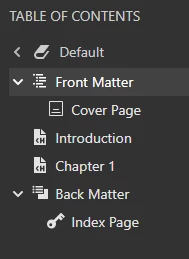


I looked in Sigil and the cover image is in the Images folder.  I looked in the opf file and the information for cover is incorrect and is pointing only at the image.  The file has: 

in metadata
<meta content="image_cover" name="cover" />
and in manifest the id is wrong
<item id="cover-image" href="images/cover.png" media-type="image/png" properties="cover-image"/>
there is no reference in the spine or guide (this would be the references to the cover xhtml page)


Lastly, when I do open an epub file in Sigil it says there are errors.  I have found the _index, when included, and _glossary xhtml files are missing the tag <!DOCTYPE html> before the html tag.  Once in place Sigil no longer says the epub book has errors.  Is this by design or a bug?  I have tried to exclude the glossary but it still appears in the output, I can exclude the index.  When I upload the file to Google Play Books the book fails processing, which is what I would expect since the cover is messed up.


Thoughts?


If you are explaining how to do something please go step by step since I am very new to RoboHelp 2020.


Cheers,

Noral

    This topic has been closed for replies.

    5 replies

    Peter Grainge
    Community Expert
    Community Expert
    May 11, 2022

    I am not too surprised that you are looking at another tool. RoboHelp was developed with other outputs being the focus so whilst it is capable to producing eBooks, albeit with some issues, we don't see many people on this forum with queries. To me that suggests other tools with more focus on eBooks are the way to go.

    ________________________________________________________

    My site www.grainge.org includes many free Authoring and RoboHelp resources that may be of help.


    Use the menu (bottom right) to mark the Best Answer or Highlight particularly useful replies. Found the answer elsewhere? Share it here.
    Peter Grainge
    Community Expert
    Community Expert
    May 11, 2022

    First let me say that I know little more about eBook publication than is in the topic on my site.


    If I am not misreading your image, you appear to have a Book type TOC, then an inline TOC called Front Matter and another called Back Matter.


    In the image below I have shown a Book TOC and an Online TOC already in a project and then I have added a new Book TOC labelled eBook. I have double clicked that to expand it on the right. You should be seeing something like that. There is more about TOCs at RH2020 The Table of Contents (grainge.org).


    I am not sure why you are seeing a glossary but I have a suspicion. You may have left the Glossary field as you see it here as you did not want a glossary. Click the dropdown and select None. Because of a bug, you will still see Select but None will apply. Until you do that, the other option of Default will apply. If that's not it, then I don't know.


    What happens after you hand over the RoboHelp output to the various tools such as Sigil is something I know nothing about. I did see on the Sigil site they appear to provide an authoring tool so I did wonder whether that would integrate better.


    If none of this or the other replies resolve all the issues, then perhaps try Support. See https://helpx.adobe.com/contact/enterprise-support.other.html#robohelp for your Adobe Support options. The email link tcssup@adobe.com is recommended as it reaches a team dedicated to Technical Communication Suite products including RoboHelp. 

    ________________________________________________________

    My site www.grainge.org includes many free Authoring and RoboHelp resources that may be of help.


    Use the menu (bottom right) to mark the Best Answer or Highlight particularly useful replies. Found the answer elsewhere? Share it here.
    Community Expert
    May 11, 2022

    They have opened their book toc by clicking the arrow icon, not by double-clicking on the name. It's displayed all in the side panel.

    Peter Grainge
    Community Expert
    Community Expert
    May 11, 2022

    I wasn't sure that is the case but having looked again at what I created, you are right.

    ________________________________________________________

    My site www.grainge.org includes many free Authoring and RoboHelp resources that may be of help.


    Use the menu (bottom right) to mark the Best Answer or Highlight particularly useful replies. Found the answer elsewhere? Share it here.
    Community Expert
    May 11, 2022

    I've never used ebook output so I don't know if that Adobe counts that output type as online or print. You could test by setting up a small online TOC rather than a book toc and see if that outputs correctly.


    @Jeff_Coatsworth In RH2020 Adobe in their infinite wisdom decided the table of contents had to be completely different between web and print outputs. That's where the front matter and back matter sections come in.

    Noral K.Author
    Participant
    May 11, 2022

    @Amebr - Thank you for explaining that ... I did not know how to put that into words since I am so new.


    @Jeff_Coatsworth - Doing it as you suggests does do it as well.

    Jeff_Coatsworth
    Community Expert
    Community Expert
    May 10, 2022

    Wouldn't the Cover Page topic just be the first topic in the TOC? I'm not sure what the "Front Matter" bit you have there is...

    Jeff_Coatsworth
    Community Expert
    Community Expert
    May 10, 2022

    Are you all patched up? Check Help > Updates to check - you should be on Patch 7 by now [May 2022]. Are you following Peter's site's guidance? https://www.grainge.org/pages/authoring/rh_tour/rh2020/outputs/outputs_ebook.htm

    Noral K.Author
    Participant
    May 10, 2022

    Hi Jeff,


    Thank you for getting back to me.


    Yes, the version I am on is 2020 patch 7.  I did see that resource and did read that link, sadly there is nothing about the cover image.


    Noral