
Drop-Down Text box
Hi,
New issue with the Drop-Down Text "box".
I use the D-D-T for a dictionnary of actions for our technicians. They click the name of the action and its description appears. Very usefull and makes the page seem less dense.
I started the dictionnary a few weeks ago. Went back in to finish it. Went at the bottom of the list of actions and typed in the next action. Further in that same Topic, I copied the definition of the action, went back to the action name and selected it. I then clicked the DropDown Text option button (icon).
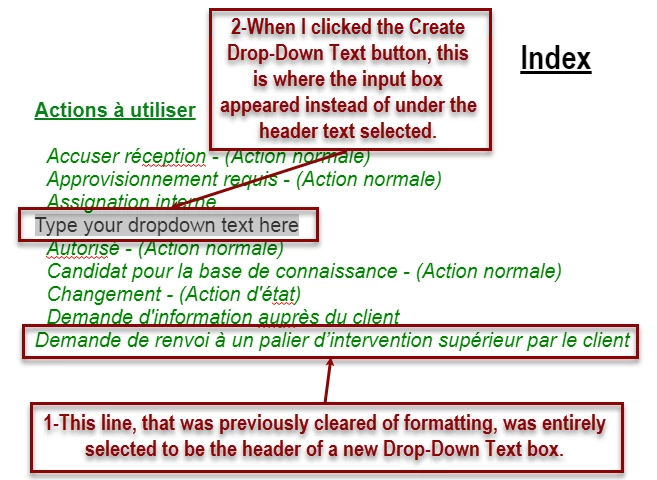
Normally, the "Type your dropdown text here" appears directly under the Header. This time, and for all the others I created today, the insert section appeared under a previously created DDT. At first, I would cancel the insertion, delete the new Header, save the cancellation and try again. Image below.
After a few times that it did that, I copied the text in the offered insertion section. Below, the result in the Published page.
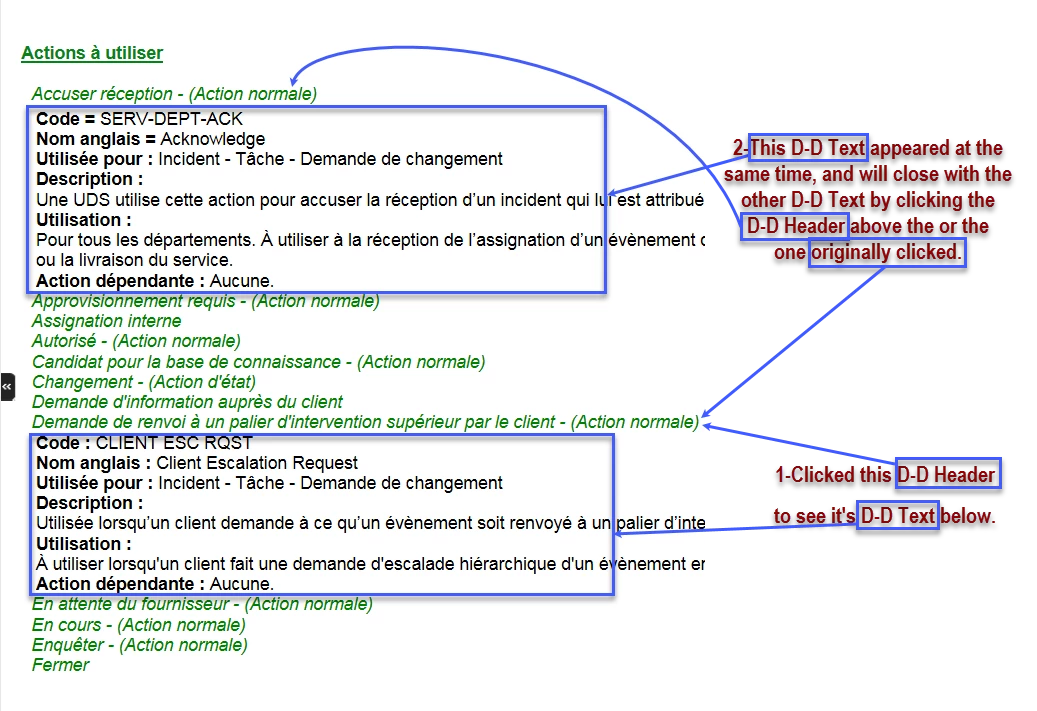
The Headers Demande de renvoi... and the four others below it all act the same way.
Any idea why it's doing that and how to fix it?
Pierre


 AdChoices