


Participant
June 29, 2021
Answered

Embedded PDF won't open in CHM viewer

  • June 29, 2021
  • 1 reply
  • 372 views

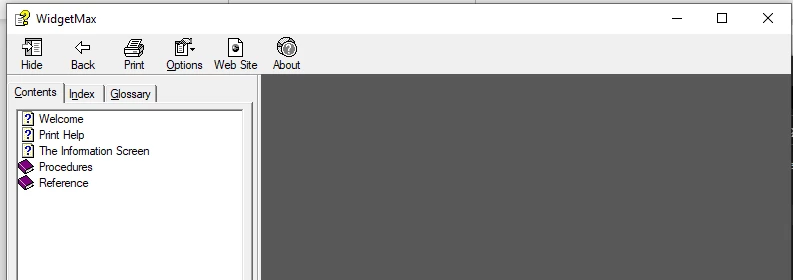
I'm using RoboHelp to create a PDF, then embedding that PDF into a CHM (again using RoboHelp) so users can easily print the Help contents. This process has worked seamlessley for years, but when I recompiled yesterday, the PDF will no longer load in Microsoft's CHM viewer. Instead, I just get a blank gray screen, shown below. There's nothing wrong with the PDF, and when I view the CHM using RoboHelp, the PDF works fine.


I've narrowed it down to whether or not Acrobat is installed on the machine. If it is, the PDF doesn't load, but uninstalling Acrobat will prompt the user to Open or Save it, since the CHM viewer is using Internet Explorer in the background. Has anyone else experienced this? The only workaround so far is to set the PDF to open in a new window, which will open it in IE. This is far from ideal.


    This topic has been closed for replies.
    Correct answer Stephen Rhea

    Thanks for responding @Amebr . It turns out it isn't a RoboHelp issue at all, but a functionality-synchronization issue between Acrobat and the CHM Viewer, as you suggest. The latest version of Acrobat Reader DC introduced a "bug" that causes ActiveX controls to fail when loading a PDF. Bug is in quotes because ActiveX controls are supposedly deprecated, placing the onus on Microsoft.

    1 reply

    Community Expert
    June 30, 2021

    What version of Robohelp  (including patch number)?


    Also, if it was working recently, it would suggest some update has been installed (windows, acrobat, antivirus, etc). Perhaps you can track down what has changed since last time this worked.


    i assume the rest of the chm works fine?

    Stephen RheaAuthorCorrect answer
    Participant
    July 7, 2021

    Thanks for responding @Amebr . It turns out it isn't a RoboHelp issue at all, but a functionality-synchronization issue between Acrobat and the CHM Viewer, as you suggest. The latest version of Acrobat Reader DC introduced a "bug" that causes ActiveX controls to fail when loading a PDF. Bug is in quotes because ActiveX controls are supposedly deprecated, placing the onus on Microsoft.