Participant
June 22, 2023
Answered

Excluding topics from RH22 translation process

  • June 22, 2023
  • 3 replies
  • 188 views

I'm translating content and trying to exlude some of my topics from the translation process. I've read (from Peter Grainge's pages ) that topics can be excluded from the translation process by selecting No in Properties > General > Attributes > Translate but at least for me there is no Attribute section visible there. I can find the translate attribute for content, but that applies only for paragraph or word level, it does not exlude the whole topic from the translate process.

    This topic has been closed for replies.
    Correct answer Peter Grainge

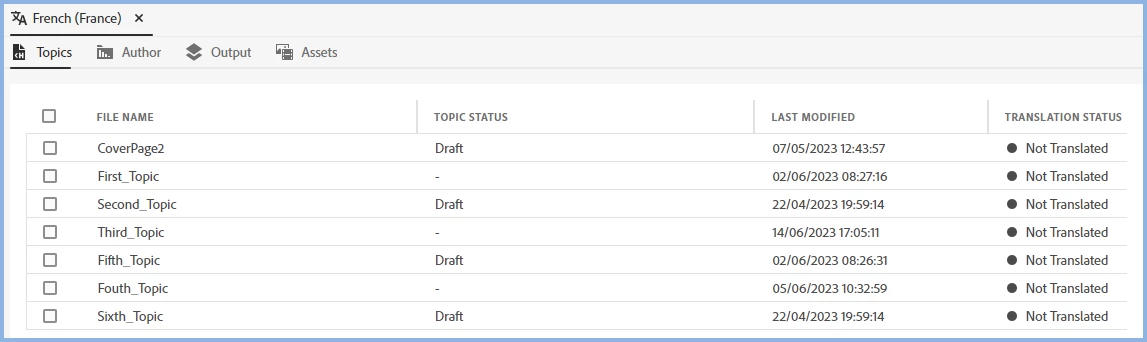
    I have heard back from Adobe who have confirmed the check box is how you include/exclude topics for translation. To deal with your points, use the Topic Status field as that shows in the Translation UI.


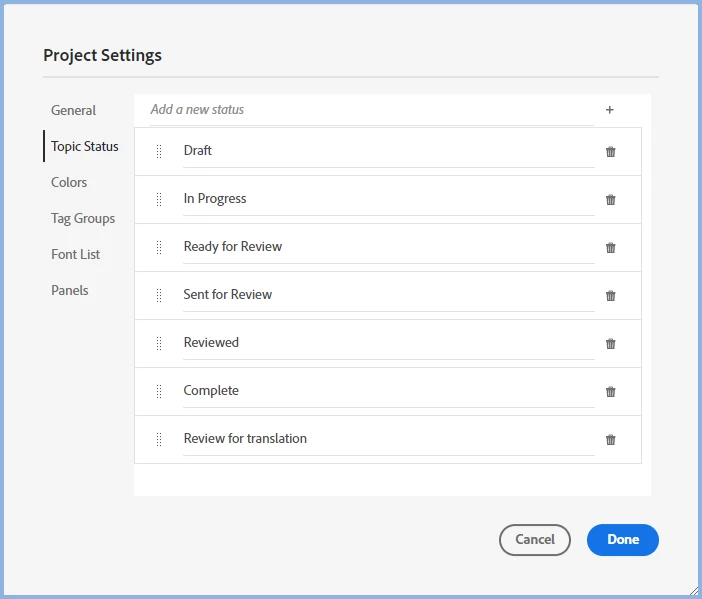
    What you can do is create new Topic Status values that will tell you whatever you want. Here I have entered "Ready for Review" where the field reads "Add a new status" and clicked +. That adds it to the values below. You can add as many values as you need. Never translate, Not until next major release and so on.


    Thus instead of selecting Yes/No as you would for content, you select from as many status values as you want. Thus you have more options than the simple Yes/No.


    Whatever you set, then shows in the UI and to my mind that is more useful because of the multiple values.

    ________________________________________________________

    My site www.grainge.org includes many free Authoring and RoboHelp resources that may be of help.


    3 replies

    Peter Grainge
    Community Expert
    Peter GraingeCommunity ExpertCorrect answer
    Community Expert
    June 23, 2023

    I have heard back from Adobe who have confirmed the check box is how you include/exclude topics for translation. To deal with your points, use the Topic Status field as that shows in the Translation UI.


    What you can do is create new Topic Status values that will tell you whatever you want. Here I have entered "Ready for Review" where the field reads "Add a new status" and clicked +. That adds it to the values below. You can add as many values as you need. Never translate, Not until next major release and so on.


    Thus instead of selecting Yes/No as you would for content, you select from as many status values as you want. Thus you have more options than the simple Yes/No.


    Whatever you set, then shows in the UI and to my mind that is more useful because of the multiple values.

    ________________________________________________________

    My site www.grainge.org includes many free Authoring and RoboHelp resources that may be of help.


    Use menu (bottom right) to mark as Best Answer or to Highlight particularly useful replies. Found the answer elsewhere? Share it here.
    Peter Grainge
    Community Expert
    Community Expert
    June 22, 2023

    I am not saying that is the correct solution, just a workaround until I have an answer from Adobe.

    ________________________________________________________
    My site www.grainge.org includes many free Authoring and RoboHelp resources that may be of help.


    Use menu (bottom right) to mark as Best Answer or to Highlight particularly useful replies. Found the answer elsewhere? Share it here.
    Peter Grainge
    Community Expert
    Community Expert
    June 22, 2023

    I'm checking with Adobe but meantime I think the checkboxes in the translation UI determine what gets translated. 

    ________________________________________________________
    My site www.grainge.org includes many free Authoring and RoboHelp resources that may be of help.


    Use menu (bottom right) to mark as Best Answer or to Highlight particularly useful replies. Found the answer elsewhere? Share it here.
    JFK85Author
    Participant
    June 22, 2023

    That's sad if those checkboxes are the only way to handle this. If it is so, how to differentiate content that:

    • is not yet translated but should be translated in the next translation round (translation status "Not translated")
    • is not translated and should not be translated (translation status "Not translated").