



ChadPink
Inspiring
July 31, 2023
Question

Failing to Generate Word output (RH 2022)

  • July 31, 2023
  • 9 replies
  • 6406 views

I'm having a similar issue. It looks like RH is looking for a Temp folder that it failed to create.

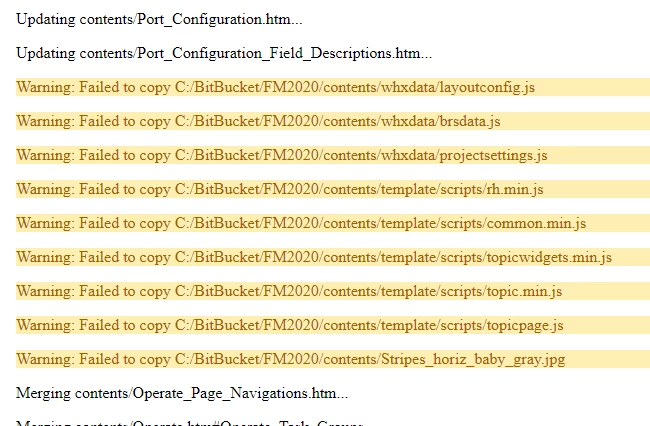
It looks like the rest of the pages were updated, except for these RH files:
 

[Moderator message - thread split out on its own from https://community.adobe.com/t5/robohelp-discussions/failed-to-generate-word-output-rh-2020/m-p/12649951#M142303]


    This topic has been closed for replies.

    9 replies

    Community Expert
    September 14, 2023

    I think it would be worth reporting the problem with symbols in the title as a bug. I can't think of any reason it would cause problems, like having them in the filename can.  If you wanted a more immediate answer you could contact support - use the details posted earlier in this thread for the best contact for Robohelp.


    You can request features and report issues here: https://tracker.adobe.com/

    Post the item number in the discussion so people can easily vote if they want the same functionality.

    ChadPink
    ChadPinkAuthor
    Inspiring
    September 15, 2023

    Anyone know what this code means? Aside from the ampersand, there were multiple other pages that do not generate a WORD file. I noticed they CDATA on the source page. 


    Jeff_Coatsworth
    Community Expert
    Community Expert
    September 15, 2023

    I think that CDATA stuff may come in from either Word imports of content OR corrupting your source content with output (a common enough occurance in Classic that the New UI now stops you from outputting back into your project folder).

    Community Expert
    September 11, 2023

    In RH2020 you can do Jeff's suggestion just using new table of contents files, rather than copies of your project. I'd also suggest a new output preset, and make sure the setting for "include all referenced topics" is unticked, so that only the topics listed in the toc are included when generating.

    ChadPink
    ChadPinkAuthor
    Inspiring
    September 12, 2023

    That's a great idea! Thank you!

    ChadPink
    ChadPinkAuthor
    Inspiring
    September 13, 2023

    It looks like the issue is caused by the ampersand (&). I have a number of topics that have & to match what is in the SW.

    In older RH versions, the & was shown as _ in the .htm file. Example: Lock & Key would be Lock___Key

    I had issues awhile back with linking these in our app, so I updated changed the htm files (had to relink) to Lock_and_Key.

    I did however keep the & in the Titles. This is what is causing issues in patch 3. I'll have to rename my titles, as well as update my links. Will post an update after I update all the &.


    Peter Grainge
    Community Expert
    Community Expert
    September 11, 2023

    Can you share the project? If you can, then see the Contact page on my site and send the project as instructed there. Do make sure you include a link to this thread and please do not email the project direct.

    ________________________________________________________
    My site www.grainge.org includes many free Authoring and RoboHelp resources that may be of help.


    Use menu (bottom right) to mark as Best Answer or to Highlight particularly useful replies. Found the answer elsewhere? Share it here.
    ChadPink
    ChadPinkAuthor
    Inspiring
    September 11, 2023

    We have government contracts here and abroad. I'd have to request an approval. But highly unlikely it will be approved.

    Jeff_Coatsworth
    Community Expert
    Community Expert
    September 11, 2023

    Well, I think you proved you were able to generate the Word output before with a mini-project; I think the time has come to take a copy of you project, throw out half the topics & try generating. Then rinse & repeat until you succeed - then start adding back topics, generating as you go until you hit the one that is messing up the process. 

    Peter Grainge
    Community Expert
    Community Expert
    September 10, 2023

    Please see my answer in your other thread. The two things are likely linked.


    https://community.adobe.com/t5/robohelp-discussions/robohelp-2022-2-22-does-not-open-index-htm-file/m-p/14073749#M151186 

    ________________________________________________________

    My site www.grainge.org includes many free Authoring and RoboHelp resources that may be of help.


    Use menu (bottom right) to mark as Best Answer or to Highlight particularly useful replies. Found the answer elsewhere? Share it here.
    ChadPink
    ChadPinkAuthor
    Inspiring
    September 11, 2023

    Installed the latest patch. I'm no longer seeing the "next version warning." 


    I opened a sample project and created a new WORD preset. This is the error I'm seeing.


    Jeff_Coatsworth
    Community Expert
    Community Expert
    September 11, 2023

    Are you running RH as an Admin? Do you have full rights to your output folder? Does the log file reveal anything?

    Peter Grainge
    Community Expert
    Community Expert
    August 2, 2023

    Looking through the thread again, can you clarify what the issue is at this stage. Is it just the red warnings shown in the post at https://community.adobe.com/t5/robohelp-discussions/failing-to-generate-word-output-rh-2022/m-p/13976470#M150739?

    ________________________________________________________

    My site www.grainge.org includes many free Authoring and RoboHelp resources that may be of help.


    Use menu (bottom right) to mark as Best Answer or to Highlight particularly useful replies. Found the answer elsewhere? Share it here.
    ChadPink
    ChadPinkAuthor
    Inspiring
    August 2, 2023

    Yes, just the red warnings.

    Peter Grainge
    Community Expert
    Community Expert
    August 2, 2023

    ... and you get that warning if you move the project out of your user profile to say C:\Test and generate to say C:\Output?


    Whilst there are two warnings, I think one is saying what the issue is and the other is saying nothing was generated because of that.


    A search for "enoent no such file" gives whole lot of information but it's a general issue rather than a RoboHelp one. To me it feels like a permissions or installation issue. I think I would uninstall RoboHelp, reboot and reinstall it. The person installing must have admin rights.


    If that fails, then I can only suggest trying Adobe Support. See https://helpx.adobe.com/contact/enterprise-support.other.html#robohelp for your Adobe Support options. The email link tcssup@adobe.com is recommended as it reaches a team dedicated to Technical Communication Suite products including RoboHelp.


    Show this reply to your IT people for their take on it.

    ________________________________________________________

    My site www.grainge.org includes many free Authoring and RoboHelp resources that may be of help.


    Use menu (bottom right) to mark as Best Answer or to Highlight particularly useful replies. Found the answer elsewhere? Share it here.
    Jeff_Coatsworth
    Community Expert
    Community Expert
    August 1, 2023

    What point version of RH are you running? I don't think we ever saw that in any of your posts.

    ChadPink
    ChadPinkAuthor
    Inspiring
    August 1, 2023


    Jeff_Coatsworth
    Community Expert
    Community Expert
    August 1, 2023

    Ok, that's the current patch (Patch 2 - July 2023). What's the destination folder for the Word output?

    Jeff_Coatsworth
    Community Expert
    Community Expert
    August 1, 2023

    @ChadPink - I've split you out from the original thread as I don't think your issue is the same as the original poster.
    Did this ever work before or is it a new configuration you're trying? My suspicion is that trying to run a RH project from a cloud-synched location may be the issue.

    ChadPink
    ChadPinkAuthor
    Inspiring
    August 1, 2023

    I typically generate Responsive HTML5 or PDF, and both work great! This is the first time I've tried to generate a WORD doc.

    ChadPink
    ChadPinkAuthor
    Inspiring
    August 1, 2023

    I tried a work around and exported to PDF then exported to WORD, but the WORD file is just messy. I have over 500 pages and fixing the styles is too tedious.

    ChadPink
    ChadPinkAuthor
    Inspiring
    July 31, 2023

    Thanks, Peter! Yeah, I was surprised. Another user did that.

    Peter Grainge
    Community Expert
    Community Expert
    July 31, 2023

    You have to search in your project for the end of the string.

    ________________________________________________________
    My site www.grainge.org includes many free Authoring and RoboHelp resources that may be of help.


    Use menu (bottom right) to mark as Best Answer or to Highlight particularly useful replies. Found the answer elsewhere? Share it here.
    ChadPink
    ChadPinkAuthor
    Inspiring
    July 31, 2023

    By "string," are you referring to the docx file? I renamed the WORD file in the preset, and still getting the same error. I think RH is unable to create the temp folder.


    Peter Grainge
    Community Expert
    Community Expert
    July 31, 2023

    @ChadPink You marked your post as a correct answer when you are stating you have a similar problem, thus it is not an answer. I have therefore unmarked it.


    There was another thread last week about your issue. I will see if I can find it.

    ________________________________________________________

    My site www.grainge.org includes many free Authoring and RoboHelp resources that may be of help.


    Use menu (bottom right) to mark as Best Answer or to Highlight particularly useful replies. Found the answer elsewhere? Share it here.
    Peter Grainge
    Community Expert
    Community Expert
    July 31, 2023

    See Failed when generated to Word - Adobe Support Community - 13960397


    It's the same problem you have regardless of output.

    ________________________________________________________

    My site www.grainge.org includes many free Authoring and RoboHelp resources that may be of help.


    Use menu (bottom right) to mark as Best Answer or to Highlight particularly useful replies. Found the answer elsewhere? Share it here.
    ChadPink
    ChadPinkAuthor
    Inspiring
    July 31, 2023

    Thanks Peter! After looking for the missing files from an old project file (backup copy that I keep around), I no longer have any of the yellow highlighted rows. However, I'm still getting the same error: